How to start saving money
Lorem ipsum dolor sit amet, consectetur adipiscing elit lobortis arcu enim urna adipiscing praesent velit viverra sit semper lorem eu cursus vel hendrerit elementum morbi curabitur etiam nibh justo, lorem aliquet donec sed sit mi dignissim at ante massa mattis.
- Neque sodales ut etiam sit amet nisl purus non tellus orci ac auctor
- Adipiscing elit ut aliquam purus sit amet viverra suspendisse potent
- Mauris commodo quis imperdiet massa tincidunt nunc pulvinar
- Excepteur sint occaecat cupidatat non proident sunt in culpa qui officia
Why it is important to start saving
Vitae congue eu consequat ac felis placerat vestibulum lectus mauris ultrices cursus sit amet dictum sit amet justo donec enim diam porttitor lacus luctus accumsan tortor posuere praesent tristique magna sit amet purus gravida quis blandit turpis.

How much money should I save?
At risus viverra adipiscing at in tellus integer feugiat nisl pretium fusce id velit ut tortor sagittis orci a scelerisque purus semper eget at lectus urna duis convallis. porta nibh venenatis cras sed felis eget neque laoreet suspendisse interdum consectetur libero id faucibus nisl donec pretium vulputate sapien nec sagittis aliquam nunc lobortis mattis aliquam faucibus purus in.
- Neque sodales ut etiam sit amet nisl purus non tellus orci ac auctor
- Adipiscing elit ut aliquam purus sit amet viverra suspendisse potenti
- Mauris commodo quis imperdiet massa tincidunt nunc pulvinar
- Adipiscing elit ut aliquam purus sit amet viverra suspendisse potenti
What percentege of my income should go to savings?
Nisi quis eleifend quam adipiscing vitae aliquet bibendum enim facilisis gravida neque. Velit euismod in pellentesque massa placerat volutpat lacus laoreet non curabitur gravida odio aenean sed adipiscing diam donec adipiscing tristique risus. amet est placerat in egestas erat imperdiet sed euismod nisi.
“Nisi quis eleifend quam adipiscing vitae aliquet bibendum enim facilisis gravida neque velit euismod in pellentesque”
Do you have any comments? Share them with us on social media
Eget lorem dolor sed viverra ipsum nunc aliquet bibendum felis donec et odio pellentesque diam volutpat commodo sed egestas aliquam sem fringilla ut morbi tincidunt augue interdum velit euismod eu tincidunt tortor aliquam nulla facilisi aenean sed adipiscing diam donec adipiscing ut lectus arcu bibendum at varius vel pharetra nibh venenatis cras sed felis eget.
Managing drivers across a growing fleet can quickly become complex without the right tools. Manual systems often lead to inefficiencies and missed details.
Driver management software centralizes these processes. It helps organizations improve performance, reduce risk, and maintain visibility across all driving operations.
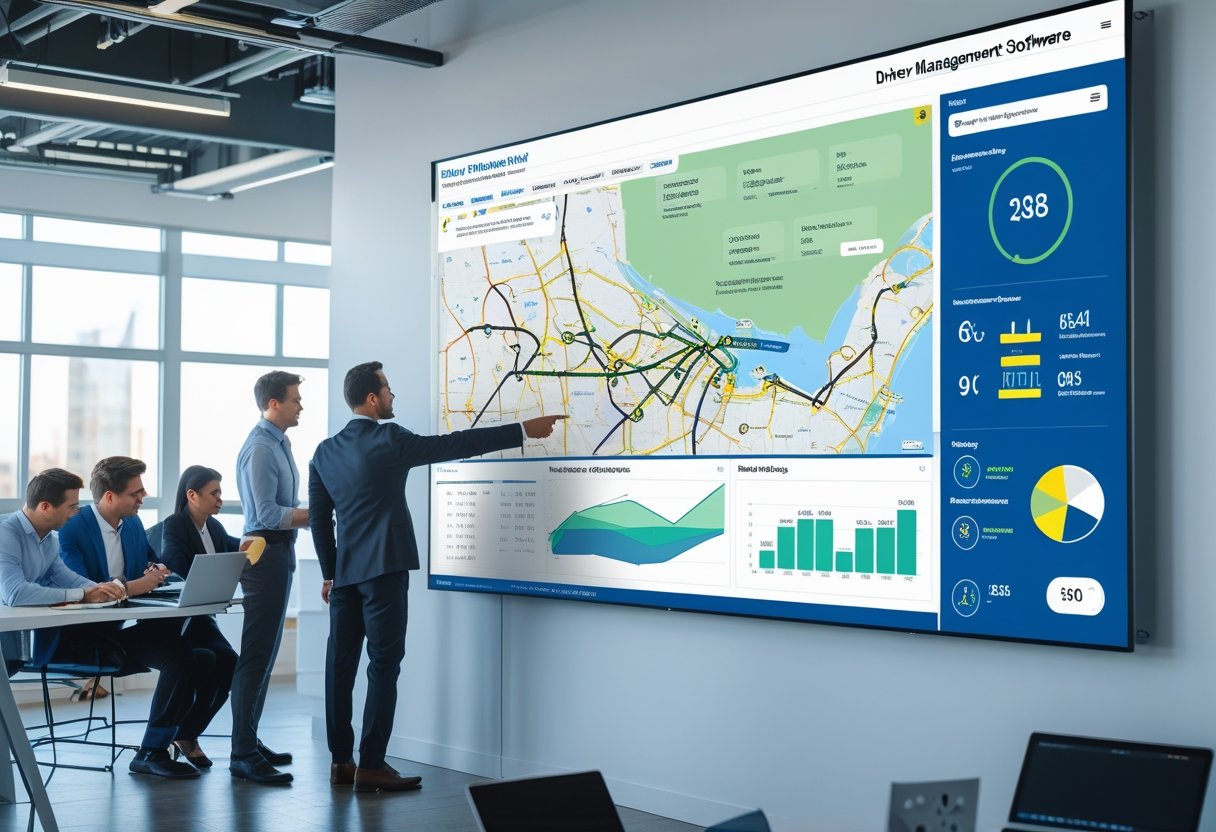
This technology connects dispatch, scheduling, route planning, and behavior monitoring. It uses data analytics and telematics to show driver performance and highlight areas for improvement.
Companies gain a clearer view of daily operations while keeping compliance simple. The software supports managers with insights to guide decisions and improve safety and productivity.
What Is Driver Management Software?

Driver management software helps organizations monitor, evaluate, and support drivers across commercial fleets. It centralizes driver data, integrates with fleet management tools, and promotes compliance, safety, and efficiency.
Core Functions and Purpose
A driver management system (DMS) focuses on the people who operate company vehicles. It tracks driver qualifications, work hours, incidents, and performance to maintain compliance with regulations.
Managers use it to automate daily tasks such as updating driver profiles, verifying licenses, monitoring training, and scheduling assignments. Automation reduces paperwork and helps prevent errors.
The software improves safety by collecting data from telematics and monitoring tools. It identifies risky driving patterns like harsh braking or speeding, allowing targeted coaching to reduce accidents and lower costs.
Key Components of Driver Management
Most driver management solutions include several integrated features. Common components include:
ComponentFunctionDriver ProfilesStores credentials, contact information, and vehicle assignmentsCompliance TrackingManages license status, certifications, and hours-of-service recordsTelematics IntegrationMonitors locations, routes, and driving behavior in real timePerformance AnalyticsEvaluates key metrics such as fuel economy and efficiencyReporting ToolsDelivers summaries for audits, performance reviews, and safety programs
These features create a single data source for decision-making. Fleet managers can quickly identify drivers needing training, verify documentation, and analyze performance trends.
Driver Management vs. Fleet Management Systems
Driver management and fleet management systems serve different purposes. A fleet management system focuses on vehicles, tracking maintenance, fuel usage, and asset utilization.
Driver management software centers on human performance and regulatory compliance. Integrating both systems offers better operational visibility.
Data from telematics feeds into the DMS, providing insight into driver behavior. This helps optimize routing and reduce vehicle wear, creating an efficient process for managing both people and assets.
Essential Features of Driver Management Software

Effective driver management software unites tracking, analytics, compliance, and record-keeping in one platform. It strengthens safety, improves control, and supports data-driven decisions.
Real-Time Driver Tracking
A driver tracking system provides continuous visibility into vehicle and driver locations using GPS tracking. Fleet managers can view route progress, estimated arrival times, and idle periods in real time.
This data helps identify inefficiencies such as detours or unplanned stops. Most driver tracking software uses a map-based dashboard to show routes, speed, and driver status.
Alerts notify teams when drivers exceed speed limits or enter restricted zones. These features improve safety oversight and reduce unnecessary fuel use.
A typical tracking setup includes:
Key FunctionDescriptionLocation UpdatesProvides live GPS data on vehicle positionRoute HistoryRecords past routes for reviewGeofencingDefines approved areas and triggers alerts when crossed
Digital records of movements reduce manual reporting and ensure accurate accountability.
Driver Performance Monitoring
Driver performance monitoring tracks activities such as speed, braking, idling, and route adherence. By analyzing this data, fleet managers can identify safe and unsafe behaviors and adjust training.
Modern systems collect performance metrics automatically using telematics. When monitoring driver behavior, the software ranks drivers against benchmarks, making it easier to recognize strong performers or address risks.
Performance dashboards typically highlight:
- Speeding events per route
- Fuel use by driver and vehicle
- Sudden acceleration or braking
- Use of mobile devices while driving
Managers can use reports to set measurable goals for safety and vehicle life.
Compliance and Regulatory Tools
Compliance management features help fleets meet transportation laws and standards. The system tracks hours of service, vehicle inspections, and electronic logging device (ELD) records.
Regulatory compliance modules log driving time and rest periods to meet standards. Many solutions include electronic driver vehicle inspection reports (DVIR) for digital trip inspections.
These tools generate alerts for renewals, violations, or audits. A structured compliance process supports safer fleets and simplifies reporting.
Driver Documentation and Records Management
Driver records management organizes all driver documentation in one system. Typical records include licenses, certifications, training histories, incident reports, and driver ID information.
Document management features monitor expiration dates and send reminders for renewals or medical requirements. Managers can upload and categorize documents for quick retrieval.
Digital signature and version control features improve accuracy and support secure information exchange. Proper document management streamlines work and ensures compliance with legal standards.
Driver Safety and Behavior Analytics
Driver safety software relies on data analysis to improve accountability and reduce risk. Accurate analytics help identify patterns that influence safety, such as speeding, harsh braking, or excessive idling.
Driver Behavior Analysis and Reporting
Driver behavior analysis uses telematics, sensors, and GPS tracking to measure how drivers operate vehicles. These analytics evaluate behaviors linked to safety risks, including aggressive driving and distracted driving.
The system compiles information into driver reports that highlight strengths and problem areas. Managers can review events like rapid acceleration or hard braking to understand patterns.
Reports often include trend graphs, incident lists, and metrics comparing drivers. Automated driver behavior monitoring sends real-time notifications of unsafe actions, allowing for quick corrective measures.
Promoting Safe Driving Habits
Driver management systems support safe driving by providing direct feedback to drivers. Alerts for speeding or harsh maneuvers help drivers self-correct.
Fleet managers can use targeted coaching focused on improvement. Some systems reward drivers who maintain steady speeds, keep idle times low, and show progress in metrics.
This approach builds a culture of driver accountability. Drivers benefit from mobile access to their own data, encouraging continuous improvement and awareness on the road.
Consistent small adjustments often lead to long-term changes that enhance both driver safety and efficiency.
Safety Scorecards and Incident Tracking
Safety scorecards turn behavior analytics into a measurable rating. Common factors include speeding, harsh braking, seatbelt use, fuel efficiency, and excessive idling.
MetricDescriptionImpact on ScoreSpeeding EventsFrequency of driving above set limitsHighHarsh BrakingRapid deceleration eventsModerateIdle TimeDuration of engine running while stoppedModerateSeatbelt ComplianceUse tracked through sensorsHigh
Accurate incident tracking ensures every unsafe event is documented and reviewed. Managers can cross-reference reports with telematics data to verify details and find root causes.
This process improves transparency and supports decisions for training and policy updates.
Operational Efficiency and Productivity
Driver management software improves how fleets plan routes, manage fuel, and schedule maintenance. These capabilities reduce wasted time, lower costs, and keep vehicles in service longer.
Route Planning and Optimization
Accurate route planning helps carriers achieve higher fleet efficiency and reduce driver downtime. The software uses real-time traffic data, GPS tracking, and historical performance to find the best routes.
These tools minimize idle time, late arrivals, and extra mileage. Automating route assignments improves delivery consistency.
Dispatchers can view driver locations and delivery progress on one dashboard, adjusting routes quickly when delays occur. Some systems integrate asset tracking and driver information, allowing managers to match routes to driver skills and compliance needs.
This results in more balanced workloads and predictable schedules.
Optimization MetricTypical ImpactAverage delivery timeReduced by 10–20%Empty milesLowered significantlyDriver compliance rateImproved through monitored routing
Fuel Usage and Economy
Fuel monitoring tools collect and analyze consumption data for every trip. By tracking idle time, speeding, and harsh acceleration, companies can spot inefficient habits that raise costs.
Systems generate fuel efficiency reports to show where training or route changes can help. Some applications use telematics for real-time fuel economy indicators, allowing drivers to adjust on the go.
Fleet managers often set fuel usage benchmarks per vehicle. Alerts prompt action when usage exceeds limits, improving fuel economy and extending engine life.
Maintenance Scheduling and Vehicle Health
Effective maintenance scheduling keeps fleets reliable and compliant. Driver management software tracks vehicle maintenance histories and schedules preventative maintenance based on mileage, engine hours, or alerts.
Digitized driver vehicle inspection reports (DVIRs) ensure issues are logged after each inspection. Managers can review maintenance tickets, prioritize repairs, and document actions for compliance.
Connected diagnostic systems enable proactive repairs. Automated alerts and centralized documentation help fleets maintain higher uptime and plan asset use more effectively.
User Experience and Integration
Driver management software relies on practical design and reliable connectivity. Its effectiveness depends on easy navigation, timely alerts, and access to integrated data within broader fleet management systems.
Mobile Apps and User-Friendly Interfaces
A driver mobile app is the main tool for field operations. Drivers use it to view assignments, update load status, and submit digital paperwork easily.
The interface should be simple, with few menus and little visual clutter. This helps reduce errors and saves time on non-driving tasks.
Modern platforms like Fleetio and TruckLogics use layouts that adjust to different devices. This lets managers and drivers quickly access schedules, inspection records, or work order tools.
Clear icons, easy navigation, and readable text make the app more user-friendly.
Key features supporting ease of use include:
- Offline access for remote driving routes
- Automatic data sync once connectivity restores
- Dashboard customization for role-specific needs
When drivers find the software easy to use, adoption rates improve. Training time also decreases.
Alerts, Notifications, and Communication
Instant alerts and notifications help keep fleet operators and drivers in sync. Good systems send timely and relevant alerts to avoid confusion.
For example, Teletrac Navman TN360 and Azuga let users set when to trigger performance, route, or maintenance warnings. Notifications can appear in the app, by email, or as dashboard pop-ups.
Reliable communication tools help drivers report issues and update status. In-app messaging is faster than phone calls and keeps records organized.
Managers can assign tasks, confirm receipt, and mark completion with a few clicks. Clear communication channels help with compliance and safety without overwhelming drivers.
Integration with Fleet Management Software
Integration connects driver management platforms to business systems like Fleetwave, Teletrac Navman, or other fleet tracking software. This allows data to flow smoothly and keeps everyone updated.
When integrated, dispatch schedules, maintenance alerts, and GPS data sync automatically. Drivers get updated routes, managers see real-time metrics, and finance teams receive accurate mileage and fuel data.
Common integration points include:
SystemExample FunctionGPS Fleet TrackingReal-time location visibilityWork Order ManagementAutomated assignment and completion updatesCompliance ToolsDriver log monitoring and alerts
Strong connectivity helps driver management software support the full fleet management ecosystem.
Driver Assignment, Settlement, and Reporting
Modern driver management software handles three main areas: assignments, settlements, and reporting. These systems track driver activities, link vehicle use with payroll, and provide performance data for compliance and efficiency.
Driver Assignment and Preferences
Driver assignment tools help managers match drivers to vehicles, shifts, or routes based on qualifications and availability. Dispatchers can assign or move drivers using calendar or dashboard views, keeping track of assets.
Important details like driver documentation, certifications, and license status are easy to find in each driver’s profile. Assignments often link to equipment or tools for better accountability.
Automated alerts prevent double assignments and overlapping schedules. By using driver account settings and preferences—like preferred routes or rest time—the system reduces scheduling errors and regulatory problems.
Driver Settlements and Payments
Accurate driver settlements build trust and satisfaction in a fleet. Automated modules calculate payments using trip data, load details, and rate agreements.
Many systems support different contracts, including company drivers and owner-operators. Settlement components include base pay, trip miles, dispatch expenses, fuel advances, and deductions.
Automation removes the need for spreadsheets and manual checks, making processing faster and fewer mistakes. The software keeps a full driver log of payment history and changes.
Audit trails improve internal controls, and integration with accounting keeps payroll and tax reporting accurate. Drivers can view statements online, which increases transparency and reduces questions to the back office.
Detailed Reporting and Analytics
Detailed reporting and performance metrics give operations teams the data needed to evaluate efficiency, safety, and profitability.
Reports can track cost per mile, trip duration, idle time, and on-time delivery rates across all drivers.
Dashboards often display visual summaries or KPIs that help identify trends quickly.
A manager might compare quarterly driver performance reports to reward efficient drivers or see where training is needed.
Analytics tools compile driver documentation and operational data into exportable reports for management or regulatory review.
Many platforms let users customize report templates, schedule automatic exports, and share summaries securely across departments.