How to start saving money
Lorem ipsum dolor sit amet, consectetur adipiscing elit lobortis arcu enim urna adipiscing praesent velit viverra sit semper lorem eu cursus vel hendrerit elementum morbi curabitur etiam nibh justo, lorem aliquet donec sed sit mi dignissim at ante massa mattis.
- Neque sodales ut etiam sit amet nisl purus non tellus orci ac auctor
- Adipiscing elit ut aliquam purus sit amet viverra suspendisse potent
- Mauris commodo quis imperdiet massa tincidunt nunc pulvinar
- Excepteur sint occaecat cupidatat non proident sunt in culpa qui officia
Why it is important to start saving
Vitae congue eu consequat ac felis placerat vestibulum lectus mauris ultrices cursus sit amet dictum sit amet justo donec enim diam porttitor lacus luctus accumsan tortor posuere praesent tristique magna sit amet purus gravida quis blandit turpis.

How much money should I save?
At risus viverra adipiscing at in tellus integer feugiat nisl pretium fusce id velit ut tortor sagittis orci a scelerisque purus semper eget at lectus urna duis convallis. porta nibh venenatis cras sed felis eget neque laoreet suspendisse interdum consectetur libero id faucibus nisl donec pretium vulputate sapien nec sagittis aliquam nunc lobortis mattis aliquam faucibus purus in.
- Neque sodales ut etiam sit amet nisl purus non tellus orci ac auctor
- Adipiscing elit ut aliquam purus sit amet viverra suspendisse potenti
- Mauris commodo quis imperdiet massa tincidunt nunc pulvinar
- Adipiscing elit ut aliquam purus sit amet viverra suspendisse potenti
What percentege of my income should go to savings?
Nisi quis eleifend quam adipiscing vitae aliquet bibendum enim facilisis gravida neque. Velit euismod in pellentesque massa placerat volutpat lacus laoreet non curabitur gravida odio aenean sed adipiscing diam donec adipiscing tristique risus. amet est placerat in egestas erat imperdiet sed euismod nisi.
“Nisi quis eleifend quam adipiscing vitae aliquet bibendum enim facilisis gravida neque velit euismod in pellentesque”
Do you have any comments? Share them with us on social media
Eget lorem dolor sed viverra ipsum nunc aliquet bibendum felis donec et odio pellentesque diam volutpat commodo sed egestas aliquam sem fringilla ut morbi tincidunt augue interdum velit euismod eu tincidunt tortor aliquam nulla facilisi aenean sed adipiscing diam donec adipiscing ut lectus arcu bibendum at varius vel pharetra nibh venenatis cras sed felis eget.
One-time GPS tracking is defined as a flexible, pay-once asset monitoring method that gives rental businesses real-time location data without recurring subscription fees. For heavy equipment rental operators, this approach solves a persistent problem: tracking expensive assets across job sites without committing to long-term software contracts. Motowatchdog reports that over 1,000 businesses already rely on subscription-free GPS solutions for exactly this reason. The core benefits are direct. A well-deployed GPS tracking solution for rentals reduces theft exposure, automates billing based on actual usage, and cuts maintenance costs through data-driven scheduling.
What is one-time GPS for rental business operations?
One-time GPS tracking, also called temporary GPS rental monitoring in the industry, refers to deploying a GPS device for a defined period without ongoing service fees. The device transmits location data via cellular networks, and the rental operator accesses that data through a software platform. The key distinction from traditional fleet telematics is the absence of a monthly subscription tied to each unit.
For heavy equipment rental businesses, this model fits naturally. A skid steer rented for three months does not need a permanent tracking contract. You attach a device, monitor the asset for the rental duration, retrieve the unit, and redeploy the tracker on the next piece of equipment. That flexibility is what makes one-time GPS tracking a practical GPS solution for businesses managing rotating inventories.
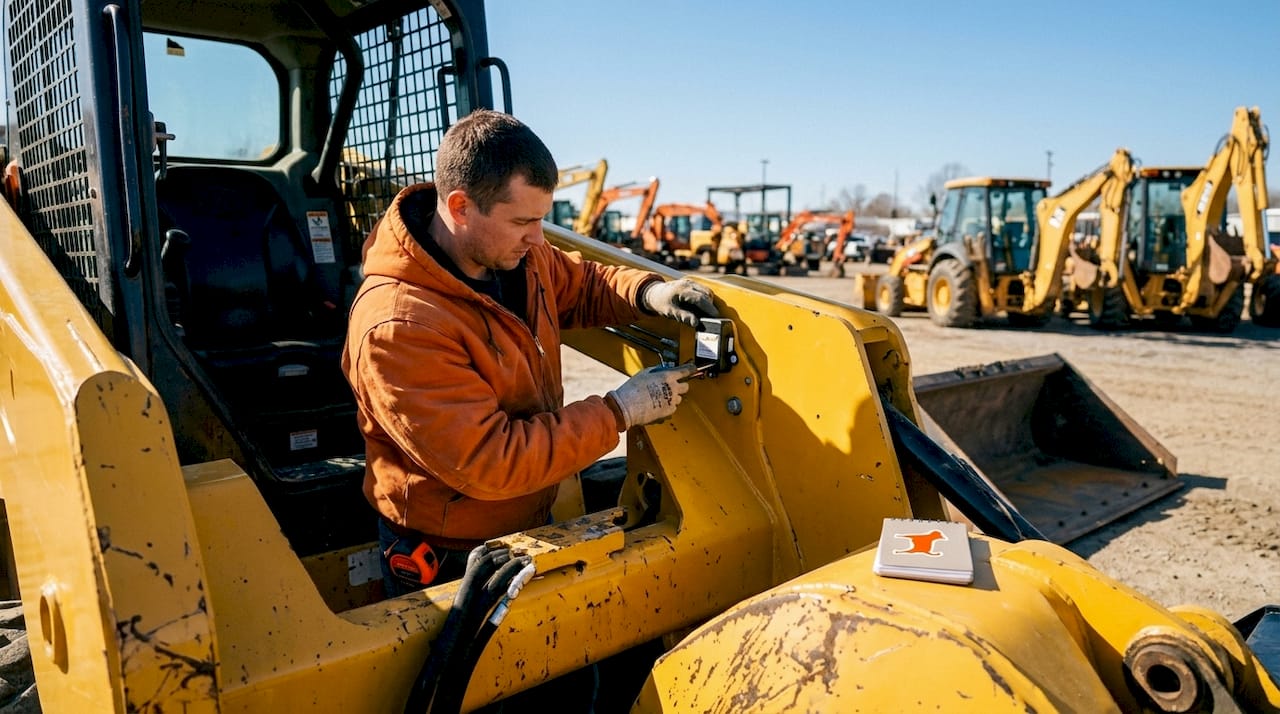
The industry standard for GPS accuracy in asset tracking is typically within 2.5 meters under open-sky conditions using civilian GPS signals. That level of precision is sufficient to confirm whether a $120,000 excavator is on the permitted job site or has moved without authorization.
What equipment and tools do you need to deploy GPS tracking for rentals?
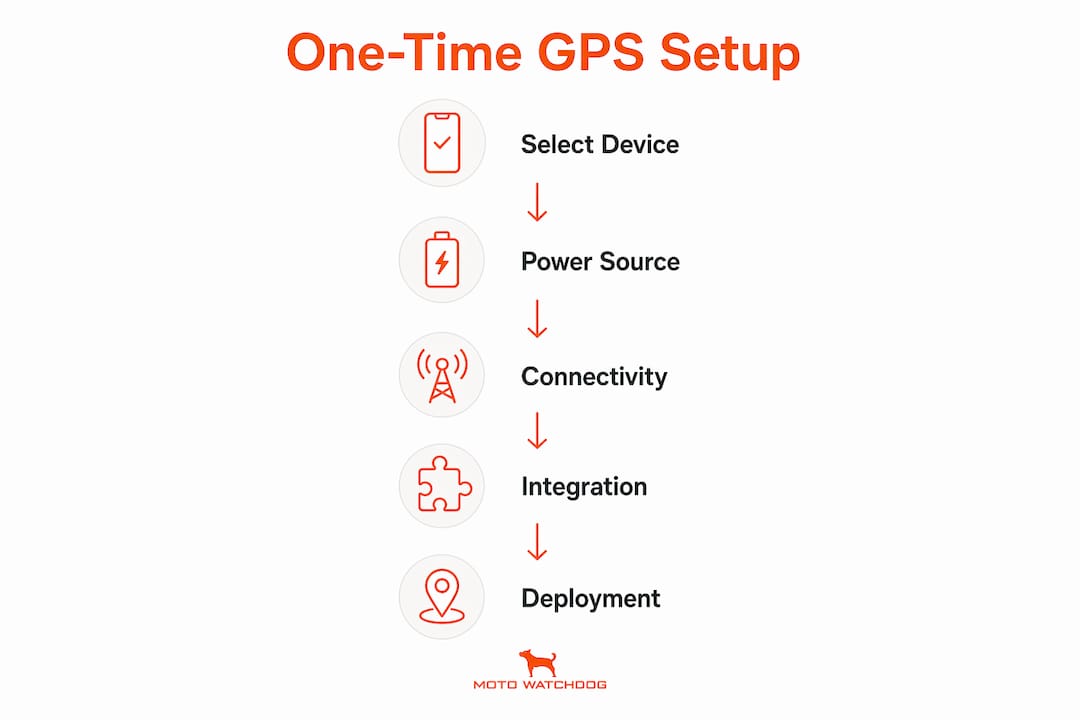
Getting GPS tracking for rentals up and running requires four components: the right hardware, a reliable power source, cellular connectivity, and a software platform that integrates with your rental management system.
Hardware options for heavy equipment
GPS tracking devices range from wireless battery-powered units to hardwired models, and both require cellular connectivity with 4G or 5G support for reliable updates. The choice between them depends on your equipment type and rental duration.
- Wireless battery-powered devices: Best for short-term rentals and equipment without accessible wiring. No installation tools required. Battery life varies by update frequency.
- Hardwired devices: Best for long-term rentals or high-value assets where continuous power is available. Requires basic wiring knowledge. See Motowatchdog’s hardwired GPS guide for installation specifics.
- OBD-II plug-in devices: Suited for wheeled equipment with a standard diagnostic port. Fast to install and remove.
Software and integration requirements
GPS platforms integrate with rental management systems to automate invoicing, maintenance scheduling, and inventory management. When evaluating a platform, confirm it supports geofence configuration, tamper alerts, and exportable usage reports. Wasp Barcode Technologies notes that unified asset tracking with usage patterns and lifecycle data helps rental managers make informed decisions about fleet rotation and retirement.
| Component | Purpose | Key Requirement |
|---|---|---|
| GPS device (wireless) | Location tracking without wiring | 4G/5G cellular support |
| GPS device (hardwired) | Continuous power, long-term tracking | Compatible vehicle power supply |
| Software platform | Real-time monitoring and alerts | Rental system integration |
| Cellular data plan | Data transmission | Coverage in operating regions |
| Mounting hardware | Secure, non-destructive installation | Magnet, clamp, or bracket |
How do you deploy and configure one-time GPS trackers on rental equipment?
Deployment follows a repeatable five-step process. Skipping any step creates gaps in data accuracy or exposes you to installation errors that void equipment warranties.
-
Select the right device for each asset. Match device type to equipment category. Use wireless units for compact equipment like plate compactors or light towers. Use hardwired units for high-value machines like excavators or telehandlers where continuous power is available. For small equipment GPS needs, battery-powered devices with extended life cycles are the standard choice.
-
Install using non-destructive methods. Installation best practices recommend non-destructive mounting such as magnets or clamps, avoiding warranty breaches, and confirming the device power supply is maintained throughout the rental period. Place the device in a location with clear sky visibility. Avoid mounting inside metal enclosures, which block cellular and GPS signals.
-
Configure geofences and alerts before activation. Log into your tracking platform and draw a geofence around the permitted job site. Set alerts for boundary breaches, tampering, and unexpected movement during off-hours. Real-time geofence alerts notify rental operators instantly on boundary breaches or tampering, reducing theft and unauthorized use. Configure alert recipients so the right team member receives the notification, not just a general inbox.
-
Activate the device and run a live test. Power on the device and confirm it appears in the platform within the expected time window, typically under five minutes on a 4G network. Drive or move the asset a short distance and verify the platform reflects the position change accurately. Check that geofence alerts trigger correctly by briefly crossing the boundary during the test.
-
Assign the asset in your platform and enable automated reporting. Link the device to the specific rental contract in your system. Set up automated usage reports tied to engine runtime or mileage. This data feeds directly into billing and maintenance scheduling without manual data entry.
Pro Tip: Label each GPS device with a unique asset ID before deployment. When you retrieve equipment at the end of a rental, you can cross-reference the device ID against your platform records in seconds, rather than manually scanning each unit.
How does one-time GPS tracking improve efficiency and reduce costs?
The financial case for GPS tracking solutions for rentals is direct and measurable. Automated GPS tracking reduces maintenance costs by 15–30% through runtime-based service alerts and improves asset recovery speed by 45 times through real-time geofence alerts. That 45x recovery improvement reflects the difference between knowing an asset’s location within minutes versus conducting a manual search that can take days.
The operational gains extend beyond theft recovery:
- Automated billing accuracy: GPS usage data automates billing based on actual engine runtime or mileage, eliminating manual disputes and improving invoicing accuracy. Rental operators who bill by the hour no longer rely on customer-reported hours, which are frequently understated.
- Reduced labor overhead: Automating tracking saves 10–15 staff hours per week and reduces labor costs by $600–$900 monthly for small to mid-sized rental shops. That time shifts from manual inventory checks to higher-value work.
- Maintenance scheduling: Runtime data triggers service reminders at the correct intervals, not based on calendar estimates. This prevents both over-servicing and costly breakdowns from deferred maintenance.
- Multi-site visibility: Top GPS devices for multi-site rental operations give operators a single dashboard view across all active rentals. You can confirm equipment utilization rates and identify underperforming assets sitting idle at job sites.
The combined effect is a shift from reactive problem-solving to data-driven decision-making. Rental operators who track utilization rates can also identify which equipment categories generate the highest return and prioritize fleet investment accordingly. For budget-conscious fleet tracking, the ROI calculation is straightforward: reduced theft losses plus automated billing accuracy plus lower maintenance costs typically outpaces device cost within the first rental cycle.
What are the common challenges with temporary GPS rental deployments?
Even well-planned deployments encounter predictable problems. Knowing them in advance prevents most of them.
- Signal loss in remote locations: Connectivity issues in remote areas cause data delays, and battery-powered devices require monitoring to avoid tracking disruptions. Before deploying to a remote site, check carrier coverage maps for the region. Some platforms store location data locally and sync when connectivity resumes.
- Battery depletion on wireless units: High update frequency drains batteries faster. Set update intervals to match operational needs. A device updating every 30 seconds on a machine that moves twice a day wastes battery life. Adjust to five-minute intervals for most rental scenarios.
- Improper mounting causing signal interference: Devices mounted inside metal compartments or behind thick steel panels lose GPS accuracy. Always test signal strength at the chosen mounting location before the rental begins.
- Warranty concerns from installation: Non-destructive mounting methods protect both the equipment warranty and the customer relationship. Never drill into equipment frames or tap into electrical systems without explicit authorization from the equipment manufacturer.
- Data discrepancies between platform and billing system: Discrepancies usually trace back to time zone mismatches or incorrect asset assignment in the platform. Verify platform time settings match your operating region before the first rental.
Pro Tip: Run a 24-hour pre-rental test on every newly configured device. This catches battery issues, signal gaps, and alert configuration errors before the equipment leaves your yard.
Key Takeaways
One-time GPS tracking is the most cost-efficient method for heavy equipment rental businesses to monitor assets, automate billing, and recover stolen equipment faster.
| Point | Details |
|---|---|
| Device selection matters | Match wireless or hardwired GPS units to asset type and rental duration for reliable data. |
| Non-destructive installation | Use magnets or clamps to avoid warranty breaches and simplify device retrieval. |
| Geofence alerts cut theft losses | Real-time boundary alerts improve stolen asset recovery speed by up to 45 times. |
| Automated billing eliminates disputes | Runtime and mileage data from GPS removes reliance on customer-reported usage hours. |
| Labor savings are measurable | Automating GPS monitoring saves 10–15 staff hours weekly and up to $900 monthly in labor costs. |
What I’ve learned from watching rental operators deploy GPS at scale
Rental operators consistently underestimate two things: how long proper configuration takes, and how much value sits in the data beyond theft recovery. Most operators set up a device, confirm it shows on the map, and consider the job done. That approach leaves the majority of the ROI on the table.
The operators who get the most from GPS tracking for rentals treat the platform as an operational source of truth, not just a theft deterrent. They use runtime data to catch maintenance intervals before breakdowns, not after. They use utilization reports to identify equipment sitting idle for two weeks at a job site, which is a signal to either pick it up or renegotiate the rental terms. That kind of visibility changes how you run the business.
The other underestimated factor is testing time. A device that looks correct in the platform during setup can fail silently if the mounting location blocks the cellular antenna. I have seen operators discover this only when a customer calls to report missing equipment and the platform shows the last known location from three days prior. A 24-hour pre-rental test eliminates that risk entirely.
My honest recommendation: start with your highest-value assets and build the configuration process into your standard rental prep checklist. Once the workflow is repeatable, scaling to your full fleet is straightforward. The GPS data integration step, connecting your tracking platform to your rental management system, is where the real efficiency gains appear. Do not skip it.
— Louis
Motowatchdog’s subscription-free GPS solution for rental businesses
Rental businesses that want GPS tracking without monthly fees have a direct option in Motowatchdog’s subscription-free 4G GPS tracking devices. Over 1,000 businesses rely on Motowatchdog for real-time asset monitoring, customizable geofencing alerts, and detailed mileage reporting, all without recurring charges.

The devices are designed for straightforward setup, which matters when you are configuring multiple units across a rotating rental fleet. No ongoing subscription means the cost calculation is simple: pay once, track as long as you need. For rental operators evaluating subscription-free GPS options, Motowatchdog’s product page lists device specifications, coverage details, and pricing directly. It is a practical starting point for any rental business ready to move from manual asset checks to automated tracking.
FAQ
What is one-time GPS tracking for a rental business?
One-time GPS tracking is a pay-once asset monitoring method where a GPS device transmits real-time location data without a recurring monthly subscription. Rental businesses use it to monitor heavy equipment for the duration of a specific rental contract.
How long does it take to set up a GPS tracker on rental equipment?
A standard wireless GPS device can be mounted and activated in under 30 minutes. Full configuration, including geofences, alert recipients, and platform asset assignment, typically takes one to two hours per device for first-time setups.
Can GPS tracking reduce equipment theft for rental businesses?
Real-time geofence alerts improve stolen asset recovery speed by up to 45 times compared to manual search methods. Instant boundary breach notifications allow rental operators to contact authorities with precise location data within minutes.
Do GPS trackers work in remote job sites with poor cell coverage?
Connectivity issues in remote areas can cause data delays. Many platforms store location data locally and sync when cellular coverage resumes. Checking carrier coverage maps before deployment reduces this risk significantly.
How does GPS tracking automate billing for rental businesses?
GPS devices record actual engine runtime and mileage, which feeds directly into billing calculations. This eliminates reliance on customer-reported usage hours and removes the most common source of invoicing disputes in equipment rental operations.