How to start saving money
Lorem ipsum dolor sit amet, consectetur adipiscing elit lobortis arcu enim urna adipiscing praesent velit viverra sit semper lorem eu cursus vel hendrerit elementum morbi curabitur etiam nibh justo, lorem aliquet donec sed sit mi dignissim at ante massa mattis.
- Neque sodales ut etiam sit amet nisl purus non tellus orci ac auctor
- Adipiscing elit ut aliquam purus sit amet viverra suspendisse potent
- Mauris commodo quis imperdiet massa tincidunt nunc pulvinar
- Excepteur sint occaecat cupidatat non proident sunt in culpa qui officia
Why it is important to start saving
Vitae congue eu consequat ac felis placerat vestibulum lectus mauris ultrices cursus sit amet dictum sit amet justo donec enim diam porttitor lacus luctus accumsan tortor posuere praesent tristique magna sit amet purus gravida quis blandit turpis.

How much money should I save?
At risus viverra adipiscing at in tellus integer feugiat nisl pretium fusce id velit ut tortor sagittis orci a scelerisque purus semper eget at lectus urna duis convallis. porta nibh venenatis cras sed felis eget neque laoreet suspendisse interdum consectetur libero id faucibus nisl donec pretium vulputate sapien nec sagittis aliquam nunc lobortis mattis aliquam faucibus purus in.
- Neque sodales ut etiam sit amet nisl purus non tellus orci ac auctor
- Adipiscing elit ut aliquam purus sit amet viverra suspendisse potenti
- Mauris commodo quis imperdiet massa tincidunt nunc pulvinar
- Adipiscing elit ut aliquam purus sit amet viverra suspendisse potenti
What percentege of my income should go to savings?
Nisi quis eleifend quam adipiscing vitae aliquet bibendum enim facilisis gravida neque. Velit euismod in pellentesque massa placerat volutpat lacus laoreet non curabitur gravida odio aenean sed adipiscing diam donec adipiscing tristique risus. amet est placerat in egestas erat imperdiet sed euismod nisi.
“Nisi quis eleifend quam adipiscing vitae aliquet bibendum enim facilisis gravida neque velit euismod in pellentesque”
Do you have any comments? Share them with us on social media
Eget lorem dolor sed viverra ipsum nunc aliquet bibendum felis donec et odio pellentesque diam volutpat commodo sed egestas aliquam sem fringilla ut morbi tincidunt augue interdum velit euismod eu tincidunt tortor aliquam nulla facilisi aenean sed adipiscing diam donec adipiscing ut lectus arcu bibendum at varius vel pharetra nibh venenatis cras sed felis eget.
A GPS tracker needs two things to report well: a clear view of the sky and a flat, level mounting position that keeps that view. For most trackers and GPS antennas, that means facing up, close to horizontal, with as little metal or equipment above it as possible. On a rental fleet, where one unit may sit on a pickup, the next on a skid steer and the next on a lowboy trailer, placement is what decides whether a unit reports every minute or goes dark for hours. This guide covers orientation, where to mount on each asset type, what blocks the signal, and how to confirm reception before the unit leaves the yard.
If you are outfitting a fleet, our no-monthly-fee GPS trackers come in plug-in, hardwired and magnetic versions, so you can match the install to the asset.
TL;DR
- Face the tracker or antenna up, on a horizontal surface. One manufacturer’s guidance sets the maximum tilt at about 20 degrees, because the underside of an antenna cannot receive satellite signals.
- Mount at the highest practical point with open sky on every side. Metal above the unit is the most common cause of weak reception.
- On heavy equipment, keep the receiver away from engine heat and place antennas high and clear of the boom, bucket and cab structure.
- Match the device to the asset: plug-in for light vehicles, hardwired for hidden installs on trucks and machines, magnetic for trailers and towed equipment.
- Always check the first fixes after install, outdoors, before the asset goes on a job.
Table of Contents
- Why orientation matters at all
- Does the tracker body itself have to face a certain way?
- Where to place a GPS tracker by asset type
- What blocks or weakens the signal
- Check reception before the asset leaves the yard
- A short checklist for installers
- Which tracker type fits which asset
- The business case for getting it right
- Choose the unit that fits your yard
- FAQ
- Sources
Why orientation matters at all
GPS works by timing signals from satellites. The receiver in your tracker needs to hear several of them at once to calculate a position. Most tracker antennas are flat “patch” designs that are most sensitive in the direction they face, which is up. Turn one on its side or upside down and it loses a large share of the sky.
One point surprises many fleet managers. A receiver gets relatively little useful positional information from satellites directly overhead and much more from those low on the horizon, according to Race Technology’s mounting notes. That is why a good mounting spot sees the whole horizon, not only the zenith. A tracker wedged beside a tall cab pillar or a raised boom can have plenty of sky overhead and still lose satellites on one side.
The practical rule has three parts:
- Face up. The sensitive side of the antenna points at the sky.
- Stay level. Keep it within about 20 degrees of horizontal.
- See wide. Nothing tall or metallic within the unit’s line to the horizon.
Does the tracker body itself have to face a certain way?
It depends on where the antenna is. When the antenna is built into the tracker housing, the whole housing follows the rule above: label or top side up, flat and level. When a tracker uses an external antenna on a cable, the main unit can be mounted sideways, upside down or under cover, and only the antenna needs sky access according to the tracker maker SolarTrak’s guidance. Check your device’s installation sheet to see which category it falls into, and follow its orientation marking.
The movement sensor and some ignition detection features can also depend on how a unit sits, so a tracker fixed securely in one position is better than one left loose. Zip ties, adhesive pads or a bracket stop it shifting as the machine vibrates.

Where to place a GPS tracker by asset type
Cars, pickups and service vans
The best place for an exterior antenna is the center of a metal roof, which gives open sky and acts as a ground plane for magnetic antennas, as antenna specialist GlobalRF Tech explains. Most fleet trackers are not roof-mounted, so the realistic choices are:
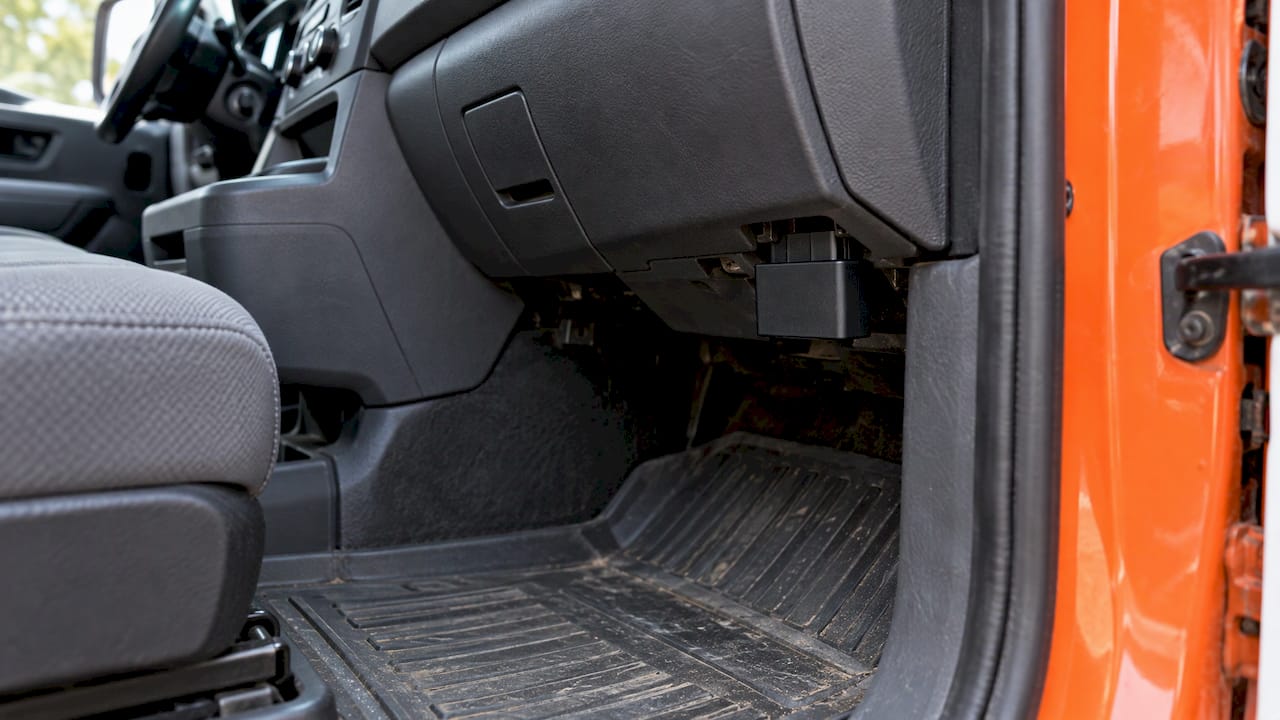
- OBD port. A plug-in tracker sits under the dash, where reception depends on the dashboard and windshield. It is the fastest install for light vehicles, and it takes minutes with no tools. Our OBD plug-in 4G tracker is built for this use. If the port is deep under the steering column, a short OBD extension lets you reposition the unit higher and flatter.
- Top of the dashboard near the base of the windshield. Works on many vehicles, but windshields with a metallic or heat-reflective coating can block GPS, according to the same GlobalRF Tech guide.
- Behind plastic trim. Plastic trim panels pass the signal. Keep the unit away from metal brackets, speaker magnets and large wiring bundles.
For vehicles where you want the unit out of sight and out of reach of a driver, the hardwired HW-200 tracker is the hidden-install option. Hide it behind plastic, not under metal: a hidden spot that is also a metal cage is the most common reason hardwired units report late.
Dump trucks, flatbeds and tractors
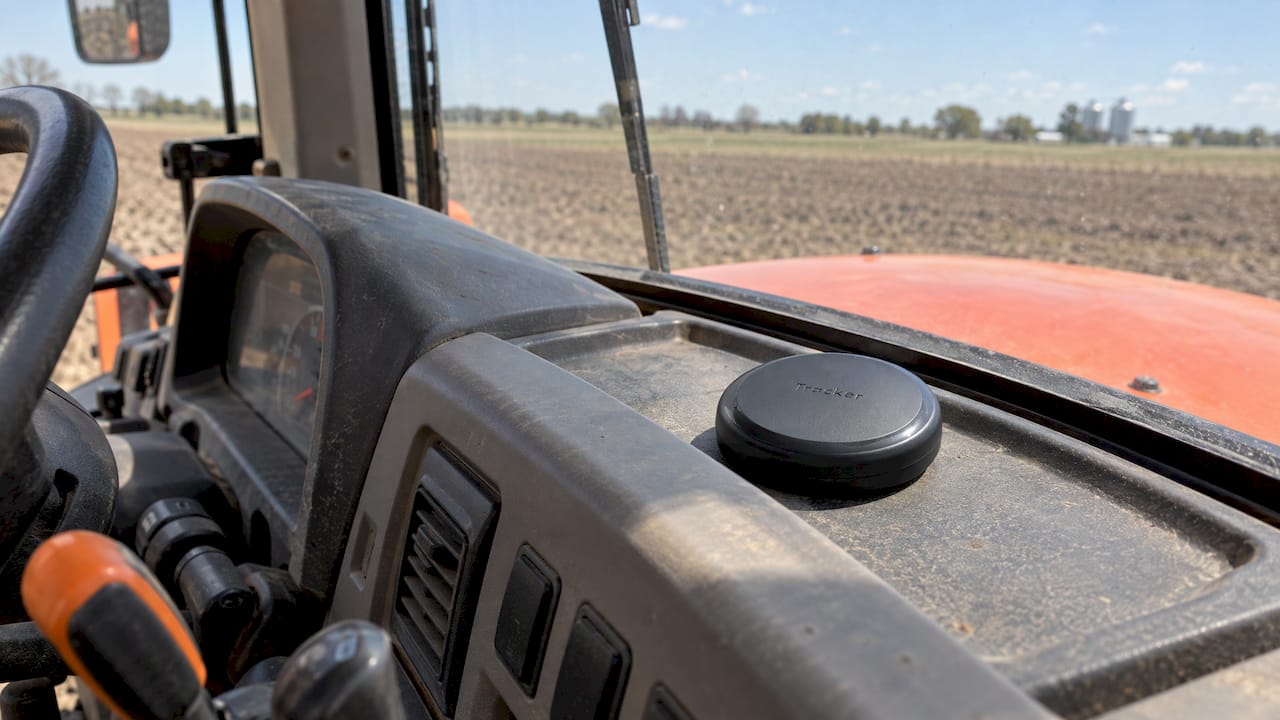
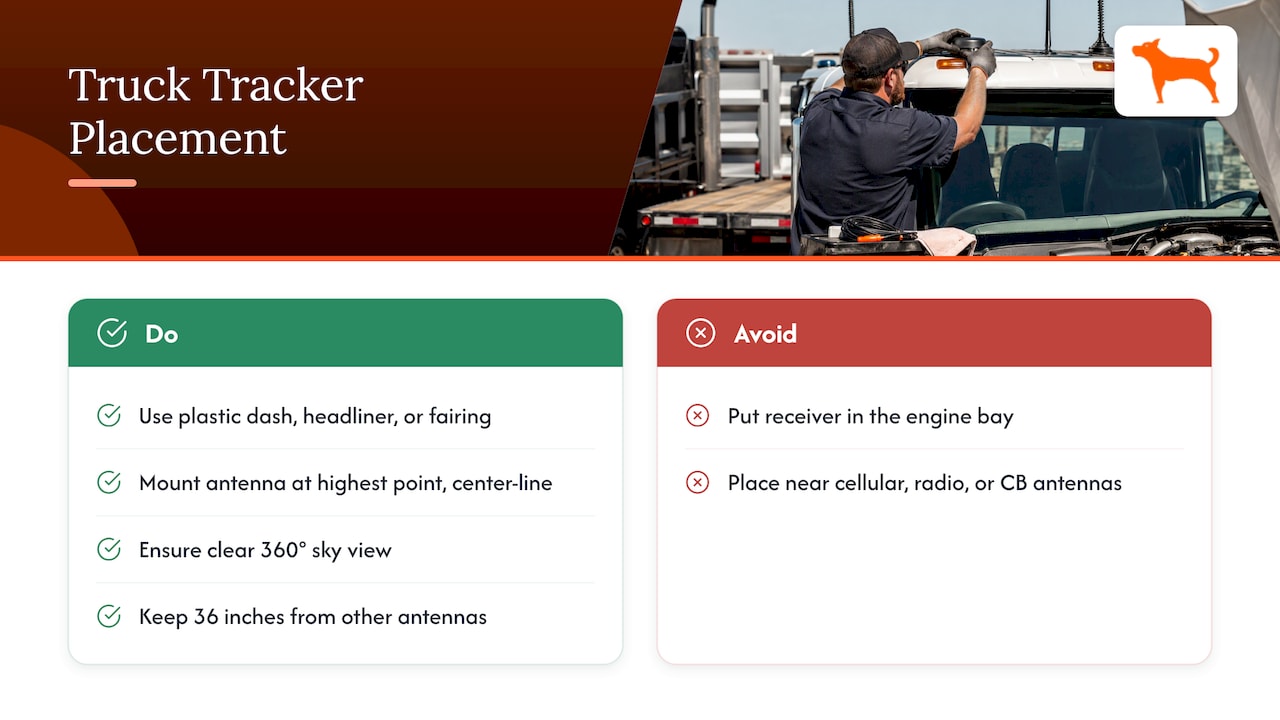
On a heavy truck the cab is the tallest point and the most reliable for sky view, but it is also where the driver can reach. Good options include behind a plastic dash panel, in the upper part of the cab headliner area, or behind a plastic fairing. Avoid the engine bay for the receiver. Heat and electrical noise both hurt performance, and the GradeMetrix installation guide for excavators tells installers to keep the receiver away from heat sources.
If a tracker has an external antenna, mount it at the tallest point of the vehicle with a clear 360-degree view of the sky. Raven’s installation manual for its agricultural GPS antenna puts it on the vehicle center-line, at the highest point and at least 36 inches from other antennas. Keep it clear of cellular, radio and CB antennas.
Excavators, loaders and skid steers
Heavy equipment has the hardest geometry: a steel cab, a boom that swings, and a counterweight. Machine-control installers deal with this daily. Their published guidance for excavators says GNSS antennas go as high as possible and as far apart as practical, and the receiver goes in a protected compartment such as the battery box, the engine compartment or behind the seat, away from heat. That guidance is for precision machine control, which uses two antennas to measure heading. A rental tracker only needs position, so one unit is enough, but the lessons carry over:
- Put the tracker on the highest flat surface that does not move with the boom, such as the cab roof, the top of the counterweight or the top of the engine cover.
- Avoid mounting on the boom, stick or bucket. They tilt through large angles, which breaks the 20-degree rule.
- Avoid placing it in the undercarriage or inside the steel frame. The ground and the machine body block most of the sky.
- Check the position with the boom both stowed and fully extended.
A hardwired unit tucked behind a plastic cover on the rear of the machine is a good fit for rental equipment, because renters rarely look there. Connect it to switched power and fuse it as the installation sheet says.
Trailers, containers and towed equipment
These have no ignition and no easy power, so a battery-powered magnetic tracker is the usual answer. The MW-1700 magnetic tracker is the magnetic option in our line with a one-month battery. For trailers:
- Mount on a flat steel surface that is as level as possible and as high as you can reach.
- A tongue, frame rail or the front wall top works. A spot inside a metal-sided box does not, because the walls and roof block the signal.
- On flatbeds and lowboys, put the tracker where cargo or a loaded machine will not sit on top of it. A 40-ton excavator parked over the unit is a large piece of metal between the tracker and the sky.
- On enclosed trailers with aluminum or steel roofs, mount the unit on the outside top or the outer edge, not inside.
What blocks or weakens the signal
Metal is the main culprit. A steel panel directly above the antenna can leave it with no signal at all, as the GlobalRF Tech guide stresses: metal blocks GPS signals. Watch for these on fleet assets:
| Location | Effect on reception | What to do |
|---|---|---|
| Under a steel roof or hood | Severe loss or no fix | Move to the outer surface or behind a plastic panel |
| Inside a metal toolbox or cargo box | Severe loss | Mount outside, on top |
| Under the dash behind metal bracing | Reduced fix, slow updates | Use a plastic-covered position or an OBD extension |
| Heat-reflective or coated glass | Weak signal through the windshield | Choose a spot not behind the coated area |
| Next to cellular, radio or CB antennas | Interference | Separate them by at least 36 inches where possible |
| Close to the engine, alternator or inverter | Heat and electrical noise | Move the receiver to a cooler, quieter spot |
| Underneath cargo or a parked machine | Obstructed sky | Keep the tracker above or beside, not under |
The environment matters as well. Tall buildings, dense tree cover, tunnels, parking structures and steep cuts in a quarry all reduce the number of visible satellites. You cannot fix that by mounting, but you can keep the tracker at the highest point so it recovers quickly when the machine moves into the open.
Check reception before the asset leaves the yard
A five-minute check after installation prevents a month of missing data.
- Install outdoors, in the open. Do not test inside the shop. A building roof blocks the signal and will make a good install look bad.
- Power it on and wait. The first fix after a cold start usually takes longer than later fixes. Give it a few minutes before judging.
- Confirm the location in the app. The dot should sit on or very near the yard, not several streets away.
- Move the asset. Drive the truck around the lot or move the machine, and confirm the track follows the path.
- Test with the real configuration. Raise the boom, close the toolbox, hitch the trailer. Re-check the location after each change.
- Fix one thing at a time. If the fix is weak, change the position or orientation, then recheck. Moving two variables at once hides the cause.
- Record where each unit lives. A one-line note per asset, such as “behind rear plastic cover, label up”, makes swaps and service faster.
Our app manages multiple devices from one dashboard, so you can check every new unit in a single view as you install it.
A short checklist for installers
- Label or top side facing up
- Within roughly 20 degrees of level
- Highest practical point, clear of metal above
- Away from engine heat and cellular antennas
- Secured so it cannot shift or tilt
- Tested outdoors with the asset moving
- Location noted in your asset record
Which tracker type fits which asset
| Asset | Tracker type | Placement |
|---|---|---|
| Pickups, vans, light trucks | OBD plug-in | OBD port, ideally raised and level, plastic around it |
| Heavy trucks, tractors, loaders | Hardwired | Behind a plastic panel, high in the cab or on a rear cover, away from heat |
| Excavators, skid steers | Hardwired | Cab roof area or upper engine cover, not on moving arms |
| Trailers, lowboys, containers | Magnetic | Flat, level, high outer surface, not under cargo |
The business case for getting it right
Placement is cheap compared to what it protects. Our trackers come with lifetime 4G data included and no monthly fees, so there is no recurring bill whether a fleet has 10 assets or 100. The one-time price starts from $124.99. Customizable geofencing alerts, idle time tracking, trip and mileage reporting and maintenance reminders all rely on steady position updates, and steady updates start with a good mounting position.
Our view on placement
We think of placement as the first feature of any tracker. A device that is level, high and clear of metal gives you accurate geofence alerts, clean mileage reports and a map you can trust. A device that is tucked under steel gives you gaps.
That is why we offer plug-in, hardwired and magnetic versions: the right way to mount a tracker on a pickup is not the right way on a trailer. Our system supports unlimited vehicles and users on one dashboard, with no activation fees and no add-ons, so a rental company can install across the whole yard and put every unit in the same view.
Our advice to every fleet manager is simple: pick the install position first, then pick the device that fits it.
Louis
Choose the unit that fits your yard
For a mixed rental fleet, start with the install position of each asset, then match the tracker. Light vehicles take the OBD plug-in tracker. Trucks and machines you want hidden take the hardwired tracker. Trailers and towed equipment take the magnetic tracker. Every one is a one-time purchase with no monthly fees.

If you need to connect tracking data to your own rental or dispatch software, we also offer API access for business accounts. Details are on our business page.
FAQ
Does a GPS antenna have to face up?
Yes. A GPS antenna should face the sky on a horizontal surface, with a tilt of no more than about 20 degrees, because the underside cannot receive satellite information. If the tracker has an external antenna, the antenna follows this rule and the tracker body can sit in other positions.
Where is the best place to hide a GPS tracker in a truck?
Behind a plastic panel high in the cab, away from the engine and from large metal brackets. Plastic lets the signal through, while steel does not. A hardwired install lets you hide the unit well and keep it powered.
Can I put a tracker inside a metal toolbox or trailer box?
It is not a good idea. Metal walls and roofs block GPS signals, so a unit inside will lose its fix or report late. Mount it on the outside top surface or on a frame rail with open sky above.
How do I know if the placement is working?
Install outdoors, wait a few minutes for the first fix, and compare the map location to the real one. Then move the asset and confirm the track follows. Repeat with the boom raised or the trailer hitched, since those change what the unit can see.
How far should a GPS antenna be from other antennas?
Keep it well apart. Raven’s installation manual specifies at least 36 inches from other antennas for its GPS antenna. Cellular and radio antennas are the usual neighbors to separate it from.