How to start saving money
Lorem ipsum dolor sit amet, consectetur adipiscing elit lobortis arcu enim urna adipiscing praesent velit viverra sit semper lorem eu cursus vel hendrerit elementum morbi curabitur etiam nibh justo, lorem aliquet donec sed sit mi dignissim at ante massa mattis.
- Neque sodales ut etiam sit amet nisl purus non tellus orci ac auctor
- Adipiscing elit ut aliquam purus sit amet viverra suspendisse potent
- Mauris commodo quis imperdiet massa tincidunt nunc pulvinar
- Excepteur sint occaecat cupidatat non proident sunt in culpa qui officia
Why it is important to start saving
Vitae congue eu consequat ac felis placerat vestibulum lectus mauris ultrices cursus sit amet dictum sit amet justo donec enim diam porttitor lacus luctus accumsan tortor posuere praesent tristique magna sit amet purus gravida quis blandit turpis.

How much money should I save?
At risus viverra adipiscing at in tellus integer feugiat nisl pretium fusce id velit ut tortor sagittis orci a scelerisque purus semper eget at lectus urna duis convallis. porta nibh venenatis cras sed felis eget neque laoreet suspendisse interdum consectetur libero id faucibus nisl donec pretium vulputate sapien nec sagittis aliquam nunc lobortis mattis aliquam faucibus purus in.
- Neque sodales ut etiam sit amet nisl purus non tellus orci ac auctor
- Adipiscing elit ut aliquam purus sit amet viverra suspendisse potenti
- Mauris commodo quis imperdiet massa tincidunt nunc pulvinar
- Adipiscing elit ut aliquam purus sit amet viverra suspendisse potenti
What percentege of my income should go to savings?
Nisi quis eleifend quam adipiscing vitae aliquet bibendum enim facilisis gravida neque. Velit euismod in pellentesque massa placerat volutpat lacus laoreet non curabitur gravida odio aenean sed adipiscing diam donec adipiscing tristique risus. amet est placerat in egestas erat imperdiet sed euismod nisi.
“Nisi quis eleifend quam adipiscing vitae aliquet bibendum enim facilisis gravida neque velit euismod in pellentesque”
Do you have any comments? Share them with us on social media
Eget lorem dolor sed viverra ipsum nunc aliquet bibendum felis donec et odio pellentesque diam volutpat commodo sed egestas aliquam sem fringilla ut morbi tincidunt augue interdum velit euismod eu tincidunt tortor aliquam nulla facilisi aenean sed adipiscing diam donec adipiscing ut lectus arcu bibendum at varius vel pharetra nibh venenatis cras sed felis eget.
A fleet onboarding GPS checklist is a structured sequence of steps that ensures every vehicle is fully configured, documented, and integrated with GPS tracking systems before deployment. Fleet managers who follow a formal vehicle onboarding procedure reduce go-live time from 10–14 days down to 5–7 working days with proper preparation. The industry term for this process is “fleet telematics onboarding,” and it covers everything from data collection and hardware installation to driver training and system integration. Skipping steps creates compliance gaps, missed maintenance triggers, and fuel tracking blind spots that are impossible to fix retroactively. This guide gives fleet managers a complete, step-by-step implementation framework built for 2026 operations.
1. What pre-flight data preparation does your GPS onboarding need?
Pre-flight preparation is the single biggest factor in whether your GPS onboarding finishes on time. Unclear stakeholder roles send requests to the wrong people and stall projects before installation even begins. Assembling the right data and the right team before kickoff eliminates that risk entirely.
Data sets to collect before kickoff:
- Vehicle identification numbers (VINs) for every unit in the fleet
- Driver CDL details, license expiration dates, and medical certificates
- Compliance documents: registration, insurance, and FMCSA safety ratings
- Telematics API keys and login credentials for your GPS platform
- Fuel card numbers linked to each vehicle
Stakeholder roles to assign:
- Project lead: owns the timeline and escalates blockers
- IT contact: manages API integrations and network access
- Shop lead: coordinates hardware installation and inspections
- Champion driver: tests the system and trains peers
Clear role assignment for each onboarding step prevents miscommunication and stalled progress. Without a named project lead, accountability diffuses across departments and timelines slip.
Pro Tip: Build a one-page stakeholder matrix listing each role, the person assigned, and their contact method. Share it with every team member before day one.

2. How to verify vehicle registration and compliance documents
Every vehicle must have its compliance documents uploaded and verified before it moves a single mile. Registration, proof of insurance, and FMCSA safety documentation belong in your fleet management system before the first trip. Uploading these at intake creates an audit-ready record from day one.
Run a physical inspection at intake to confirm the vehicle matches its paperwork. Check the VIN plate against the title, verify tire condition, and note any pre-existing body damage. Document everything with photos and attach them to the vehicle’s digital profile.
For fleets running Ford Transit vans, confirming OEM track compatibility at this stage prevents installation conflicts later. The same applies to Mercedes-Benz Sprinter operators who should verify Sprinter OEM track specs before mounting any telematics hardware.
3. Installing and activating telematics hardware
Installing telematics at intake activates GPS tracking, fault code monitoring, and mileage accumulation from day one. Delaying installation creates fuel card fraud risks and compliance gaps that grow harder to close over time. Every day a vehicle runs without a transmitting device is a day of lost data.
The installation process follows a clear sequence:
- Mount the GPS device according to the manufacturer’s wiring diagram. For hardwired units, follow a fleet hardwiring guide to avoid power draw issues.
- Connect the OBD-II port reader if your device supports it. OBD stands for On-Board Diagnostics, the standardized port found on all vehicles built after 1996.
- Power on the device and confirm it transmits a GPS signal to your platform dashboard.
- Verify the device ID matches the vehicle record in your fleet management system.
- Run a short test drive of at least one mile to confirm location data updates in real time.
Pro Tip: Block vehicle dispatch until the GPS device shows an active signal in your dashboard. A vehicle that leaves the yard without a confirmed transmission creates a data gap you cannot fill later.
4. Capturing the OBD baseline and setting up preventive maintenance
Telemetry data synchronization must be configured before the vehicle’s first trip. Missing this step results in permanent gaps in maintenance and fuel consumption records. Those gaps cannot be corrected after the fact, which means warranty claims and service histories become unreliable.
Run a full OBD scan at intake and record every active and pending fault code. This baseline protects you if a manufacturer disputes a warranty claim by proving the defect existed before your fleet took delivery. Factory defects often appear within the first 5,000–10,000 miles, making early detection critical.
Configure preventive maintenance (PM) schedules in your fleet management or CMMS (Computerized Maintenance Management System) platform before the vehicle’s first dispatch. Set intervals based on OEM guidelines: oil change mileage, brake inspection intervals, and filter replacement schedules. Link these PM triggers to the telematics mileage feed so the system alerts your shop lead automatically.
| Maintenance Item | OEM Trigger | Telematics Alert Type |
|---|---|---|
| Oil change | Per OEM interval | Mileage-based alert |
| Brake inspection | Per OEM interval | Mileage-based alert |
| Tire rotation | Per OEM interval | Mileage-based alert |
| Fault code review | Any new DTC | Real-time OBD alert |
| Annual inspection | 12-month cycle | Calendar-based alert |
5. Assigning fuel cards and preventing tracking gaps
Fuel card assignment belongs in the onboarding checklist, not as an afterthought after deployment. Each fuel card number must link to a specific vehicle record in both your fuel management system and your GPS platform. This pairing lets you cross-reference fuel purchases against vehicle location data to catch unauthorized fill-ups.
Unlinked fuel cards are one of the most common sources of fleet fraud. A driver who fills a personal vehicle using a fleet card leaves no GPS footprint unless the card is tied to a tracked unit. Closing this gap at onboarding costs nothing. Discovering it six months later costs real money.
6. How to integrate GPS data with dispatch and operational systems
Effective GPS onboarding configures at least 5 core operational areas: real-time location, geofencing, driver behavior monitoring, fuel management integration, and predictive maintenance alerts. Platforms that miss any of these areas create operational blind spots that show up as missed deliveries, unexplained fuel costs, or failed inspections.
Integration steps for each operational area:
- Dispatch software: Link vehicle availability status to your GPS platform so dispatchers see real-time location before assigning routes.
- Geofencing: Draw boundaries around job sites, customer locations, and restricted zones. Set alerts for entry, exit, and after-hours movement.
- Driver behavior alerts: Configure speed threshold alerts, hard-braking notifications, and idle time reports. Tie these to your driver scorecard system.
- Fuel management: Connect your fuel card platform to the GPS system using an API or manual import schedule. Validate that mileage figures match between both systems.
- Predictive maintenance: Link OBD fault code alerts to your CMMS so work orders generate automatically when a diagnostic trouble code (DTC) appears.
For practical examples of how GPS data integration works across these systems, reviewing real fleet configurations helps identify gaps before go-live.
After configuring each integration, run a validation test. Trigger a geofence exit manually, confirm the alert fires, and verify the right person receives it. Test every alert type before declaring the system live.
| Integration Area | Validation Test | Pass Criteria |
|---|---|---|
| Real-time location | Short test drive | Location updates within 60 seconds |
| Geofence alert | Manual boundary exit | Alert received by correct contact |
| Driver behavior | Controlled hard brake | Event logged in dashboard |
| Fuel management | Manual fuel entry | Mileage matches GPS record |
| PM alert | Simulate mileage threshold | Work order created in CMMS |
7. What driver and manager training covers for GPS adoption
Structured driver training on telematics apps takes about 25–30 minutes per driver and is the most skipped step in fleet GPS onboarding. Skipping it results in system underuse, incorrect defect reporting, and drivers who distrust the technology. Both problems are avoidable with a short, structured session.
Driver training covers:
- Logging into the mobile inspection app and completing a pre-trip DVIR (Driver Vehicle Inspection Report)
- Reporting defects with photos and written descriptions
- Understanding what GPS data the company collects and why
- Confirming fuel card procedures and mileage logging
Manager training covers:
- Reading the GPS dashboard and interpreting driver scorecards
- Responding to geofence and behavior alerts within defined timeframes
- Generating mileage and fuel reports for payroll and compliance
- Escalating maintenance alerts to the shop lead
Run a pilot phase with your champion driver before rolling out to the full fleet. The champion driver completes live inspections, submits a real defect report, and confirms the shop lead receives and processes the work order. This test catches workflow gaps before they affect every driver.
Pro Tip: Record a short screen-capture video of the mobile app walkthrough. Drivers who miss the live session can watch it on their own time, and new hires have a reference from day one.
A paperless DVIR system creates audit-ready inspection records automatically. FMCSA regulations require drivers to complete pre-trip and post-trip inspections. Digital records satisfy that requirement and eliminate the risk of lost paper forms.
Key takeaways
A complete fleet onboarding GPS checklist requires pre-flight data preparation, hardware activation before first dispatch, full system integration, and structured driver training to deliver reliable telematics data from day one.
| Point | Details |
|---|---|
| Prepare data before kickoff | Collect VINs, driver credentials, and telematics API keys to cut go-live time to 5–7 days. |
| Install telematics at intake | Activate GPS and OBD monitoring before the first trip to prevent permanent data gaps. |
| Capture an OBD baseline | Record all fault codes at intake to protect warranties and catch factory defects early. |
| Integrate all five operational areas | Connect dispatch, geofencing, fuel, behavior, and maintenance systems before declaring go-live. |
| Train drivers and managers | Allocate 25–30 minutes per driver for app training to prevent system underuse and reporting errors. |
What I’ve learned from watching fleet onboarding go wrong
Most onboarding failures share one root cause: teams treat the checklist as a formality rather than a precision exercise. I’ve seen fleets skip the OBD baseline scan because the vehicle “looked fine,” then spend months fighting a warranty dispute over a fault code that existed at delivery. The manufacturer wins that argument every time without documented proof.
The second most common mistake is launching without a named project lead. A designated project lead with clear task ownership shortens implementation timelines and prevents the “I thought someone else handled that” conversation. One person owns the checklist. Everyone else reports to them.
Automated reminder systems and enforcement gates for document submission reduce errors and compliance exposure during onboarding. Manual follow-up by email works until it doesn’t. Automate the reminders and gate vehicle dispatch behind confirmed telematics activation. The discipline pays off within the first month of operations.
Driver adoption is the final variable most managers underestimate. GPS technology only delivers value when drivers use the mobile app correctly and report defects honestly. That behavior starts with training and reinforcement, not surveillance. Frame the system as a tool that protects drivers from false liability claims, and adoption follows naturally.
— Louis
Motowatchdog makes GPS onboarding straightforward
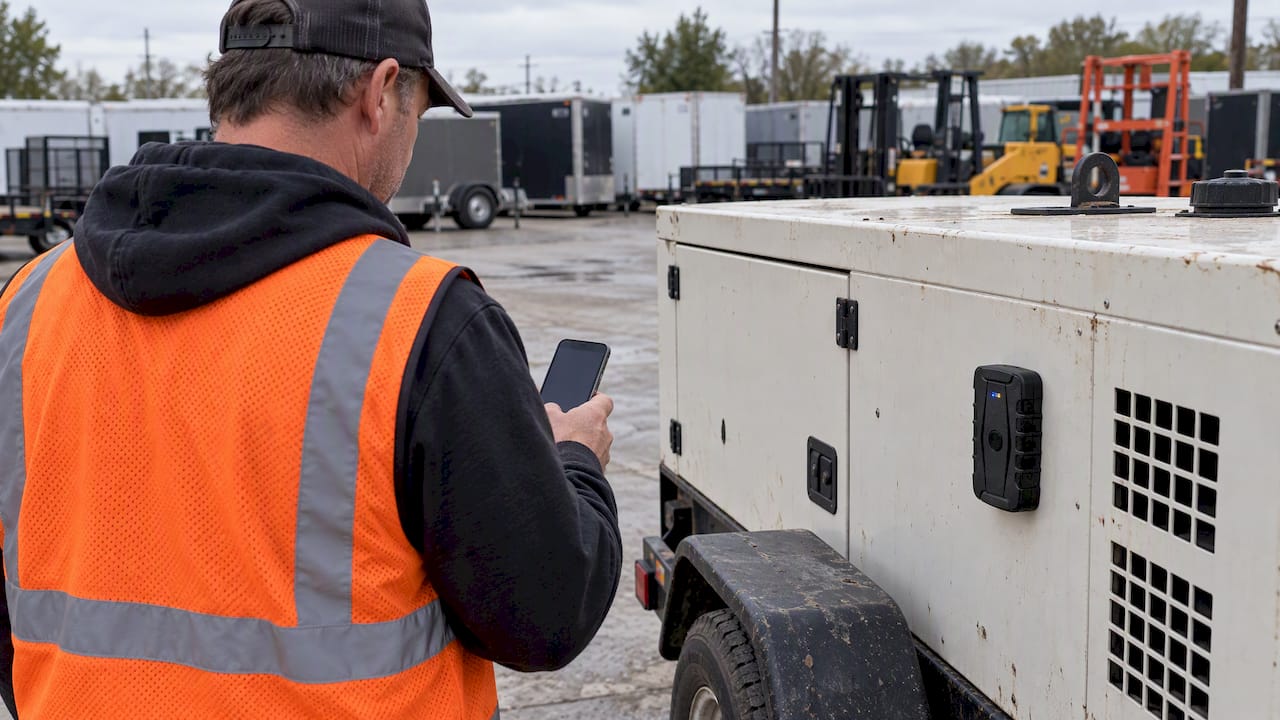
Fleet managers who want to skip the subscription billing cycle and still get reliable 4G GPS tracking have a direct path forward with Motowatchdog. Over 1,000 businesses rely on Motowatchdog’s accuracy for real-time location monitoring, geofencing alerts, and mileage tracking without paying monthly fees.

The device installs quickly, transmits immediately, and fits the onboarding timeline this checklist describes. For small fleets watching costs, subscription-free GPS tracking removes the recurring expense that makes telematics feel out of reach. Visit Motowatchdog to review device options and get your fleet tracking from day one of deployment.
FAQ
What is a fleet onboarding GPS checklist?
A fleet onboarding GPS checklist is a structured list of steps that covers data preparation, hardware installation, system integration, and driver training before a vehicle enters active service. Following it ensures GPS tracking is live and accurate from the first trip.
How long does GPS fleet onboarding take?
Fleets that complete pre-flight data preparation finish GPS onboarding in 5–7 working days. Without preparation, the same process takes 10–14 days due to missing documents and unclear roles.
What happens if you skip the OBD baseline scan?
Skipping the OBD baseline scan removes your ability to prove whether a fault code existed at delivery. Factory defects often appear within the first 5,000–10,000 miles, and without a documented baseline, warranty claims become difficult to support.
How much training do drivers need for GPS telematics apps?
Structured driver training on telematics and mobile inspection apps takes approximately 25–30 minutes per driver. Skipping this step leads to system underuse and incorrect defect reporting.
What are the five core areas GPS onboarding must configure?
Effective GPS onboarding configures real-time location, geofencing, driver behavior monitoring, fuel management integration, and predictive maintenance alerts. Missing any one of these areas creates operational blind spots that affect compliance and cost control.