
How to start saving money
Lorem ipsum dolor sit amet, consectetur adipiscing elit lobortis arcu enim urna adipiscing praesent velit viverra sit semper lorem eu cursus vel hendrerit elementum morbi curabitur etiam nibh justo, lorem aliquet donec sed sit mi dignissim at ante massa mattis.
- Neque sodales ut etiam sit amet nisl purus non tellus orci ac auctor
- Adipiscing elit ut aliquam purus sit amet viverra suspendisse potent
- Mauris commodo quis imperdiet massa tincidunt nunc pulvinar
- Excepteur sint occaecat cupidatat non proident sunt in culpa qui officia
Why it is important to start saving
Vitae congue eu consequat ac felis placerat vestibulum lectus mauris ultrices cursus sit amet dictum sit amet justo donec enim diam porttitor lacus luctus accumsan tortor posuere praesent tristique magna sit amet purus gravida quis blandit turpis.

How much money should I save?
At risus viverra adipiscing at in tellus integer feugiat nisl pretium fusce id velit ut tortor sagittis orci a scelerisque purus semper eget at lectus urna duis convallis. porta nibh venenatis cras sed felis eget neque laoreet suspendisse interdum consectetur libero id faucibus nisl donec pretium vulputate sapien nec sagittis aliquam nunc lobortis mattis aliquam faucibus purus in.
- Neque sodales ut etiam sit amet nisl purus non tellus orci ac auctor
- Adipiscing elit ut aliquam purus sit amet viverra suspendisse potenti
- Mauris commodo quis imperdiet massa tincidunt nunc pulvinar
- Adipiscing elit ut aliquam purus sit amet viverra suspendisse potenti
What percentege of my income should go to savings?
Nisi quis eleifend quam adipiscing vitae aliquet bibendum enim facilisis gravida neque. Velit euismod in pellentesque massa placerat volutpat lacus laoreet non curabitur gravida odio aenean sed adipiscing diam donec adipiscing tristique risus. amet est placerat in egestas erat imperdiet sed euismod nisi.
“Nisi quis eleifend quam adipiscing vitae aliquet bibendum enim facilisis gravida neque velit euismod in pellentesque”
Do you have any comments? Share them with us on social media
Eget lorem dolor sed viverra ipsum nunc aliquet bibendum felis donec et odio pellentesque diam volutpat commodo sed egestas aliquam sem fringilla ut morbi tincidunt augue interdum velit euismod eu tincidunt tortor aliquam nulla facilisi aenean sed adipiscing diam donec adipiscing ut lectus arcu bibendum at varius vel pharetra nibh venenatis cras sed felis eget.
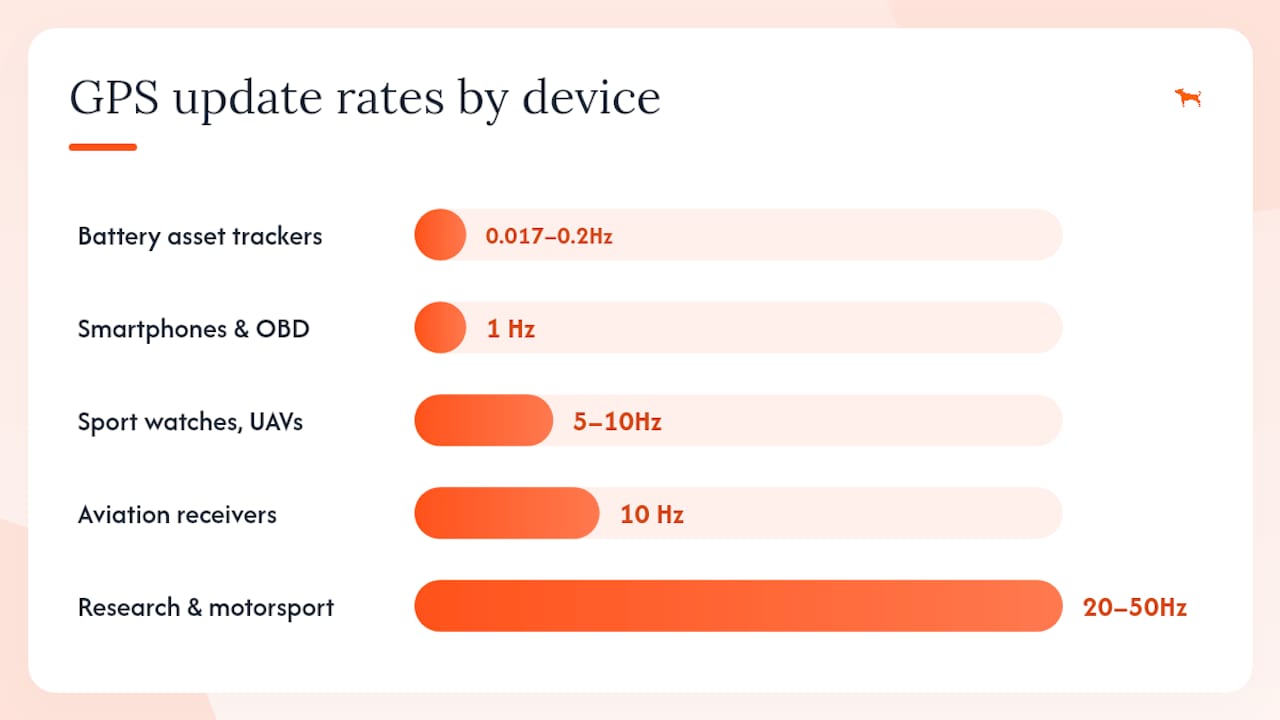
GPS update frequency is how often a receiver computes and reports its position, expressed in Hz (updates per second) or as a time interval in seconds. Most consumer devices run at 1 Hz (one fix per second), modern sport and fleet modules commonly support 5–20 Hz, and some specialized civilian chips advertise up to ~50 Hz. The practical rule: choose the lowest GPS refresh interval that satisfies your latency and accuracy requirements, then protect battery life and data costs from there.
Quick orientation:
- 1 Hz — standard for smartphones, consumer trackers, and most fleet devices
- 5–10 Hz — sport GPS units, UAV flight controllers, delivery vehicle monitoring
- 10 Hz — flight control and aviation applications
- 20–50 Hz — high-dynamics research, motorsports, tightly-coupled IMU systems
- Every 4–5 seconds or longer — asset trackers and handheld devices where battery life is the priority
Table of Contents
- What GPS update rate actually means in GNSS contexts
- How GPS receivers actually produce position updates
- Common GPS update rates and which devices use them
- Tradeoffs you need to weigh before increasing the GPS update cycle
- How to change the reporting frequency on your device or app
- How to measure and verify actual GPS update frequency
- How to choose the right update frequency for your operation
- Key Takeaways
- The interval that actually matters in the field
- Motowatchdog gives you configurable tracking without the subscription overhead
- Authoritative sources and further reading
What GPS update rate actually means in GNSS contexts
The term “update frequency” covers several related but distinct concepts that device UIs often blur together. Getting them straight prevents a common configuration mistake.
Hz vs. seconds: 1 Hz means one position fix per second. 0.2 Hz means one fix every 5 seconds. Higher Hz equals shorter intervals. Both units appear in device settings, so confirm which one a slider or input field is using before you change it.
The more important distinction is between the internal measurement cadence and the reporting interval:
- NMEA output rate / module update rate — how often the GNSS chip computes a new position and emits a sentence (e.g.,
$GPRMC,$GPGGA) on its serial port. Per SparkFun’s GPS Basics guide, most modules default to 1 Hz here.
Confusing NMEA output rate with server reporting interval is the single most common misconfiguration in fleet deployments. A module running at 5 Hz while the device only uploads every 30 seconds gives you 5 Hz data in a local log but 0.033 Hz data in your dashboard.
How GPS receivers actually produce position updates
Understanding the internal mechanics explains why doubling the output rate does not automatically double positional accuracy.
A GNSS receiver measures pseudoranges (time-of-flight distances to each satellite) and, in higher-grade units, carrier phase observables. The satellite continuously broadcasts navigation messages and PRN ranging codes as defined in the IS-GPS-200M interface specification. The receiver correlates the incoming signal against a local replica to extract timing, then solves a least-squares or Kalman-filter position estimate from four or more satellites.
Two physical limits constrain how fast that process can meaningfully run:
- Coherent integration time — the receiver averages signal energy over a window (typically 1–20 ms) to improve signal-to-noise ratio. Shorter windows reduce sensitivity; longer windows limit how fast the tracking loop can respond to dynamics. Research on sampling frequency and GNSS code tracking shows that front-end bandwidth, Doppler, and carrier-to-noise density all interact with this tradeoff.
- Tracking loop bandwidth — the delay-lock loop (DLL) and phase-lock loop (PLL) must be tuned to the expected vehicle dynamics. Wider bandwidths track fast motion but admit more noise; narrower bandwidths are more accurate but lag under acceleration. The sensitivity vs. loop update rate tradeoff is an application-specific optimization, not a universal setting.
When a module outputs at 10 Hz but its tracking loops only produce genuinely new satellite-derived measurements at 1 Hz, the intervening nine fixes per second are Kalman-filter interpolations of the existing state, not independent satellite observations. The position may look smoother, but absolute accuracy does not improve.
End-to-end latency is not just the GNSS cycle time. It is the sum of GPS measurement time, serial transmission and decode, host processing, and network/server delay. GPSD’s latency analysis shows that raising serial baud rate reduces the transmission component but yields diminishing returns compared with the GNSS cycle itself — the dominant term for most configurations.
Common GPS update rates and which devices use them
| Rate (Hz) | Interval (sec) | Typical device types | Common use cases |
|---|---|---|---|
| 0.017–0.2 | 60–5 | Battery-powered asset trackers, handheld units | Parked equipment, cargo containers, personal assets |
| 1 | 1 | Smartphones, consumer fleet trackers, OBD dongles | Standard vehicle tracking, navigation |
| 5–10 | 0.2–0.05 | Sport GPS watches, UAV autopilots, delivery fleet modules | Running/cycling metrics, drone hover control, route replay |
| 10 | 0.05 | Aviation-grade receivers, flight controllers | Fixed-wing navigation, flight control systems |
| 20–50 | 0.05 | Research-grade and motorsports modules | High-dynamics testing, IMU-coupled navigation |
A few practical notes on advertised vs. real-world rates. Modules that claim 20 Hz under open sky may drop to 5 Hz or lower under urban canyon conditions because weak signals force longer integration windows. Cold temperatures slow modem handshakes and can add latency that effectively reduces the useful reporting cadence. Always verify the rate you are actually receiving, not just the rate the firmware is configured to attempt.
Tradeoffs you need to weigh before increasing the GPS update cycle
Higher frequency costs more in three concrete ways, and the accuracy benefit often does not keep pace.
Battery consumption: Every report cycle wakes the GNSS chip, waits for a valid fix, wakes the cellular modem, completes a handshake, transmits the payload, and then idles. Battery-life planning for GPS trackers treats each report as a discrete energy spend. In weak cellular coverage, a modem may retry the connection multiple times per report, so a 60-second interval can draw far more energy than a clean calculation suggests. Shortening the interval multiplies every one of those costs.
Data and transmission cost: A device reporting every 5 seconds generates 720 records per hour versus 60 at one-minute intervals. At scale across a fleet, that difference hits server storage, data plan costs, and API processing load simultaneously.
Accuracy returns diminish quickly: Because many high-rate outputs are filter interpolations rather than new satellite measurements, pushing from 1 Hz to 5 Hz on a standard consumer module may produce a smoother track without improving absolute position accuracy at all. The gains are real only when the receiver’s tracking loops are genuinely operating at the higher rate and the application dynamics require it.
Pro Tip: Before deploying any new reporting interval fleet-wide, run a conservative stress-test profile: simulate weak signal, low battery, and cold temperatures simultaneously. The worst-case energy draw per report is what determines real battery life, not the nominal calculation.
How to change the reporting frequency on your device or app
The setting lives in different places depending on your hardware and platform. Work through these layers in order.
- Set the module update rate — Enter the desired interval in milliseconds (e.g., 200 ms = 5 Hz). Save to flash if the module supports it; otherwise the setting resets on power cycle.
For hardwired fleet trackers, power is not a constraint, so higher reporting cadences are more practical than on battery-powered units. OBD-connected devices draw from the vehicle’s electrical system and can sustain shorter intervals without the battery-depletion risk that governs standalone trackers.
How to measure and verify actual GPS update frequency
Configured rate and delivered rate are not always the same. These steps let you confirm what the device is actually doing.
- Compare the two. A gap between module interval and server interval points to buffering, modem retries, or network latency. The GPSD performance analysis provides a structured breakdown of each latency stage to help you isolate the source.
- Export and analyze. Pull a data export from your platform and compute interval statistics in a spreadsheet. Flag any gaps greater than 2× the configured interval as anomalies worth investigating.
How to choose the right update frequency for your operation
Work through this checklist before committing to a setting.
- Define your required latency. How quickly does your application need to know a new position? A geofence breach alert that must fire within 10 seconds needs a reporting interval under 10 seconds. A parked-asset check-in can tolerate 5-minute intervals.
- Map to vehicle dynamics. A pedestrian moving at 5 km/h travels 1.4 meters per second. At 1 Hz, that is 1.4 m between fixes — adequate for most routing. A vehicle at 100 km/h covers 27.8 m per second; at 1 Hz that is 27.8 m per fix, which is acceptable for fleet tracking but not for lane-level precision.
- Estimate energy cost per report. Multiply the per-report energy draw (GNSS wake + modem + transmission) by the number of reports per day. Add a 30–50% margin for retries and weak-signal conditions per conservative battery-planning guidance.
- Set acceptable data and ops cost. Calculate monthly record volume at your chosen interval and confirm it fits your data plan and server capacity.
- Choose a starting interval by use case:
- Pedestrian / personal asset: 5–30 seconds
- Delivery vehicle / contractor fleet: 10–30 seconds
- High-speed fleet (highway): 5–10 seconds
- UAV / flight control: 100 ms–200 ms (5–10 Hz)
- Aviation: 100 ms (10 Hz) per NAVSTAR guidance
- Run the conservative battery profile. Test at the chosen interval under simulated worst-case conditions before fleet-wide rollout.
- Stage by device state. Active vehicles can report every 10–30 seconds; the same device parked overnight can drop to 5-minute intervals. This single change often cuts total data volume by 60–70% on mixed fleets.
Pro Tip: For small fleet operations on a tight budget, staging intervals by device state (moving vs. parked) is the highest-leverage configuration change available. Set it before touching any other parameter.
Key Takeaways
GPS update frequency is a tradeoff between latency, accuracy, battery life, and data cost — and the right interval depends entirely on the dynamics and operational requirements of the specific application.
| Point | Details |
|---|---|
| Default rate is 1 Hz | Most consumer and fleet modules output one position fix per second; higher rates require explicit configuration. |
| Higher output ≠ better accuracy | Fixes above the receiver’s true measurement rate are filter interpolations, not new satellite observations. |
| Battery cost multiplies with frequency | Each report cycle wakes the GNSS chip and modem; run a conservative stress-test before committing to shorter intervals. |
| Stage intervals by device state | Active vehicles and parked assets have different latency needs; using separate intervals cuts data volume significantly. |
| Motowatchdog supports configurable intervals | Motowatchdog devices offer adjustable reporting cadence and long battery life, letting fleets match intervals to operational needs without subscription overhead. |
The interval that actually matters in the field
Most practitioners spend time debating whether to run 1 Hz or 5 Hz when the real leverage is somewhere else entirely: the gap between the module’s output rate and the server’s effective reporting cadence. A device configured for 5 Hz that uploads every 60 seconds because of a default firmware setting is delivering 0.017 Hz to the operations dashboard. That is the number that drives decisions, and it is the one most teams never measure.
The second overlooked variable is device state. Running a uniform interval across an entire fleet treats a vehicle doing 80 mph on the interstate the same as a trailer that has not moved in three days. The energy and data cost of that parked trailer’s high-frequency reporting is pure waste, and it shortens battery life in a way that creates maintenance overhead at exactly the wrong time.
The practical advice here is to instrument before you configure. Capture actual timestamps from the module and from the server before changing any setting. The delta between those two numbers tells you where your latency is coming from, and that diagnosis determines whether you need a faster module, a shorter upload interval, a better cellular connection, or simply a firmware fix. Changing the module rate without that diagnosis often solves nothing and costs battery life.
Motowatchdog gives you configurable tracking without the subscription overhead

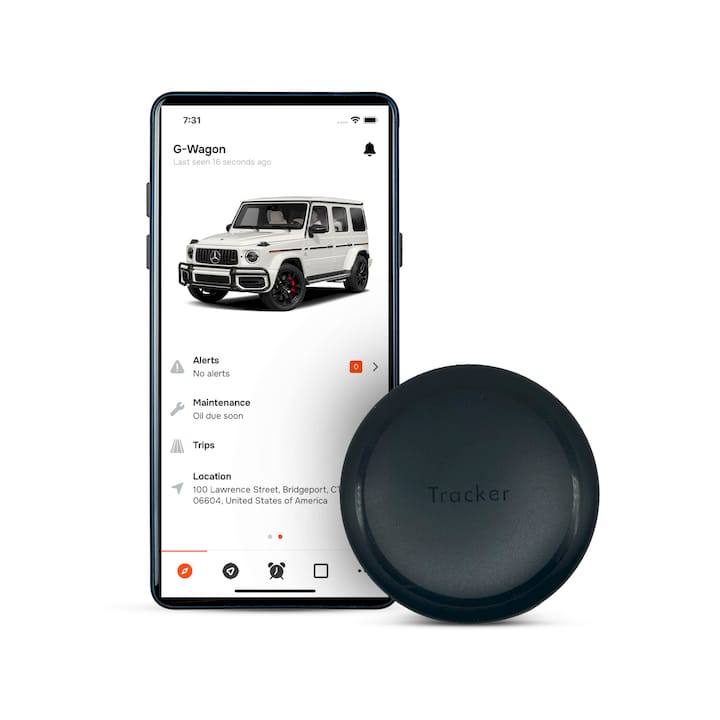
Motowatchdog devices are built for exactly the tradeoff this article describes: long battery life paired with a configurable reporting interval, so you can run a 30-second cadence on active vehicles and a 5-minute cadence on parked assets without paying a monthly fee for the privilege. Over 1,000 businesses rely on Motowatchdog for fleet and asset monitoring, and the companion app lets you adjust reporting intervals, set geofence alerts, and review trip history without touching a firmware command line.
Generic subscription-based trackers lock you into fixed reporting tiers. Motowatchdog’s one-time purchase model means the device works for your operation at the interval you choose, not the one the pricing plan allows. For fleets managing a mix of active vehicles, trailers, and equipment, that flexibility directly reduces data costs and extends time between battery replacements.
See the full device lineup and configure your tracking setup at Motowatchdog.com.
Authoritative sources and further reading
| Source | Why it is useful |
|---|---|
| IS-GPS-200M — gps.gov | Authoritative interface specification defining GPS signal structure and broadcast characteristics |
| NAVSTAR GPS User Equipment Introduction — NAVCEN | Application-driven rate guidance including flight control (10 Hz) and asset tracker intervals |
| GPS Basics — SparkFun Learn | Accessible explanation of NMEA output rates and typical module capabilities |
| Where’s the Latency? — GPSD | Practical latency breakdown by stage; useful for testing methodology and baud-rate analysis |
| GPS Tracker Battery Life Planning — TelemetryHQ | Conservative battery-budgeting methodology for operations teams |
| Highest Achievable Update Rate — Electronics Stack Exchange | Community analysis of upper bounds (~50 Hz) and interpolation limits |
| Sampling Frequency Effects on GNSS Code Tracking — ResearchGate | Academic treatment of how integration period and front-end bandwidth affect DLL/PLL performance |
| Sensitivity vs. Loop Update Rate — Springer GNSS | Advanced reference for carrier-phase and high-precision GNSS integration time optimization |

