How to start saving money
Lorem ipsum dolor sit amet, consectetur adipiscing elit lobortis arcu enim urna adipiscing praesent velit viverra sit semper lorem eu cursus vel hendrerit elementum morbi curabitur etiam nibh justo, lorem aliquet donec sed sit mi dignissim at ante massa mattis.
- Neque sodales ut etiam sit amet nisl purus non tellus orci ac auctor
- Adipiscing elit ut aliquam purus sit amet viverra suspendisse potent
- Mauris commodo quis imperdiet massa tincidunt nunc pulvinar
- Excepteur sint occaecat cupidatat non proident sunt in culpa qui officia
Why it is important to start saving
Vitae congue eu consequat ac felis placerat vestibulum lectus mauris ultrices cursus sit amet dictum sit amet justo donec enim diam porttitor lacus luctus accumsan tortor posuere praesent tristique magna sit amet purus gravida quis blandit turpis.

How much money should I save?
At risus viverra adipiscing at in tellus integer feugiat nisl pretium fusce id velit ut tortor sagittis orci a scelerisque purus semper eget at lectus urna duis convallis. porta nibh venenatis cras sed felis eget neque laoreet suspendisse interdum consectetur libero id faucibus nisl donec pretium vulputate sapien nec sagittis aliquam nunc lobortis mattis aliquam faucibus purus in.
- Neque sodales ut etiam sit amet nisl purus non tellus orci ac auctor
- Adipiscing elit ut aliquam purus sit amet viverra suspendisse potenti
- Mauris commodo quis imperdiet massa tincidunt nunc pulvinar
- Adipiscing elit ut aliquam purus sit amet viverra suspendisse potenti
What percentege of my income should go to savings?
Nisi quis eleifend quam adipiscing vitae aliquet bibendum enim facilisis gravida neque. Velit euismod in pellentesque massa placerat volutpat lacus laoreet non curabitur gravida odio aenean sed adipiscing diam donec adipiscing tristique risus. amet est placerat in egestas erat imperdiet sed euismod nisi.
“Nisi quis eleifend quam adipiscing vitae aliquet bibendum enim facilisis gravida neque velit euismod in pellentesque”
Do you have any comments? Share them with us on social media
Eget lorem dolor sed viverra ipsum nunc aliquet bibendum felis donec et odio pellentesque diam volutpat commodo sed egestas aliquam sem fringilla ut morbi tincidunt augue interdum velit euismod eu tincidunt tortor aliquam nulla facilisi aenean sed adipiscing diam donec adipiscing ut lectus arcu bibendum at varius vel pharetra nibh venenatis cras sed felis eget.
Yes, trailer tracking without an external power source works. Battery-powered devices and solar-plus-backup units both do the job, and each comes with real trade-offs. Battery devices demand periodic replacement or recharge; solar units need clear sky exposure to stay topped off. Either way, configuration, not hardware alone, determines whether the device delivers usable uptime for months or dies in a corner of the yard within weeks.
TL;DR:
- Battery lifespans vary greatly depending on reporting frequency, with aggressive updates draining batteries in weeks and optimized settings lasting years.
- Solar trackers perform poorly indoors or in covered storage, relying heavily on unobstructed exposure and backup batteries during low sunlight periods.
- Proper configuration, such as adaptive reporting and geofence-based sleep, is crucial to maximizing battery life and avoiding premature device failure.
- Physical damage, environmental factors, and poor cellular coverage are common causes of trackers losing power unexpectedly, often due to misconfiguration or environmental interference.
- Using backup power like spare batteries or portable solar panels can reduce downtime but should be paired with physical security measures to protect high-value assets.
Table of Contents
- Trailer Tracker No Power: Battery, Solar, and Wired Options Compared
- How Unpowered Trackers Actually Stay Alive
- Choosing and Configuring a Tracker for a Trailer With No Power
- What This Looks Like in Practice: Author Perspective and Field Notes
- Common Reasons Trailer Trackers Lose Power Unexpectedly
- Step-by-Step Troubleshooting for a No-Power Tracker
- Extending Battery Life on Trailer Trackers
- Backup Power Options When the Primary Source Fails
- How Weather and Storage Conditions Affect Tracker Uptime
- Getting Started With a No-Power Trailer Tracker
- Sources
Trailer Tracker No Power: Battery, Solar, and Wired Options Compared
Every trailer without a live electrical connection needs one of three approaches to stay visible: a standalone battery, a solar panel with a backup cell, or a hardwired tie-in where power exists. The right pick depends less on brand preference and more on how the trailer sits, moves, and gets stored.
Battery-powered trackers are the simplest to install. Mount, activate, done. No drilling into wiring harnesses, no rooftop panel to align. Expected lifespan varies widely based on reporting frequency. A device configured for aggressive, constant pinging burns through its cell in weeks; one set for movement-triggered reporting on a trailer that sits still most of the month can run several years on a single battery, according to industry guides on trailer GPS deployment. The trade-off is straightforward: less reporting frequency buys more runtime.
Solar-powered trackers recharge passively, which sounds like the end of the battery-anxiety problem until you consider storage patterns. A trailer parked nose-in against a warehouse wall, stacked under a carport, or stored indoors during off-season gets little to no sun. In that case, the device leans entirely on its backup battery, and that backup drains on the same schedule a battery-only unit would. Solar makes sense for trailers that live outdoors in open lots. It’s a weaker bet for covered yards or seasonal storage.
Wired or hardwired trackers belong on assets with a constant power source: reefer units, tractors, and equipment with always-on electrical systems. If you’re tracking a powered asset rather than a bare trailer, a hardwired OBD tracker is often the better call because it removes battery management entirely. But most dry vans, flatbeds, and drop trailers simply don’t have that option.
Before buying, run through a short checklist:
- What’s the asset type, and does it ever have access to power?
- How does it get stored, indoors, outdoors, covered, exposed?
- How often do you actually need location updates?
- Who’s responsible for battery swaps or panel cleaning?
How Unpowered Trackers Actually Stay Alive
A trailer tracker with no external power source survives by doing almost nothing most of the time. The device sits in deep sleep, sipping microamps, until an accelerometer detects motion. That motion trigger wakes the unit into recovery mode, where it starts reporting location far more frequently. This is the mechanism that lets a battery-only device sit dormant in a yard for weeks and still snap awake the moment someone hitches up and rolls.
Connectivity works in two layers. GNSS (the umbrella term covering GPS and similar satellite systems) fixes the position; cellular radio sends that fix back to the app. When a trailer sits somewhere with no cell service, a metal-clad warehouse or a remote lot, the device doesn’t just fail silently. Most units store the position data locally and forward it once a signal returns, a behavior called store-and-forward. It’s a critical detail: don’t assume “no update” means “no power.” It might just mean no signal, something worth checking against the FCC’s coverage map before you commit to a deployment area.
Three configuration habits preserve battery life without sacrificing usefulness:
- Adaptive reporting. Set the device to report rarely at rest and frequently in motion, rather than pinging on a fixed interval regardless of activity.
- Scheduled health checks. One check-in per day confirms the unit is alive without draining the cell the way constant polling does.
- Geofence-based sleep. Trailers parked inside a known yard boundary can drop to minimal reporting until they cross the fence line.
Pro Tip: Excessive location pings during long dwell periods are one of the top causes of premature battery drain flagged in fleet GPS diagnostic reports. If a device seems to die faster than advertised, check the reporting interval before assuming the hardware failed.
Indoor yards and metal trailer bodies remain the toughest environment for signal. Mounting near a roof vent or under a plastic cap, rather than deep inside a steel frame, usually improves both GNSS and cellular reception.
Choosing and Configuring a Tracker for a Trailer With No Power
Picking the right unit for an unpowered trailer comes down to matching the hardware spec to your actual operating pattern, not the flashiest feature list.
Selection checklist:
- Battery capacity and rated lifespan at a specific reporting interval (vague marketing claims of “years of battery life” mean nothing without the interval attached)
- IP rating for weather sealing, look for IP65 or higher for units mounted externally
- Tamper alerts that notify you if the device is removed or the case is opened
- Mounting flexibility, magnetic, bolted, or concealed, depending on theft risk
- Firmware update policy, does the manufacturer push power-optimization updates over the air
- Supported cellular bands, confirm they match carriers with coverage in your operating region
Ask any vendor these questions before you buy, live, not from a spec sheet: What’s the expected lifespan at my reporting profile, not the best-case demo profile? What exactly happens in recovery mode, how fast does reporting ramp up once movement is detected? What’s the warranty and RMA turnaround if a unit fails in the field? Can a technician swap the battery on-site, or does the whole unit go back to the factory?
For default configuration on an unpowered trailer, most fleets do well starting with a daily health check, movement-triggered high-frequency reporting, geofence alerts on the home yard, and whatever low-power firmware mode the manufacturer offers.
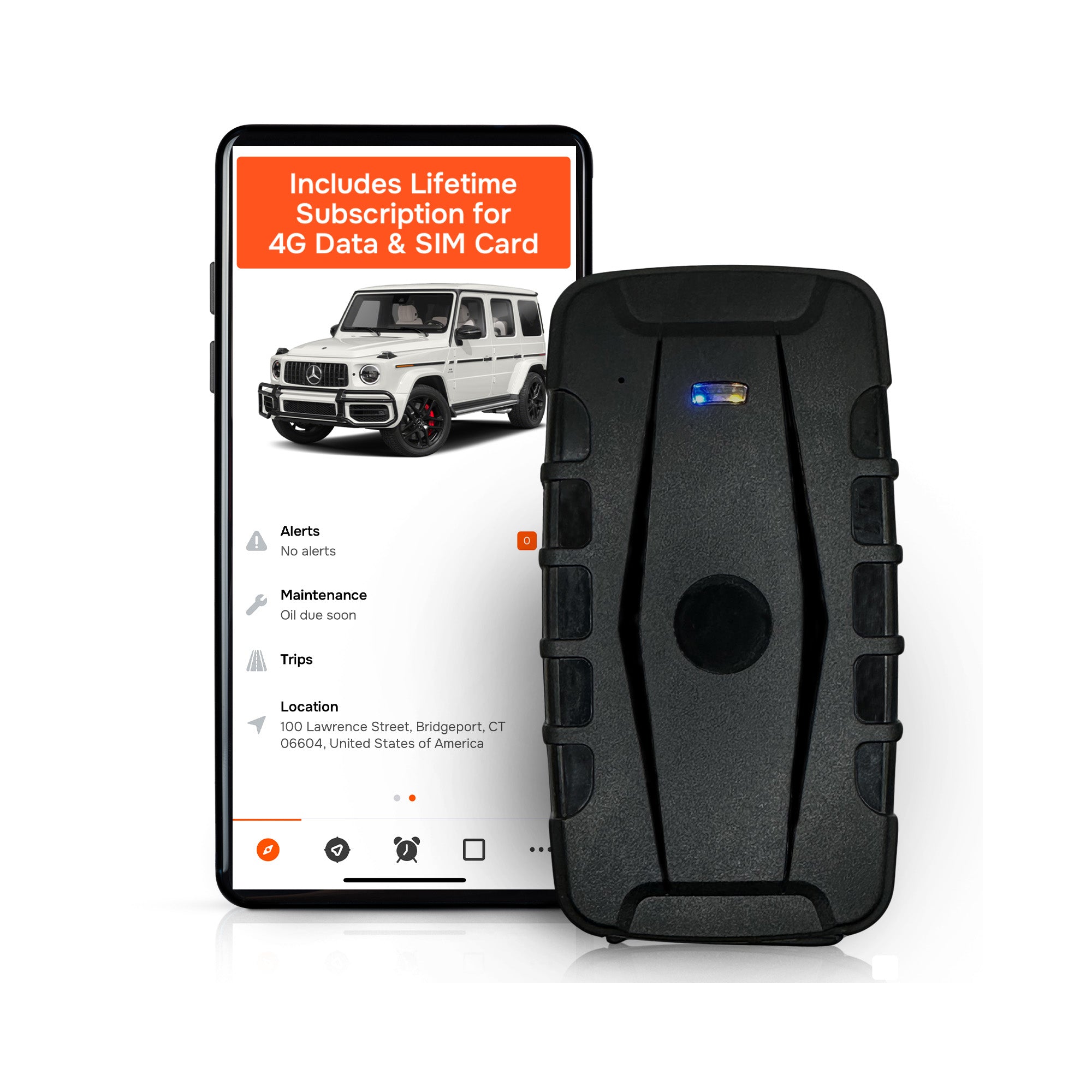
Two red flags should end a purchase conversation immediately. First, any vendor promising continuous, real-time tracking off a small internal battery with no caveats about reporting interval, that math rarely works, and the industry consensus on multi-year lifespans only holds when reporting is optimized, not constant. Second, a non-removable battery with no clear replacement policy. That’s a device you’ll be throwing away, not maintaining.
What This Looks Like in Practice: Author Perspective and Field Notes
Louis has spent years covering fleet telematics and GPS hardware decisions for contractor and trailer-heavy operations, and the pattern that shows up again and again is simple: the tracker rarely fails because of bad hardware. It fails because of bad configuration on top of decent hardware.
Moto Watchdog’s approach fits the unpowered-trailer problem directly because it’s built around the two variables that matter most here: no subscription fee eating into the math over a device’s multi-year life, and long battery life engineered around movement-triggered reporting rather than constant polling. Add customizable geofencing, and a trailer sitting in a known yard barely spends any battery at all until it crosses a line it shouldn’t. Over 1,000 businesses currently rely on the platform for exactly this kind of asset visibility.
Fleet managers evaluating total cost of ownership consistently find that eliminating recurring fees changes the calculus entirely, a device paid for once and configured correctly outlasts the subscription math of competitors within the first year or two.
None of this erases physics. Solar remains a poor bet for trailers stored under cover or indoors for stretches of the year, and any battery-powered fleet still needs a maintenance rhythm for swaps.
— Louis
Common Reasons Trailer Trackers Lose Power Unexpectedly
Most “dead” trackers aren’t dead at all. They’re misconfigured, mismatched, or misunderstood.
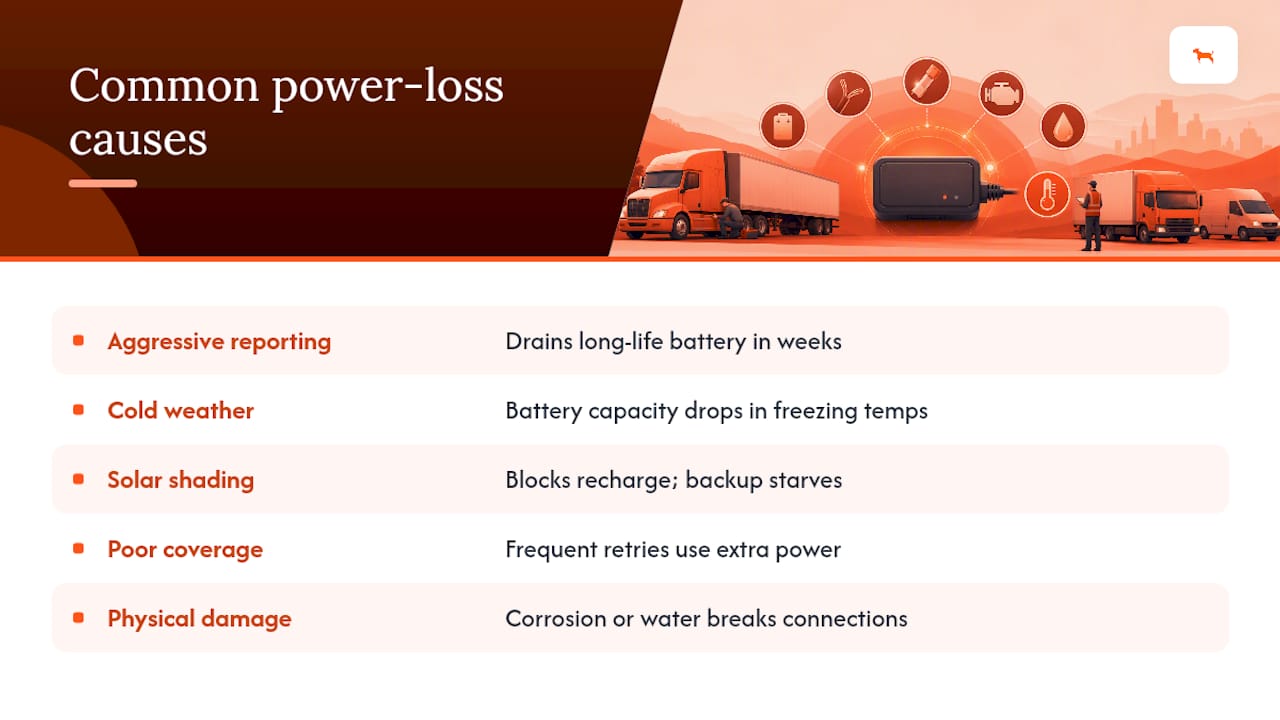
Overly aggressive reporting intervals top the list. A unit set to report every few minutes regardless of movement burns through a battery rated for years in a matter of weeks. This is the single most common cause flagged in fleet diagnostic reports, and it’s entirely avoidable with adaptive settings.
Cold weather. Battery chemistry, particularly lithium-based cells common in tracker hardware, loses capacity in freezing conditions. A device that ran fine all summer can report intermittently once temperatures drop, not because it’s broken, but because the cell can’t deliver current as efficiently.
Solar panel obstruction or shading. Dust buildup, a trailer parked nose-toward-shade, or seasonal sun angle changes can quietly starve a solar unit’s backup battery over weeks.
Poor cellular coverage forces devices into store-and-forward mode more often, which itself consumes extra power as the unit repeatedly attempts to reconnect and transmit a backlog.
Physical damage or water intrusion on units with inadequate IP ratings can corrode connections long before the battery itself is depleted.
Manufacturing defects or aging cells are real but rarer than fleet managers assume, most “no power” cases trace back to configuration or environment first.
Step-by-Step Troubleshooting for a No-Power Tracker
When a trailer tracker stops reporting, work through this sequence before assuming hardware failure:
- Check the app or dashboard for last-reported timestamp and battery percentage. A last-known reading of 40% battery two days ago tells a different story than a flat zero from three weeks back.
- Confirm cellular coverage at the trailer’s last known location. Use a coverage resource like the FCC’s broadband map to rule out a dead zone before touching the device.
- Physically inspect the mount. Look for water intrusion, cracked housing, or signs the unit shifted position and lost antenna line of sight.
- For solar units, check panel exposure. Dust, shade, or a trailer’s parked orientation can silently starve the backup cell.
- Review the reporting configuration. If someone recently changed the interval to a more aggressive setting, that’s often the culprit.
- Attempt a manual wake or reset if the manufacturer supports one, many units respond to a magnet swipe or app-triggered ping.
- If nothing else works, swap the battery (on units designed for field replacement) before assuming a warranty claim is needed.
- Document the failure pattern and contact the vendor with specifics: reporting interval, last known battery percentage, and environmental conditions, this speeds up any RMA process considerably.
Extending Battery Life on Trailer Trackers
A few habits separate fleets that get years out of a device from those replacing units every few months.
Set reporting intervals to match actual operational need, not worst-case paranoia. A trailer that moves twice a week doesn’t need hourly pings while parked. Use geofence-scheduled reporting windows so the device only checks in frequently during known operating hours, cutting down on needless nighttime pings that add up over a year.
Keep solar panels clear of dust, snow, and debris; a quick wipe during routine trailer inspections costs nothing and preserves recharge capacity. Store trailers with solar-equipped trackers facing open sky when possible, rather than backed against a building or under an overhang.
For battery-only units, track install dates and expected replacement windows in whatever maintenance log the fleet already uses. Treat the tracker battery the way you’d treat a smoke detector battery: on a calendar, not a guess. Cold-weather fleets should budget for reduced runtime estimates during winter months and consider swapping batteries proactively before a harsh season rather than reactively after a failure.
Backup Power Options When the Primary Source Fails
Even a well-configured tracker eventually needs a contingency plan for total power loss, especially on high-value trailers where a gap in visibility carries real theft risk.
The simplest backup is a spare, pre-charged battery kept in a maintenance vehicle or yard office, ready for immediate field swap on units designed for it. This turns a dead tracker into a five-minute fix rather than a shipping delay. For solar-equipped units, a small portable panel or power bank can bridge a gap during extended cloudy stretches or while the trailer sits in temporary covered storage.
Some fleets keep a rotating stock of two devices per trailer position, essentially, one active and one charging, swapping on a schedule during routine yard checks. This works well for high-theft-risk assets where downtime in tracking coverage isn’t acceptable even for a few days.
Whatever backup approach you choose, pair it with the security basics that matter regardless of tracker uptime: secure load practices and visible deterrents reduce the odds you ever need the recovery feature in the first place. A tracker is a recovery tool, not a replacement for basic physical security.
How Weather and Storage Conditions Affect Tracker Uptime
Environment shapes power availability more than most fleet managers expect going in.
Temperature swings hit battery chemistry directly. Extreme cold reduces the current a battery can deliver, which can make a device appear to lose power faster than its rated lifespan suggests, even though the cell itself isn’t damaged. Extreme heat, conversely, accelerates chemical degradation over time, shortening total lifespan even if day-to-day performance looks normal.
Storage pattern matters as much as climate. A trailer that sits in open sun year-round is the best-case scenario for a solar-equipped tracker. A trailer that rotates between outdoor lots and indoor warehouse storage puts real strain on solar reliability, since the backup battery ends up doing most of the work during covered stretches.
Metal trailer bodies and dense cargo can also interfere with both GNSS and cellular signal, forcing the device to work harder (and draw more power) to get a fix or transmit a report. Mounting position matters here: closer to a roof vent or non-metal access point generally outperforms a deep interior mount.
Fleets operating across multiple climates or regions should factor regional weather patterns into battery maintenance schedules rather than applying one national assumption to every trailer in the fleet.
Getting Started With a No-Power Trailer Tracker
For trailers with no external power source, Moto Watchdog’s subscription-free devices are built around exactly the trade-offs covered above: long battery life engineered for movement-triggered reporting, customizable geofencing to cut needless pings while a trailer sits idle, and no recurring fee stacking cost on top of hardware you already own.

Getting set up correctly matters more than which device you buy. When mounting a solar-equipped unit, position it toward open sky, top-of-roof whenever the trailer design allows it, rather than tucked against a wall or overhang. Enable recovery mode so the device shifts to frequent reporting automatically the moment unexpected movement is detected. Set a daily health check so you know the unit is alive without draining the battery on constant polling.
Explore the full lineup of subscription-free tracking devices built for trailers, fleets, and equipment, or read more about how the no-fee model changes total cost over a multi-year device lifespan. If you’re ready to equip a trailer today, the product landing page walks through device specs and configuration options for exactly this use case.
Sources
- Trailer Gps Tracking Systems – Complete Guide - Onlymechanic
- Solar tracker performance depends on exposure - AZoCleantech
- Secure your load - NHTSA
- How to use the FCC’s National Broadband Map - FCC help