How to start saving money
Lorem ipsum dolor sit amet, consectetur adipiscing elit lobortis arcu enim urna adipiscing praesent velit viverra sit semper lorem eu cursus vel hendrerit elementum morbi curabitur etiam nibh justo, lorem aliquet donec sed sit mi dignissim at ante massa mattis.
- Neque sodales ut etiam sit amet nisl purus non tellus orci ac auctor
- Adipiscing elit ut aliquam purus sit amet viverra suspendisse potent
- Mauris commodo quis imperdiet massa tincidunt nunc pulvinar
- Excepteur sint occaecat cupidatat non proident sunt in culpa qui officia
Why it is important to start saving
Vitae congue eu consequat ac felis placerat vestibulum lectus mauris ultrices cursus sit amet dictum sit amet justo donec enim diam porttitor lacus luctus accumsan tortor posuere praesent tristique magna sit amet purus gravida quis blandit turpis.

How much money should I save?
At risus viverra adipiscing at in tellus integer feugiat nisl pretium fusce id velit ut tortor sagittis orci a scelerisque purus semper eget at lectus urna duis convallis. porta nibh venenatis cras sed felis eget neque laoreet suspendisse interdum consectetur libero id faucibus nisl donec pretium vulputate sapien nec sagittis aliquam nunc lobortis mattis aliquam faucibus purus in.
- Neque sodales ut etiam sit amet nisl purus non tellus orci ac auctor
- Adipiscing elit ut aliquam purus sit amet viverra suspendisse potenti
- Mauris commodo quis imperdiet massa tincidunt nunc pulvinar
- Adipiscing elit ut aliquam purus sit amet viverra suspendisse potenti
What percentege of my income should go to savings?
Nisi quis eleifend quam adipiscing vitae aliquet bibendum enim facilisis gravida neque. Velit euismod in pellentesque massa placerat volutpat lacus laoreet non curabitur gravida odio aenean sed adipiscing diam donec adipiscing tristique risus. amet est placerat in egestas erat imperdiet sed euismod nisi.
“Nisi quis eleifend quam adipiscing vitae aliquet bibendum enim facilisis gravida neque velit euismod in pellentesque”
Do you have any comments? Share them with us on social media
Eget lorem dolor sed viverra ipsum nunc aliquet bibendum felis donec et odio pellentesque diam volutpat commodo sed egestas aliquam sem fringilla ut morbi tincidunt augue interdum velit euismod eu tincidunt tortor aliquam nulla facilisi aenean sed adipiscing diam donec adipiscing ut lectus arcu bibendum at varius vel pharetra nibh venenatis cras sed felis eget.
The fastest way to stop missing maintenance is to pick one system and automate it. Whether you manage a vehicle, a home, or a set of tools, the principle is the same: set the trigger once, log the last service, and let the reminder do the work.
Start here — three immediate actions.
- Pick your interval. Choose time-based (monthly, quarterly, annual) or usage-based (mileage, hours) depending on the asset.
- Set the reminder now. Add a repeating calendar event or configure an app alert before you close this page.
- Log the last service. Record the date, odometer reading or hours, and what was done. That entry becomes your baseline.
For vehicle owners who want mileage-triggered alerts without manual tracking, Motowatchdog automates the process with a subscription-free GPS tracker that sends push notifications when service intervals are due. Following the manufacturer’s recommended schedule and keeping documented service records protects vehicle reliability and can be critical evidence if a warranty claim is disputed.
Key Takeaways
A consistent reminder system, whether a calendar template, a dedicated app, or an automated GPS tracker, is the most reliable way to protect vehicle reliability, home value, and tool performance over time.
| Point | Details |
|---|---|
| Pick one system and start | Choose calendar, app, or GPS tracker based on your highest-priority need and configure it today. |
| Log six data points per service | Capture date, vendor, component, work performed, cost, and next service date to protect warranties and resale value. |
| Match triggers to asset type | Use mileage triggers for vehicles, calendar triggers for home tasks, and hours-of-use triggers for tools. |
| Stagger alerts to avoid fatigue | Set a primary alert 2 weeks out and a follow-up 3 days before to keep reminders from being ignored. |
| Motowatchdog for vehicle automation | Subscription-free GPS tracker that automates mileage-based alerts and produces exportable logs for warranty and resale. |
Table of Contents
- What maintenance reminders actually cover across vehicles, homes, and tools
- Copyable maintenance schedule templates you can use today
- How to set reminders that actually get done
- What to log and why it matters for warranty, resale, and troubleshooting
- How to choose the right app or system for your needs
- Three simple workflows you can start today
- How Motowatchdog automates vehicle maintenance reminders
- What actually works in practice
- Motowatchdog makes automated vehicle reminders simple
- Sources
What maintenance reminders actually cover across vehicles, homes, and tools
Most people think of service reminders as an oil-change alert. The real scope is wider, and a unified approach to all three asset categories prevents the expensive surprises that come from tracking only one.
Vehicles are the most time-sensitive category. Fluid levels, tire pressure, brake wear, and filter replacements each follow distinct intervals, and missing any one of them can cascade into a larger repair. Typical auto maintenance follows monthly visual checks, 3,000–7,500 mile oil and filter changes depending on oil type, 6-month tire and battery inspections, and annual brake and fluid reviews. Electric vehicles skip oil changes but still need coolant, brake fluid, cabin air filter, and tire rotation checks on their own schedules.
Homes carry a different risk profile. A missed HVAC filter swap or a skipped roof inspection after a storm can turn a $30 fix into a $3,000 repair. Inspecting your home at least twice a year and budgeting a portion of its market value annually for maintenance helps prevent costly repairs and preserve resale value. Seasonal tasks, such as winterizing pipes before a freeze or clearing gutters in fall, are the ones most likely to slip without a calendar prompt.
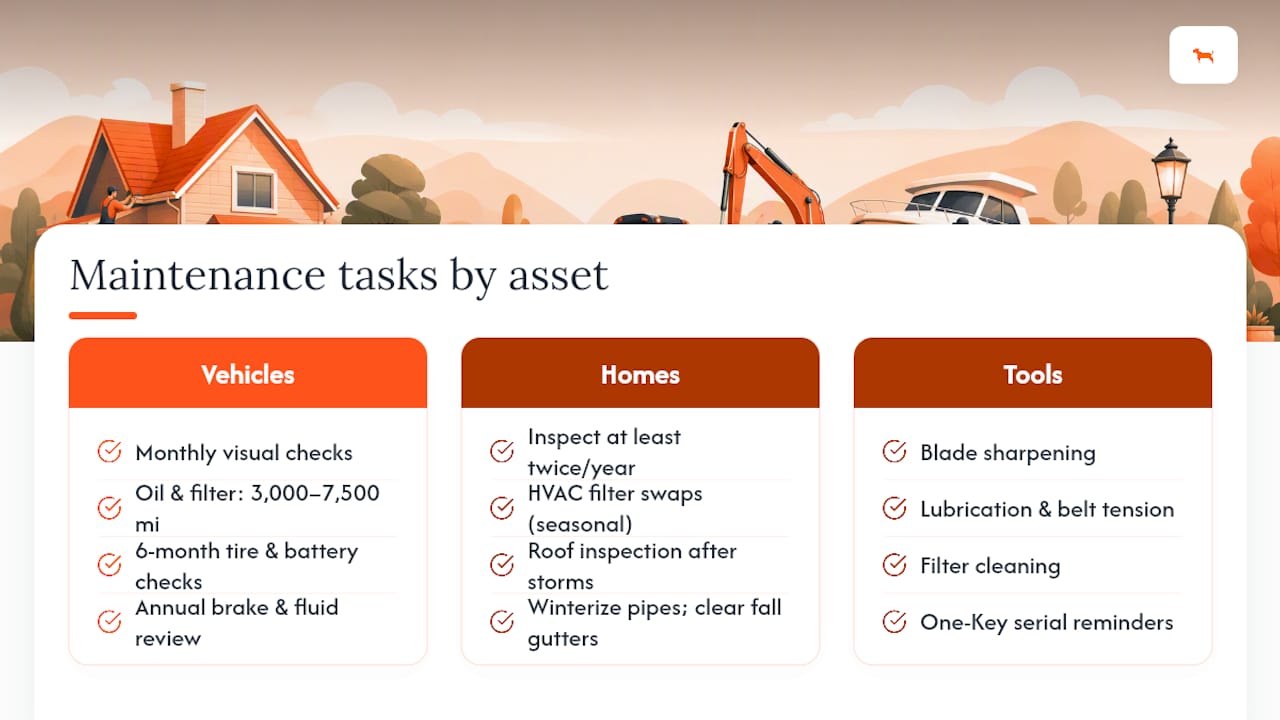
Tools and equipment are the most overlooked category. Blade sharpening, lubrication, belt tension, and filter cleaning all affect performance and safety. Milwaukee’s One-Key platform, for example, lets users set service reminders tied to individual tool serial numbers so each item in an inventory gets its own maintenance schedule. Contractors running multiple tools benefit most from this approach, since a dull blade or a worn bit rarely announces itself until it causes a problem.
Cross-cutting items worth flagging in any system: manufacturer warranty expiration dates, seasonal safety checks (smoke detectors, CO detectors, fire extinguisher tags), and any item covered by a service contract with a defined inspection window.
Copyable maintenance schedule templates you can use today
A practical schedule maps tasks to intervals you can actually follow. The table below covers the most common tasks across vehicles, homes, and tools.
Copyable plain-text checklist for a calendar or reminder app:
Monthly: tire pressure / fluid levels / smoke detector test / blade inspection
Every 3 months: oil change / gutter check / belt tension
Every 6 months: tire rotation / HVAC tune-up / blade sharpening
Annual: brake inspection / roof inspection / full equipment service
Paste this into Google Calendar as a recurring note, or drop it into any maintenance app as a template.
Pro Tip: EV owners can extend most fluid-check intervals but should add a quarterly high-voltage battery cooling system check. High-mileage drivers (over 15,000 miles per year) should shift oil changes to the shorter end of the 3,000–7,500 mile range. In climates with hard winters, move the HVAC and roof inspections to October rather than waiting for the standard annual slot.
How to set reminders that actually get done
The most reliable trigger type depends on the asset. Time-based triggers work for home and seasonal tasks. Usage-based (mileage or hours) triggers work for vehicles and power tools. Condition-based triggers, such as a warning light or a visible wear indicator, are a safety net, not a primary system.
Automating scheduled maintenance reduces missed tasks, centralizes records, and lowers long-term costs compared with reactive maintenance. Here is how to implement each trigger type:
-
Time-based trigger. Open your calendar app and create a recurring event. Set the repeat interval (monthly, quarterly, annual). Add a description with the specific task and the vendor’s phone number. Google Calendar, Apple Calendar, and Outlook all support this natively.
-
Mileage-based trigger. Note your current odometer reading and add the target interval (e.g., current mileage + 5,000). Set a calendar reminder for roughly the date you expect to hit that mileage, or use a GPS tracker that reads mileage automatically and fires a push notification when the threshold is reached.
-
Usage/hours-based trigger. For tools, check the manufacturer’s spec for service intervals in hours of use. Log hours after each job in a spreadsheet or dedicated app. Set a reminder when cumulative hours approach the threshold.
-
Condition-based trigger. This is reactive by nature. Use it as a backup: if a warning light appears or a filter looks visibly dirty before the scheduled interval, act immediately and reset the timer from that date.
Which trigger fits which task? Oil changes by mileage, HVAC filter swaps by calendar month, blade sharpening by hours of use, and roof inspections by season. Mixing trigger types across your asset list is normal and correct.
Pro Tip: Alert fatigue is real. Stagger reminders so you are not receiving five notifications on the same day. Use a two-step approach: a primary alert 2 weeks before the due date and a follow-up alert 3 days before. The first gives you time to schedule the appointment; the second prevents it from slipping.
What to log and why it matters for warranty, resale, and troubleshooting
Logging date, vendor, task, cost, odometer reading or hours, and photos at every service visit protects warranties and supports resale negotiations. A buyer who sees a complete, dated service history pays more. A warranty administrator who sees a gap in records may deny a claim.
Organizing records by system and capturing six key data points per service visit makes those records usable for warranty, insurance, and resale. The six fields to capture every time:
- Date of service
- Vendor name and contact information
- System or component serviced (e.g., “engine oil and filter,” “HVAC blower motor”)
- Work performed in plain language
- Cost including parts and labor
- Next service date or mileage
For receipts, photograph them immediately after the appointment and name the file with a consistent format: YYYY-MM-DD_VehicleOrSystem_Task (e.g., 2026-03-15_TruckF150_OilChange). Store one copy in a cloud folder (Google Drive, iCloud, or Dropbox) and one local copy on your device. For home records, create a folder per system: HVAC, Plumbing, Roof, Electrical. For vehicles, one folder per vehicle.
Sync matters when multiple people share an asset. A shared Google Drive folder or a maintenance app with multi-user access means a spouse, co-owner, or fleet manager always sees the current record without chasing down paper receipts.
How to choose the right app or system for your needs
Choose by the highest-priority capability you need. If you want automation with no manual mileage entry, a GPS-connected tracker is the right foundation. If you manage a home and want photo storage and cloud backup, a dedicated home-maintenance app fits better. If you want zero cost and already live in a calendar app, a template works fine.
Standard features to expect from a well-rated maintenance app include service reminders, mileage logging, and photo attachments. App store listings confirm these are baseline features across popular options. Home-maintenance apps on Google Play similarly advertise smart reminders, task logging, and cloud sync as core capabilities.
| Capability | Solo Owner | Family / Shared | Small Fleet |
|---|---|---|---|
| Mileage-based triggers | Needed | Needed | Critical |
| Multi-user access | Optional | Needed | Critical |
| Photo/receipt storage | Useful | Useful | Needed |
| Cloud sync and backup | Recommended | Needed | Critical |
| Warranty/resale export | Useful | Useful | Needed |
| Automated GPS alerts | Optional | Optional | Strongly recommended |
Before committing to any app, ask three questions: Can you export your data in a standard format (CSV or PDF)? Does the app back up records automatically, or do you have to trigger it manually? Which notification channels does it use (push, email, SMS)?
Pro Tip: Privacy matters with GPS-connected apps. Check whether the app stores location data on its own servers and whether you can delete your history. Subscription-free hardware options like Motowatchdog keep data tied to your account without ongoing fees, which limits third-party data exposure compared with subscription platforms that monetize usage data.
Three simple workflows you can start today
The right workflow depends on how much automation you want and how many assets you manage.
Workflow 1: Calendar template (DIY homeowner or occasional user)
- Setup: 30 minutes to create recurring events.
- Automation level: None. You set it; you act on it.
- Cost: Free.
- Best for: Homeowners or single-vehicle owners who already live in Google Calendar or Outlook and want a no-app solution.
- Limitation: No mileage tracking; relies entirely on your discipline to log completions.
Workflow 2: Dedicated maintenance app (busy vehicle or home owner)
- Setup: 1–2 hours to enter assets and past service history.
- Automation level: Medium. The app fires reminders; you log completions manually.
- Cost: Free to low monthly fee depending on the app.
- Best for: Individuals managing multiple assets (two vehicles, a home, a set of tools) who want one place for all records and photo storage.
- A shared family account adds multi-user visibility without extra complexity.
Workflow 3: Automated GPS tracker (contractor, fleet manager, or vehicle-focused owner)
- Setup: Device installation plus app configuration, typically under an hour.
- Automation level: High. Mileage is read automatically; push alerts fire when thresholds are reached.
- Cost: One-time hardware purchase, no ongoing subscription with options like Motowatchdog.
- Best for: Contractors tracking multiple vehicles or tools, fleet managers who need exportable mileage logs, and vehicle owners who want zero manual mileage entry.
- For small fleet tracking on a budget, a GPS-based workflow eliminates the spreadsheet overhead that makes calendar templates collapse at scale.
To integrate any of these into a shared family calendar, create a dedicated maintenance calendar in Google Calendar or Apple Calendar, share it with household members, and assign each recurring task to the person responsible. Color-coding by asset type (vehicle, home, tools) makes the calendar scannable at a glance.
How Motowatchdog automates vehicle maintenance reminders
Motowatchdog can automate mileage-based maintenance alerts so vehicle owners receive push notifications when a service interval is due, without entering a single odometer reading manually. The device reads real mileage from the vehicle and fires alerts through the companion app when a preset threshold is reached.
Core features relevant to maintenance tracking:
- Subscription-free GPS: One-time hardware purchase with no recurring monthly fee.
- Mileage reporting: Automatic trip and mileage logs that feed directly into service interval calculations.
- Geofencing alerts: Customizable zones that trigger notifications when a vehicle enters or leaves a defined area, useful for fleet managers tracking when a vehicle returns to a home base for scheduled service.
- Push notifications: Alerts delivered to the mobile app when a maintenance threshold is reached.
- Long battery life: Suitable for vehicles, trailers, and equipment that are not always running.
Setup follows a straightforward flow. After installing the device (hardwired or OBD port depending on the model, with guidance available in the GPS tracker hardwiring guide), the user opens the companion app, enters the current odometer reading, and sets the mileage interval for each maintenance task. From that point, the app tracks mileage automatically and sends a push notification when the vehicle approaches the threshold.
Motowatchdog’s subscription-free model means the maintenance reminder system keeps working without a monthly bill. For a contractor running three trucks, that translates to mileage-triggered oil change alerts, geofence-based return-to-base notifications, and exportable trip logs for warranty documentation, all from a single device per vehicle.
Who benefits most: a single-vehicle owner who wants oil-change alerts without manual tracking, a contractor managing tools and vehicles across job sites, and a small fleet manager who needs exportable mileage logs for warranty and resale documentation. The OBD GPS tracker guide covers which vehicle types are compatible and what diagnostic data is available alongside mileage.
What actually works in practice
The most common failure in any reminder system is not the tool. It is the gap between receiving an alert and booking the appointment.
The practitioners who maintain their assets most reliably share three habits. First, they pair every reminder with a committed next action, not just an acknowledgment. When the oil-change alert fires, the next step is not “remember to schedule it.” It is opening the shop’s booking page and picking a date, right then. Second, they keep vendor contact information inside the reminder itself, so there is no friction between the alert and the call. Third, they treat small recurring tasks, a monthly tire pressure check, a quarterly filter swap, as non-negotiable calendar blocks rather than optional to-dos. The tasks that feel trivial are the ones that accumulate into expensive repairs.
One practical pairing worth adopting: link each reminder to a specific vendor contact in your phone. When the HVAC tune-up alert fires in September, the reminder body contains the HVAC company’s number. When the brake inspection alert fires, the shop’s address is already there. That single habit removes the most common excuse for delay.

Motowatchdog makes automated vehicle reminders simple
If you want mileage-triggered maintenance alerts without manual tracking, Motowatchdog delivers that with a one-time hardware purchase and no ongoing subscription fees.

Key benefits for vehicle owners and fleet managers:
- Automatic mileage reporting that triggers service alerts when intervals are reached, no odometer entries required.
- Push notifications delivered to your phone when a maintenance threshold is due.
- No monthly subscription, so the system keeps working without recurring costs.
- Exportable trip and mileage logs that serve as documented proof for warranty claims and resale negotiations.
Over 1,000 businesses rely on Motowatchdog’s accuracy for real-time vehicle monitoring. Setup takes under an hour, and the companion app walks you through linking mileage thresholds to specific maintenance tasks. Visit Motowatchdog to see device options and confirm compatibility with your vehicle or fleet.
Sources
The sources below cover manufacturer-recommended schedules, record-keeping best practices, and app options referenced throughout this article. Each is worth bookmarking if you want to verify intervals or explore a specific category further.
- Preventative home maintenance | NC State Extension
- Car maintenance guide | Kelley Blue Book (KBB)
- How to Maintain Your Car to Keep It Running Well | Car and Driver
- Scheduled maintenance | Accruent
- How to organize home maintenance records: 5 steps | RealEstateLedger