

How to start saving money
Lorem ipsum dolor sit amet, consectetur adipiscing elit lobortis arcu enim urna adipiscing praesent velit viverra sit semper lorem eu cursus vel hendrerit elementum morbi curabitur etiam nibh justo, lorem aliquet donec sed sit mi dignissim at ante massa mattis.
- Neque sodales ut etiam sit amet nisl purus non tellus orci ac auctor
- Adipiscing elit ut aliquam purus sit amet viverra suspendisse potent
- Mauris commodo quis imperdiet massa tincidunt nunc pulvinar
- Excepteur sint occaecat cupidatat non proident sunt in culpa qui officia
Why it is important to start saving
Vitae congue eu consequat ac felis placerat vestibulum lectus mauris ultrices cursus sit amet dictum sit amet justo donec enim diam porttitor lacus luctus accumsan tortor posuere praesent tristique magna sit amet purus gravida quis blandit turpis.

How much money should I save?
At risus viverra adipiscing at in tellus integer feugiat nisl pretium fusce id velit ut tortor sagittis orci a scelerisque purus semper eget at lectus urna duis convallis. porta nibh venenatis cras sed felis eget neque laoreet suspendisse interdum consectetur libero id faucibus nisl donec pretium vulputate sapien nec sagittis aliquam nunc lobortis mattis aliquam faucibus purus in.
- Neque sodales ut etiam sit amet nisl purus non tellus orci ac auctor
- Adipiscing elit ut aliquam purus sit amet viverra suspendisse potenti
- Mauris commodo quis imperdiet massa tincidunt nunc pulvinar
- Adipiscing elit ut aliquam purus sit amet viverra suspendisse potenti
What percentege of my income should go to savings?
Nisi quis eleifend quam adipiscing vitae aliquet bibendum enim facilisis gravida neque. Velit euismod in pellentesque massa placerat volutpat lacus laoreet non curabitur gravida odio aenean sed adipiscing diam donec adipiscing tristique risus. amet est placerat in egestas erat imperdiet sed euismod nisi.
“Nisi quis eleifend quam adipiscing vitae aliquet bibendum enim facilisis gravida neque velit euismod in pellentesque”
Do you have any comments? Share them with us on social media
Eget lorem dolor sed viverra ipsum nunc aliquet bibendum felis donec et odio pellentesque diam volutpat commodo sed egestas aliquam sem fringilla ut morbi tincidunt augue interdum velit euismod eu tincidunt tortor aliquam nulla facilisi aenean sed adipiscing diam donec adipiscing ut lectus arcu bibendum at varius vel pharetra nibh venenatis cras sed felis eget.
Sleep mode shuts down GNSS and/or the cellular modem to save battery, but a properly configured tracker still wakes on motion, ignition, or a schedule. The trade-off is straightforward: deeper sleep buys longer battery life at the cost of instant location updates. Most fleet-grade devices split the difference with wake triggers tied to the accelerometer, ignition wire, a timer, or a tamper input, so the device still reports meaningfully without draining its battery in a week.
TL;DR:
- Sleep modes that turn off GNSS and cellular functions can extend battery life to several months but may delay location updates during inactive periods.
- Ultra Deep Sleep consumes less than 2 mA and triggers wake on motion or tamper detection, ideal for rarely-moving assets.
- Smart wake-on-motion reduces power consumption by up to 70 percent compared to fixed polling intervals, fitting assets with varying activity levels.
- Configurable settings like movement sensitivity, radius triggers, and publish frequency should be tested in real conditions before deployment.
- Dual-mode policies with remote overrides for emergency tracking ensure long battery life while enabling immediate location reporting when necessary.
Table of Contents
- How GPS Tracker Sleep Mode Works Across Hardware, Firmware, and Network Layers
- Common Sleep Modes and Their Trade-Offs
- How to Configure Sleep Mode: Settings and Sample Presets
- Fleet Best Practices for Sleep Mode Policy and Recovery
- Why Moto Watchdog’s Approach to Sleep Mode Holds Up
- What Fleet Managers Should Prioritize When Setting Sleep Mode
- Get a Tracker Built Around Configurable Sleep Mode
- Sources
- FAQ
How GPS Tracker Sleep Mode Works Across Hardware, Firmware, and Network Layers
A tracker isn’t one component making a single power decision. It’s four systems, each with its own sleep behavior, all coordinated by firmware.
The microcontroller (MCU) usually stays in a low-power state, waking briefly to check sensors or a timer before going back under. The GNSS receiver is the most power-hungry part when active, so “GNSS off” during sleep literally means the device stops acquiring new location fixes until something wakes it. The cellular modem is separate: “cellular off” means no data uploads, even if the device technically knows where it is from a cached fix. Accelerometers and I/O sensors typically draw the least power and are often left running specifically so they can trigger a wake event.

Network-level power features add another layer. Extended Discontinuous Reception (eDRX) and Power Saving Mode (PSM) let a device negotiate long sleep windows directly with the carrier network, rather than relying purely on device-side logic. This negotiation is why eDRX and PSM matter for standby life, but it comes with a catch: a device asleep at the network level can be unreachable for downlink commands until its next scheduled wake, which matters if you’re trying to push an emergency live-tracking command.
Current draw figures explain the real-world gap between modes:
- Active GNSS acquisition and cellular transmission draw in the tens to hundreds of milliamps (mA).
- Simple GPS sleep modes typically pull under 12 mA.
- Ultra-low-power sleep states can drop below 2 mA.
That gap, milliamps versus microamps, is the entire reason a tracker can run for months on a battery that would drain in days under continuous tracking.
Common Sleep Modes and Their Trade-Offs
Manufacturers use different labels, but four behaviors show up repeatedly across device families.
- GPS Sleep turns off the GNSS receiver while leaving the cellular modem partially active, so the device can still respond to network pings faster than deeper modes, at a moderate power cost.
- Online Deep Sleep cuts power further but keeps a low-power connection to the server alive on a schedule, checking in periodically without a full wake cycle.
- Deep Sleep powers down GNSS and cellular between scheduled wake windows, waking fully only at set intervals, hourly or daily, to acquire a fix and transmit it.
- Ultra Deep Sleep minimizes draw to under 2 mA and typically wakes only on a major trigger: motion, ignition, or a long timer, sometimes measured in weeks.
- Smart wake-on-motion blends the above by staying dormant while stationary and switching to frequent reporting the moment the accelerometer detects movement, which is where the real battery gains show up.
That smart approach isn’t marginal. Reporting only when the asset actually moves, instead of on a fixed interval regardless of activity, cuts power consumption by roughly 60 to 70 percent compared with fixed-interval polling.
Match the mode to the asset. A parked trailer or generator that moves rarely is a candidate for Deep Sleep or Ultra Deep Sleep. A daily-driver work truck benefits most from smart wake-on-motion, since it reports in near real time while running and goes quiet overnight. High-theft-risk equipment needs the fastest possible wake response, even if that means accepting a shorter standby window.
How to Configure Sleep Mode: Settings and Sample Presets
Every tracker firmware or cloud dashboard exposes a similar set of levers, even if the exact field names differ. Before touching any preset, locate these settings:
- Maximum and minimum publish frequency — the outer bounds on how often the device is allowed to check in, whether stationary or moving.
- Radius trigger — the distance, in meters, an asset must travel before the device wakes to publish an off-schedule update.
- Post-publish awake time — how many seconds the modem stays powered after sending data, useful if you expect a follow-up command from the server.
- Movement sensitivity — the accelerometer threshold that counts as “moving” versus road vibration or wind.
- Maximum connect time — how long the device attempts to register on the cellular network before giving up and returning to sleep, which protects the battery on weak-signal routes.
These parameters are documented in detail by manufacturers building tracker firmware, and they’re worth reading before you trust a default preset for a use case it wasn’t built for.
Three configurations cover most fleet scenarios:
- Stationary asset: Ultra Deep Sleep with a once-daily check-in, wide movement sensitivity, and a short maximum connect time to conserve battery on equipment that rarely moves.
- Active vehicle: Smart mode with a tight radius trigger, frequent publishes while moving, and a return to sleep within minutes of stopping.
- Anti-theft monitoring: Long standby by default, but with an immediate wake on motion or tamper and a remote command that forces continuous live tracking during a suspected theft.
Before deploying any preset, test it. Simulate movement to confirm the wake trigger fires reliably, measure both cold and warm GNSS fix times to see how long the device takes to get a location after waking, and test behavior in a weak-signal area to confirm the maximum connect time doesn’t drain the battery hunting for a network.
Pro Tip: Never set a publish interval below 10 minutes while in a sleep mode. Manufacturer guidance from device makers like Teltonika warns that overly aggressive reconnection attempts can trigger carrier-side abuse protections, and some carriers will flag or suspend a SIM that reconnects too frequently.
Fleet Best Practices for Sleep Mode Policy and Recovery
The safest operational model for a fleet is dual-mode: long-standby sleep as the default, with a remote command that flips a device into short-term, high-frequency live tracking on demand. This mirrors how battery-optimized asset trackers manage to run for years in standby while still supporting recovery when needed, an approach documented in pallet-tracking deployments built around exactly this trade-off.
That flexibility only works with policy behind it:
- Limit who can trigger emergency live-tracking mode to dispatch or fleet management, not every driver.
- Cap how long live mode runs automatically, then require manual renewal, so a forgotten override doesn’t drain a battery meant to last months.
- Set tamper alerts and scheduled heartbeat check-ins on high-value or high-theft-risk assets so a missing report gets flagged fast, not discovered weeks later.
- Recalibrate accelerometer sensitivity and check battery health during routine service, since a poorly tuned sensor either misses real movement or wakes constantly on vibration.
This addresses what’s sometimes called the “lost device” paradox: a tracker sleeps to survive long term, but a stolen asset needs it awake immediately. More frequent heartbeats and tamper-triggered wakes on your highest-risk assets solve that tension without sacrificing standby life across the rest of the fleet. For contractors managing job-site vehicles specifically, this policy layer matters as much as the tracking hardware itself.
Why Moto Watchdog’s Approach to Sleep Mode Holds Up
Moto Watchdog builds its devices around the same principle this guide recommends: long battery life without sacrificing the ability to check on an asset when it matters. The subscription-free model removes a common friction point in fleet tracking, no recurring fee pressure that pushes operators toward aggressive polling just to feel like they’re getting value from a monthly bill.
Many businesses rely on Moto Watchdog for tracking accuracy across vehicles and equipment, using customizable geofencing alerts and mileage reporting alongside long-battery-life hardware. That combination, configurable sleep behavior plus alerting that doesn’t depend on constant GNSS polling, is precisely the dual-mode strategy fleet managers should be building toward.
What Fleet Managers Should Prioritize When Setting Sleep Mode
If you take one thing from this guide, make it this: smart wake-on-motion paired with an emergency live-tracking override beats any single fixed sleep mode for almost every fleet use case. Fixed Deep Sleep intervals feel efficient until the one time you need a location update between check-ins.
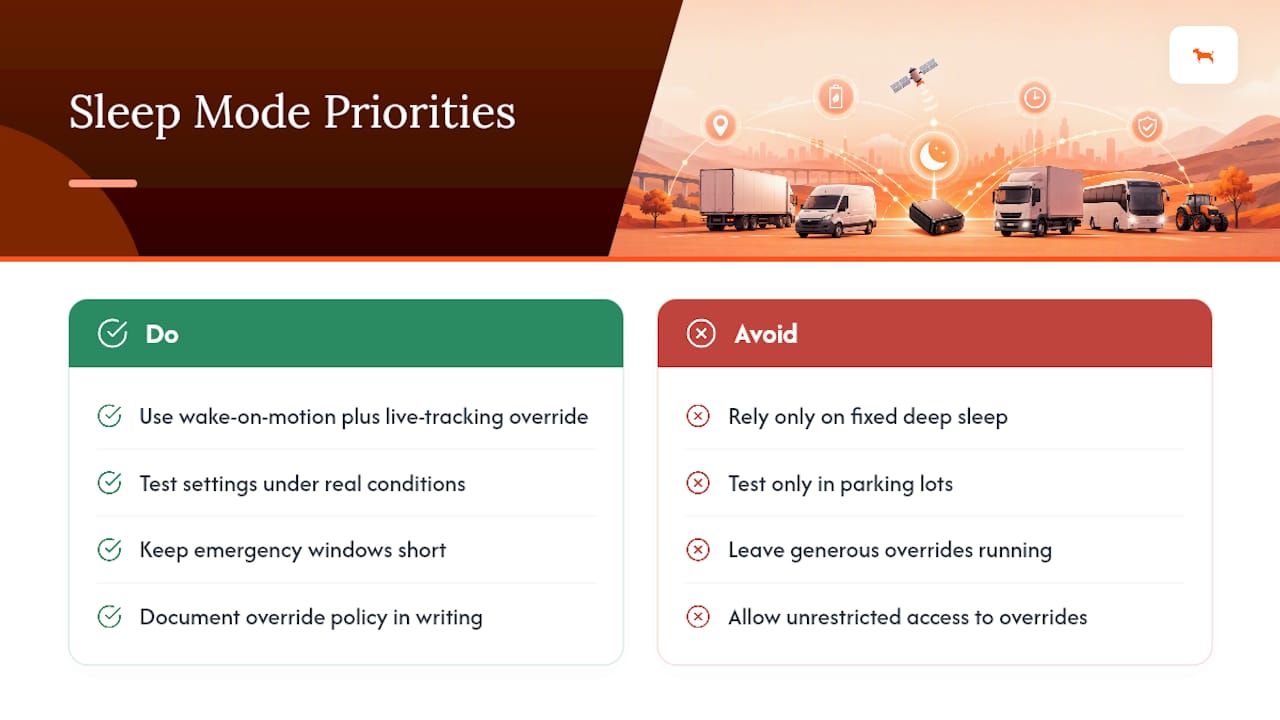
Test your settings under real conditions, not just in a parking lot with full signal. And keep emergency live-tracking windows short and access limited. A generous override is only useful until it’s left running and the battery it took months to conserve disappears in a weekend.
Document the policy, not just the settings. Firmware defaults change between updates, and a written standard for who can override sleep mode and for how long outlasts any single configuration screen.
— Louis
Get a Tracker Built Around Configurable Sleep Mode
Configuring sleep settings only matters if the hardware underneath actually supports the flexibility this guide describes. This company sells subscription-free GPS trackers with long battery life, customizable geofencing alerts, and reporting frequencies you control directly, without a monthly bill pushing you toward settings that drain the battery faster than necessary.

That subscription-free structure matters here specifically because sleep-mode strategy often gets compromised by cost pressure. Fleet managers on a per-device monthly plan sometimes crank up polling frequency to justify the expense, which defeats the entire point of a well-tuned sleep configuration. This removes that incentive entirely: you pay once for the device, then configure reporting intervals, radius triggers, and geofence alerts based on what the asset actually needs, not what makes a subscription feel worthwhile. If you’re ready to compare hardware built for this kind of dual-mode standby and recovery strategy, check out Moto Watchdog’s tracker lineup and see which configuration fits your fleet.
Sources
For deeper specs on the parameters covered here, consult the Particle tracker sleep documentation, the Teltonika FMB202 sleep-mode wiki, and Onomondo’s guide to eDRX and PSM for carrier-level power negotiation details.
- The importance of eDRX and PSM
- PSM and eDRX explained
- Tracker sleep - Particle
- FMB202 Sleep modes - Teltonika
- How a pallet tracker achieves 10-year battery life
FAQ
Does GPS tracker sleep mode stop the device from reporting entirely?
No. Sleep mode reduces how often the device reports, but wake triggers like motion, ignition, or a scheduled timer still bring it back online to transmit a location.
How does GPS sleep mode actually extend battery life?
It powers down the GNSS receiver and cellular modem between wake events instead of running them continuously, and modes like Ultra Deep Sleep can pull under 2 mA compared with much higher draw during active tracking.
How do trackers know when an asset is actually moving, versus vibration?
Trackers use an accelerometer with an adjustable sensitivity threshold, filtering out road vibration or wind so only genuine movement triggers a wake and report.
How do I switch a tracker out of sleep mode for emergency tracking?
Most fleet-grade devices support a remote command, sent through the companion app or dashboard, that forces the tracker into continuous live-reporting mode regardless of its current sleep schedule.
What publish interval is safe to use in sleep mode?
Keep it at 10 minutes or longer. Shorter intervals in sleep modes can trigger excessive reconnection attempts that some carriers flag or restrict.
Does Moto Watchdog support configurable sleep and wake settings?
Yes. Devices of this type offer configurable reporting frequency and geofencing alerts alongside long battery life, letting you set a dual-mode standby and emergency live-tracking strategy without a monthly subscription.

