

How to start saving money
Lorem ipsum dolor sit amet, consectetur adipiscing elit lobortis arcu enim urna adipiscing praesent velit viverra sit semper lorem eu cursus vel hendrerit elementum morbi curabitur etiam nibh justo, lorem aliquet donec sed sit mi dignissim at ante massa mattis.
- Neque sodales ut etiam sit amet nisl purus non tellus orci ac auctor
- Adipiscing elit ut aliquam purus sit amet viverra suspendisse potent
- Mauris commodo quis imperdiet massa tincidunt nunc pulvinar
- Excepteur sint occaecat cupidatat non proident sunt in culpa qui officia
Why it is important to start saving
Vitae congue eu consequat ac felis placerat vestibulum lectus mauris ultrices cursus sit amet dictum sit amet justo donec enim diam porttitor lacus luctus accumsan tortor posuere praesent tristique magna sit amet purus gravida quis blandit turpis.

How much money should I save?
At risus viverra adipiscing at in tellus integer feugiat nisl pretium fusce id velit ut tortor sagittis orci a scelerisque purus semper eget at lectus urna duis convallis. porta nibh venenatis cras sed felis eget neque laoreet suspendisse interdum consectetur libero id faucibus nisl donec pretium vulputate sapien nec sagittis aliquam nunc lobortis mattis aliquam faucibus purus in.
- Neque sodales ut etiam sit amet nisl purus non tellus orci ac auctor
- Adipiscing elit ut aliquam purus sit amet viverra suspendisse potenti
- Mauris commodo quis imperdiet massa tincidunt nunc pulvinar
- Adipiscing elit ut aliquam purus sit amet viverra suspendisse potenti
What percentege of my income should go to savings?
Nisi quis eleifend quam adipiscing vitae aliquet bibendum enim facilisis gravida neque. Velit euismod in pellentesque massa placerat volutpat lacus laoreet non curabitur gravida odio aenean sed adipiscing diam donec adipiscing tristique risus. amet est placerat in egestas erat imperdiet sed euismod nisi.
“Nisi quis eleifend quam adipiscing vitae aliquet bibendum enim facilisis gravida neque velit euismod in pellentesque”
Do you have any comments? Share them with us on social media
Eget lorem dolor sed viverra ipsum nunc aliquet bibendum felis donec et odio pellentesque diam volutpat commodo sed egestas aliquam sem fringilla ut morbi tincidunt augue interdum velit euismod eu tincidunt tortor aliquam nulla facilisi aenean sed adipiscing diam donec adipiscing ut lectus arcu bibendum at varius vel pharetra nibh venenatis cras sed felis eget.
You can share equipment location with clients by putting a GPS tracker with its own cellular connection on each machine, then giving the client a limited view of that one unit for the length of the rental. The client sees where the machine is and when it arrived. You keep the full fleet view, the history and the ability to turn their access off. The rest of this guide covers the hardware, the access rules, the privacy limits and the dispatch workflow that make it work.
TL;DR
- Use a self-powered or hardwired 4G tracker on each machine. The client needs only a link or an app login to see it, not any hardware.
- Share one unit, for one rental period, and revoke access on return. Never hand a client your whole fleet map.
- Expect gaps: signal blockage, parked machines under cover and weak coverage can all delay or distort a position.
- Use location sharing to cut “where is it?” calls on delivery and pickup day, and to settle disputes with timestamps.
- Treat location data as sensitive. Collect it for the rental, use it for the rental, and say so in your contract.
Table of Contents
- Why clients ask for equipment location
- What you need to share a machine’s location
- How to share a machine’s location, step by step
- Limiting and revoking client access
- Privacy and legal considerations for U.S. rental fleets
- What can block or distort a shared location
- Fitting location sharing into rental workflows
- Choosing the right tracker for rental equipment
- Our perspective
- Start with the machines that matter most
- FAQ
- Sources
Why clients ask for equipment location
Heavy equipment rental generates the same phone calls every week. A customer wants to know whether the skid steer left the yard. A project manager wants proof the excavator reached the right gate. A dispatcher wants to know if the lift is still on the job site or has been moved to another one.
Sharing location answers those questions without a call. It also protects you. A timestamped position trail is the quickest way to resolve a dispute about late delivery, an unauthorized move to a different site, or a machine left running over a weekend.
The same capability helps your clients in their own work. A general contractor who rents several machines from you can see which ones are on site and which are idle, and can plan around real positions instead of guesses.
What you need to share a machine’s location
Three pieces have to be in place before a client can see anything.
1. A tracker that reports on its own
The tracker has to find its position by GPS and send it over a cellular network. For rented equipment, that means a 4G device with its own data connection. Nothing on the client’s side is involved, so a renter does not need to connect anything, pair a phone or supply power.
How the device is powered decides where you can use it:
- Hardwired units connect to the machine’s battery and suit equipment with a reliable electrical system. Our guide to what a hardwired GPS tracker is explains the installation and its trade-offs.
- Battery-powered units suit trailers, attachments, generators and light towers that have no power to draw from. Long battery life matters here, because nobody wants to climb a trailer tongue to swap batteries mid-rental. See our overview of small equipment GPS tracking for how to match a device to an asset.
For a mixed fleet you will likely use both. What matters is that every unit reports to the same dashboard.
2. A platform that separates your view from the client’s
Your dashboard should show every machine, every user and every alert. The client’s view should show one machine or a short list. If the software cannot make that distinction, you are left screenshotting maps and emailing them, which defeats the purpose.
Look for these capabilities when you evaluate software:
- Sharing of a single device with a person outside your organization
- Access that can be removed in one step
- Location history you can export when you need proof
- Geofences that alert you when a machine enters or leaves a site
- Multi-device management so one dispatcher can handle the whole fleet
3. A way for the client to look
In practice, clients view a shared machine through a mobile app or a web view. Before you promise either, test what the client actually experiences: whether they must create an account, whether it works on a phone in a truck cab, and how fast the first position loads. A client who needs to install software and wait for approval on the day the machine arrives will simply call you instead.
How to share a machine’s location, step by step
The process below works for most rental operations. Adjust the order to match your own paperwork.
- Assign the tracker to the machine and confirm it reports. Check that a fresh position appears on your dashboard before the machine leaves the yard. A tracker that has not reported yet is a common source of day-one complaints.
- Name the unit clearly. Use the unit number the client sees on the contract and the machine itself. “Unit 4417 Mini Excavator” saves a call; a device serial number does not.
- Set the delivery geofence. Draw a boundary around the job site address so you get an alert at arrival, and another around your yard for the return.
- Share only that unit. Send the client access to this one machine. Note the date and the person who received it.
- Tell the client what they will see. Explain update frequency and that a position may lag in poor coverage, so a short delay does not trigger a panic.
- Revoke access at return. Remove the client’s access when the machine is checked in, and record the removal.
A small rental yard can run this in a few extra minutes per contract. Once it is routine, the payoff is fewer calls and stronger records.
Limiting and revoking client access
The biggest risk of sharing is giving away more than you meant to. A client who can see your entire fleet can see which competitors rent from you, where your idle machines sit, and which yards hold the most valuable equipment. A few rules prevent that.
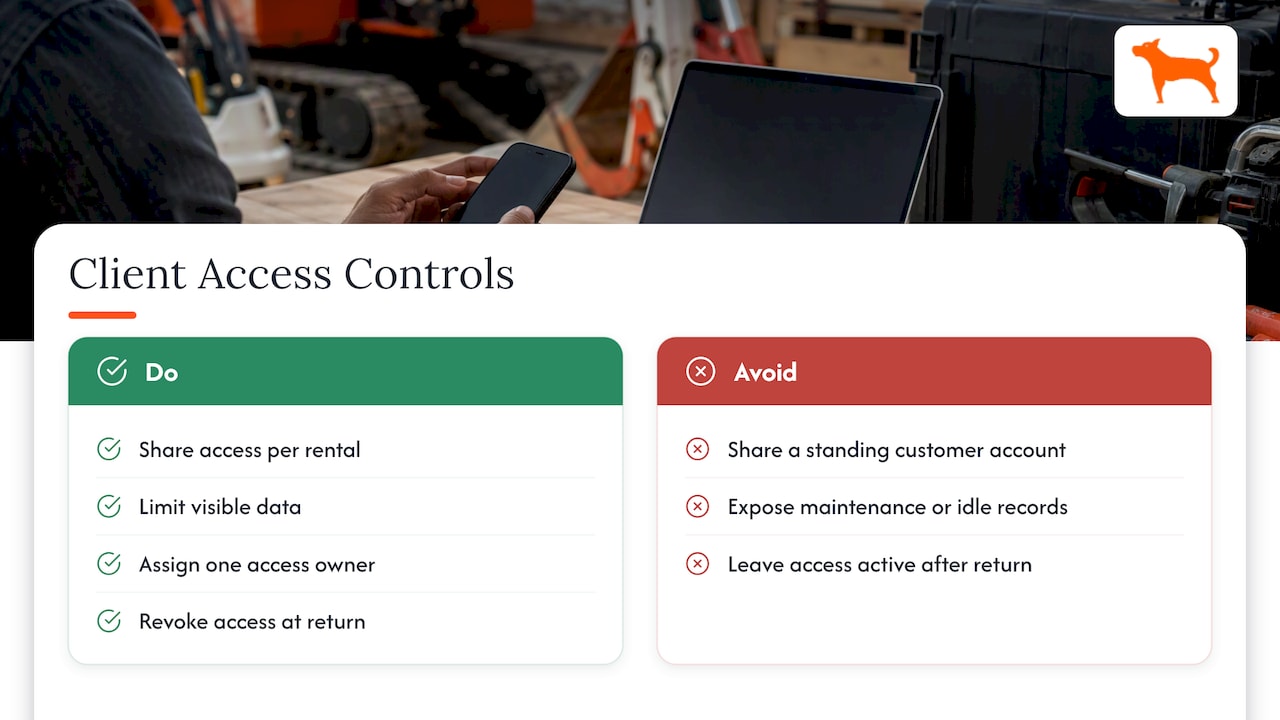
Share per rental, not per customer. Access should begin with the contract and end with the return. A standing customer account that shows every machine you have ever rented them is a privacy problem for you and for their other projects.
Limit what is visible. Current location and arrival history are usually all a client needs. They do not need your maintenance schedule, idle-time records or mileage reports for other jobs.
Keep one owner for access changes. Pick a dispatcher or fleet manager who adds and removes shared access, so no machine stays visible by accident. If your platform supports unlimited users on one dashboard, as ours does, give each dispatcher their own login and keep the permissions tidy.
Put the removal step on the return checklist. The line “revoke client location access” belongs next to “inspect for damage” and “record hour meter”. If it is on the checklist, it happens.
Privacy and legal considerations for U.S. rental fleets
Location data tells a story about where people and crews go. Even when you track a machine, not a person, the position can reveal a client’s job sites, schedules and business relationships. Handle it that way.
The Federal Trade Commission has treated sensitive location data as a serious issue. In January 2025 it finalized a consent order in its Gravy Analytics matter, which prohibits the company and its subsidiary from selling sensitive location data. That case concerned data brokers, not rental fleets, but it shows where regulators are looking: who collects location data, what they do with it and whether people know.
Practical steps for a rental company:
- Say it in the contract. Add a clause that the equipment carries a GPS tracker, that location is recorded during the rental, and that you may share it with the client and use it for recovery, billing and dispute resolution.
- Use data for the stated purpose. Do not sell or pass rental location history to third parties.
- Be careful with driver-level data. If an operator drives a machine, the location may tie back to a person. Your client, not you, is usually the employer in that case, so agree in writing who may see what.
- Keep retention sensible. Keep history long enough to handle billing and damage disputes, and no longer than you need.
- Ask your attorney about state rules on tracking employees or vehicles before you extend sharing to client crews. Requirements differ by state and by whether the vehicle is a company asset.
None of this is a reason to avoid sharing. A clear contract clause and a short access policy are enough for most rental businesses.
What can block or distort a shared location
Clients lose trust quickly when a map shows a machine in the wrong place. Know the causes so you can explain them before the first complaint.
Satellite signal conditions
The official U.S. GPS site says that smartphones are typically accurate to within about 16 feet under open sky, and that accuracy worsens near buildings, bridges and trees. Dedicated trackers differ from phones, but the same physics applies: anything that blocks the sky weakens the fix. Machines parked in a garage, under a bridge deck or beside a tall structure may show a position that drifts or goes stale.
Cellular coverage
A tracker can know where it is and still fail to report. Quarries, rural pipeline work and the lower levels of a build can have thin coverage. The device usually reports once it has signal again, so the gap shows up as a late update, not a wrong location.
Power problems
A hardwired tracker on a machine whose battery has been disconnected will go quiet. A battery-powered unit that is low will report less often. Check power status before delivery and during the rental.
Placement
A tracker buried inside a steel housing or under metal plating can have a weaker view of the sky than one mounted near an opening or plastic panel. Follow the installation guidance for each machine type, and test the first fix on the actual machine, not on a bench.
How to handle it with the client
Give clients one sentence up front: the map shows the last confirmed position, with a timestamp, and a gap usually means the machine is in a covered or low-coverage area. Then a stale pin is an explanation, not an alarm.
Fitting location sharing into rental workflows
The feature is most valuable when it is part of how you already work, not an extra.
Dispatch and delivery. Use the geofence to know when the truck and machine arrive. Share the unit with the site contact once it is loaded, so they can watch it approach. This reduces “where is my equipment?” calls at the busiest time of the morning.
On-site verification. If a contract names a specific site, the geofence alerts you when a machine leaves it. You can call the client about an unplanned move the same day, not discover it at return.
Idle and usage review. Idle-time records help you discuss usage with a client who disputes hours. Movement history shows whether a machine ran or sat.
Returns and pickup. Share location with the driver scheduled to collect the machine, so pickup does not depend on a phone call to the client. When the machine enters your yard geofence, the check-in process starts.
Maintenance. Use hours and mileage to schedule service between rentals, and keep that information on your side of the dashboard, not the client’s.
Connecting to your own systems. If you run billing or dispatch software, tracker data can feed it. Our piece on fleet GPS data integration examples shows how that connection works in practice, and our API access is built for teams that want location in their own tools.
Choosing the right tracker for rental equipment
Before you buy for a fleet, run through a short list of questions. Our fleet GPS hardware checklist goes deeper, but these decide most cases:
- Does the device have its own cellular connection, with data included for the life of the device?
- Is there a monthly or activation fee that grows with every machine you add?
- Can you manage many devices and many users from one dashboard?
- Does the battery last long enough for a typical rental without service?
- Are geofence alerts and sharing included, or sold as add-ons?
- Can the device go on both powered and unpowered assets?
The cost question matters more for rentals than for most fleets. A rental company may own hundreds of machines, many of which sit in the yard for weeks. Paying a monthly fee on every one of them adds up. A device with no recurring cost lets you track the whole fleet instead of only the machines you can justify a subscription for. Our explainer on lifetime GPS trackers with no fees breaks down how that model works.
Our perspective
We build subscription-free GPS trackers, and we hear the same story from rental operators: tracking only a part of the fleet because of the monthly cost. The machines that go untracked are usually the ones that cause trouble: older units, attachments, trailers and small equipment that move around without much paperwork.
When the hardware is a one-time purchase, the decision changes. You can put a tracker on every asset worth recovering, and sharing a location with a client becomes a normal part of a rental, not a premium service you have to price in.
We think the best client sharing is narrow and short: one machine, one rental, one link, removed at return. It earns trust because it shows the client you know where your equipment is, and it respects their site information. Our devices are designed for that style of work, with geofence alerts, long battery life, multi-device management and sharing features, all running from a single dashboard with unlimited vehicles and users.
Start small if you like. Put trackers on the five machines you are most worried about, share them with the next five clients and see how many calls disappear.
— Louis
Start with the machines that matter most
Moto Watchdog trackers start from $124.99 as a one-time purchase, with real-time 4G tracking, geofencing and alerts, trip and mileage reporting, and a mobile app for managing your devices. There is no monthly fee and no activation fee. Pick the units you rent out most often and see how it fits your delivery and return routine.
FAQ
Do clients need special hardware to see equipment location?
No. The tracker stays on your machine and reports through its own cellular connection. The client only needs the access you give them, such as an app login or a shared view, on a phone or computer. Test that experience yourself before you promise it.
Can I stop a client from seeing a machine after the rental ends?
Yes, if your platform lets you share a single device and remove that access. Make removal a line on your return checklist and record the date. Share per rental, not per customer, so access ends with the contract.
Why does the map sometimes show an old or wrong position?
The common causes are blocked sky view, weak cellular coverage and low or disconnected power. The official GPS site notes that accuracy gets worse near buildings, bridges and trees. Tell clients the map shows the last confirmed position with a timestamp, and check power if a unit stays quiet.
Is it legal to share a machine’s location with a client?
Sharing the location of your own equipment during a rental is common, and a contract clause that discloses tracking and sharing is good practice. Location tied to an individual operator is more sensitive, and state rules vary, so talk with your attorney before sharing crew-level data.

