
How to start saving money
Lorem ipsum dolor sit amet, consectetur adipiscing elit lobortis arcu enim urna adipiscing praesent velit viverra sit semper lorem eu cursus vel hendrerit elementum morbi curabitur etiam nibh justo, lorem aliquet donec sed sit mi dignissim at ante massa mattis.
- Neque sodales ut etiam sit amet nisl purus non tellus orci ac auctor
- Adipiscing elit ut aliquam purus sit amet viverra suspendisse potent
- Mauris commodo quis imperdiet massa tincidunt nunc pulvinar
- Excepteur sint occaecat cupidatat non proident sunt in culpa qui officia
Why it is important to start saving
Vitae congue eu consequat ac felis placerat vestibulum lectus mauris ultrices cursus sit amet dictum sit amet justo donec enim diam porttitor lacus luctus accumsan tortor posuere praesent tristique magna sit amet purus gravida quis blandit turpis.

How much money should I save?
At risus viverra adipiscing at in tellus integer feugiat nisl pretium fusce id velit ut tortor sagittis orci a scelerisque purus semper eget at lectus urna duis convallis. porta nibh venenatis cras sed felis eget neque laoreet suspendisse interdum consectetur libero id faucibus nisl donec pretium vulputate sapien nec sagittis aliquam nunc lobortis mattis aliquam faucibus purus in.
- Neque sodales ut etiam sit amet nisl purus non tellus orci ac auctor
- Adipiscing elit ut aliquam purus sit amet viverra suspendisse potenti
- Mauris commodo quis imperdiet massa tincidunt nunc pulvinar
- Adipiscing elit ut aliquam purus sit amet viverra suspendisse potenti
What percentege of my income should go to savings?
Nisi quis eleifend quam adipiscing vitae aliquet bibendum enim facilisis gravida neque. Velit euismod in pellentesque massa placerat volutpat lacus laoreet non curabitur gravida odio aenean sed adipiscing diam donec adipiscing tristique risus. amet est placerat in egestas erat imperdiet sed euismod nisi.
“Nisi quis eleifend quam adipiscing vitae aliquet bibendum enim facilisis gravida neque velit euismod in pellentesque”
Do you have any comments? Share them with us on social media
Eget lorem dolor sed viverra ipsum nunc aliquet bibendum felis donec et odio pellentesque diam volutpat commodo sed egestas aliquam sem fringilla ut morbi tincidunt augue interdum velit euismod eu tincidunt tortor aliquam nulla facilisi aenean sed adipiscing diam donec adipiscing ut lectus arcu bibendum at varius vel pharetra nibh venenatis cras sed felis eget.
The best way to evaluate fleet GPS is to start with the problem you need solved, then score every system on the same nine criteria: fit to your assets, accuracy, coverage, power and durability, alerts and reports, data access, security, total cost, and support. A tracker that looks impressive in a demo can still fail a rental yard or a contractor fleet if it misses even one of these. This guide gives you the checklist, the questions to ask, and a simple scorecard you can use with any vendor.
TL;DR
- Define your costliest problem first (downtime, theft, idle time, billing disputes), then pick features that solve it instead of buying the broadest platform.
- Match the device to the asset: hardwired or OBD trackers for vehicles, battery-powered trackers for trailers and equipment that have no reliable power.
- Judge cost over three to five years, including subscriptions, activation fees, data plans and gated API access, not just the device price.
- Test accuracy, update intervals and coverage on your own routes and job sites before you roll out to the whole fleet.
- Score every vendor with the same weighted scorecard so the decision rests on evidence, not on the demo.
Table of Contents
- Start with the problem, not the feature list
- Criterion 1: Fit to your asset types
- Criterion 2: Accuracy and update frequency
- Criterion 3: Network coverage and connectivity
- Criterion 4: Power, battery life and durability
- Criterion 5: Alerts, reports and workflow features
- Criterion 6: Data access and integrations
- Criterion 7: Ease of use, privacy and security
- Criterion 8: Total cost of ownership and ROI
- Criterion 9: Compliance, support and vendor reliability
- A simple scorecard you can reuse
- Our perspective: judge the cost model as hard as the hardware
- Where Moto Watchdog fits
- FAQ
- Sources
Start with the problem, not the feature list
Most failed GPS rollouts begin with a feature checklist instead of a business problem. Virginia Tech’s market guide to fleet telematics services frames the early questions well: what does the organization need, how will the solution fit existing operations, and is service available in the regions where you work.
Write your answers down before you talk to any vendor:
- The dominant problem. Flyntlok’s heavy equipment software guide suggests identifying whether your biggest loss is maintenance and downtime, tracking and utilization, safety and audit evidence, rental workflows, or coordination between departments. Start where you lose the most money or time. A focused system often beats a broad one you only use ten percent of.
- Who will use the data. Dispatchers, mechanics, an office manager, an owner on a phone. Each needs a different view.
- What it must connect to. Accounting, rental software, maintenance schedules, a spreadsheet you already trust.
- Where you operate. Urban yards, rural highways, quarries, basements, shipping containers, cross-border routes.
The answers become your weighting in the scorecard later in this guide. A rental company that bills by the hour will weight meter data heavily. A contractor with twelve pickups will weight vehicle alerts and mileage reports.
Criterion 1: Fit to your asset types
The first split is vehicle tracking versus asset tracking.
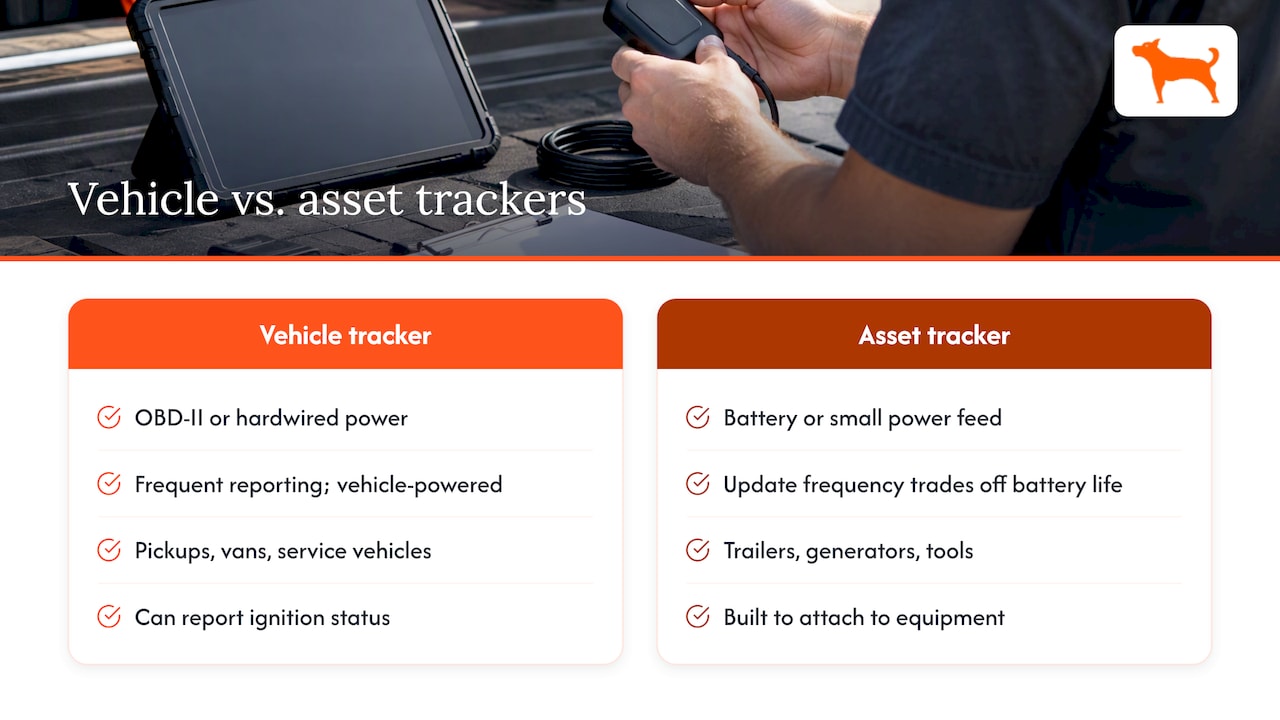
Vehicle trackers draw power from the vehicle, either through an OBD-II port or a hardwired connection. They report frequently, because power is not a constraint, and they suit pickups, vans, box trucks and service vehicles. The connection also makes some vehicle data possible, such as ignition status.
Asset trackers run on a battery or have a small power feed, and they are built to be attached to trailers, generators, compressors, skid steers, light towers and tools. Their trade-off is the balance between update frequency and battery life.
Most mixed fleets need both. A landscaping company might run trackers on trucks and a battery unit on each mower trailer. For a deeper look at the equipment side, see our guide to an equipment tracker for efficient asset management.
For rental fleets, a further question matters: assets move constantly between customers, sites and contracts. Fleet Management Advisor’s rental fleet analysis says to define asset identity, custody, contract status and location workflows before you evaluate GPS. In practice, that means a tracker has to stay tied to the right machine record even when the machine changes hands three times in a month.
Criterion 2: Accuracy and update frequency
Every vendor claims accuracy, so know what actually drives it. GPS.gov explains that the accuracy you receive depends on satellite geometry, signal blockage, atmospheric conditions and receiver design, and that accuracy worsens near buildings, bridges and trees. No tracker escapes physics. What you can compare is how a device behaves under those conditions and how often it reports.
Ask and test:
- What is the reporting interval, and can you change it? A 10-second ping suits live dispatch. A once-an-hour ping may be enough for a trailer in a yard.
- What happens when the signal drops? Does the device store points and upload them later, or do you lose that stretch of the trip?
- How does it behave in your worst location? Park a tracker in a steel container, under a bridge, or in a deep cut at a job site and see what the map shows.
- How is the position displayed? Look for a timestamp on every point so you can tell a fresh position from a stale one.
A two-week pilot on five vehicles and two pieces of equipment tells you more than any spec sheet.
Criterion 3: Network coverage and connectivity
GPS receives satellite signals, but the tracker still needs a cellular connection to send its position to you. That makes the cellular side a separate evaluation item.
- Network generation. Many older trackers used 2G and 3G networks that carriers have retired in the United States, so confirm that any device you consider runs on 4G LTE.
- Carrier coverage. Check coverage on the roads and sites where you actually work, not just the national map.
- Roaming. If you cross into Canada or Mexico, ask whether the device keeps reporting.
- Data included or billed separately. Some systems bundle connectivity into a recurring fee, others include it for the life of the device. This feeds directly into total cost, covered below.
If your work is in remote areas, weight this criterion highly and use the pilot to log every gap in reporting.
Criterion 4: Power, battery life and durability
Specifications here separate a tracker that survives a season from one that fails in a month.
Power and battery
- For vehicle units, check the input voltage range, because heavy trucks and equipment may run at 12V or 24V.
- Check whether the device has an internal backup battery so it still reports if someone disconnects it.
- For battery units, battery life is always quoted at a specific reporting interval. A claim of many months usually assumes infrequent updates. Ask for the life at the interval you intend to use, and ask how you will know when the battery is low.
Durability
- Look for an ingress protection rating that covers dust and water immersion. Equipment lives in mud, rain and pressure washing.
- Check the operating temperature range for winter yards and summer cabs.
- Check vibration resistance and the housing material. A tracker bolted to a breaker or a roller takes a beating.
Installation
- Plug-in or magnet-mounted units take minutes. Hardwired units are more discreet and more tamper-resistant but need installer time.
- Hidden mounting matters for theft recovery. A tracker that thieves can find in a minute does not protect the asset.
Our guide to waterproof, durable trackers for tools goes deeper on small-asset hardware.
Criterion 5: Alerts, reports and workflow features
The features worth paying attention to are the ones tied to your problem. A practical list:
- Geofences around yards, job sites and customer locations, with entry and exit alerts. For rental fleets, this is how you spot a machine leaving a contracted site.
- Movement alerts for equipment that should be stationary, such as off-rent or after-hours movement.
- Missing-update exceptions, which tell you a device has gone quiet, whether from a dead battery, a tamper or a coverage gap.
- Trip and mileage reports that can be exported for tax, reimbursement and client billing.
- Idle time tracking, which directly shows fuel waste.
- Maintenance reminders based on mileage or hours, so service happens on a schedule rather than after a breakdown.
- Push notifications that reach the right person on a phone, not just an email nobody reads.
Fleet Management Advisor’s rental fleet guidance adds an important point for rental businesses: hour-meter and odometer readings should be timestamped and exportable, because those readings affect billing, damage disputes and maintenance scheduling. Ask any vendor how meter data is captured and whether you can export it.
If you want to see what you can do once the data is flowing, our piece on fleet analytics software for vehicle performance covers the reporting side.
Criterion 6: Data access and integrations
Tracking data is only valuable if it moves to where decisions are made. Ask three things.
- Can you export it? CSV or spreadsheet export of location history, trips and events is the minimum.
- Is there an API, and is it included? Fleet Management Advisor notes that you should check whether API or export access is included or gated to a paid tier or partner, since limited access can mean manual exports or paid services that raise your operating cost.
- What are the limits? Ask about data retention, rate limits and whether updates can be pulled incrementally, which matters if you feed a rental ERP or business intelligence tool.
If you plan to connect tracking to your own software, ask about API access for business accounts early in the process, so the conversation does not stall after you have already picked a device.
Criterion 7: Ease of use, privacy and security
A system nobody opens is wasted money. Evaluate usability with the people who will actually use it.
- Setup time. Can a non-technical person activate a device and see it on the map in minutes?
- Interface. Can a dispatcher find one machine among two hundred without training?
- User management. Can you give a foreman access to his crew’s vehicles only? Can you remove a former employee quickly?
- Mobile app. Field staff need a phone view as much as the office needs a desktop one.
Security deserves a direct question, because a tracking account holds the location of every asset you own. A U.S. DOT-hosted report on connected-vehicle security recommends security-by-design processes, threat modeling and cryptographic controls. Turn that into vendor questions: how is data encrypted in transit and at rest, is two-factor sign-in available, who at the vendor can see your data, and what happens to your history if you cancel?
If you track employee-driven vehicles, also write a short policy telling drivers what is tracked and when. Check state rules and talk to your attorney if you track personal vehicles or operate across several states.
Criterion 8: Total cost of ownership and ROI
The sticker price is rarely the real price. Build a five-year view for each option.
| Cost line | What to ask |
|---|---|
| Device | Price per unit, any minimum order |
| Activation | One-time fee per device? |
| Subscription | Monthly or annual fee per device, and contract length |
| Data plan | Included for life, or billed separately? |
| Feature add-ons | Are alerts, reports, maintenance reminders or sharing extra? |
| API or export access | Included or a paid tier? |
| Installation | Self-install or paid technician time |
| Replacement | Battery replacement, warranty length, failure rate |
| Cancellation | Do you lose features or history if you stop paying? |
Here is why this table matters. A tracker with a modest monthly fee, multiplied by 50 devices and 60 months, can cost far more than a higher-priced device with no recurring charge. Run that arithmetic with real quotes. The cost of the subscription model also grows with every asset you add, which can quietly discourage you from tracking smaller equipment that is still worth protecting.
For ROI, estimate the savings you can realistically measure:
- Fuel and idle time: hours of idling per vehicle per week, multiplied by your fuel burn and fuel price.
- Theft and loss: the replacement cost of equipment you have lost or nearly lost, plus insurance deductibles.
- Billing recovery: unbilled hours or days on rental assets, and disputes you lost for lack of evidence.
- Maintenance: avoided breakdowns when service is triggered by actual use.
- Admin time: hours spent on mileage logs, phone calls to locate vehicles, and manual reports.
Use your own numbers, not a vendor’s average. Even one recovered machine or a handful of recovered billing hours can change the math. For a fuel-focused view, see our guide to fuel and fleet management.
Criterion 9: Compliance, support and vendor reliability
Compliance depends on your fleet. If your drivers must log hours of service, a basic GPS tracker is not an electronic logging device. The FMCSA lists who is not required to use ELDs, and the exceptions page includes drivers who use paper logs no more than 8 days in any 30-day period and drivers of vehicles manufactured before model year 2000. If you operate commercial vehicles under federal hours-of-service rules, confirm with FMCSA or your safety consultant whether you need a registered ELD in addition to asset tracking. Many contractors and rental yards operate vehicles outside those rules and need location, geofence and meter data instead.
On support, ask:
- How quickly does a human answer a technical question?
- Is there a warranty, and who handles a failed unit?
- What does onboarding look like for 5 devices versus 100?
- How long has the vendor been selling, and can you speak to a customer with a fleet your size?
A simple scorecard you can reuse
Give each criterion a weight from 1 to 5 based on your problem statement, score each vendor from 1 to 5 after the pilot, then multiply and add.
| Criterion | Weight (example: equipment rental) | Weight (example: contractor trucks) |
|---|---|---|
| Asset fit | 5 | 4 |
| Accuracy and update rate | 3 | 4 |
| Coverage | 4 | 3 |
| Power and durability | 5 | 3 |
| Alerts and reports | 4 | 5 |
| Data access and integrations | 5 | 2 |
| Ease of use and security | 3 | 4 |
| Five-year cost | 5 | 5 |
| Support and compliance | 3 | 4 |
These weights are examples. Replace them with your own. The point is to make trade-offs visible: a system with a flashy dashboard but gated data access may lose to a plainer system that exports everything.
Our perspective: judge the cost model as hard as the hardware
We build trackers, so we have a bias, and we will state it plainly: the most overlooked criterion is the pricing structure. Fleet managers compare screens and maps, then discover later that alerts, reports or API access sit behind a recurring plan. When we designed our trackers, we decided the full feature set would come with the device: geofencing, alerts, trip and mileage reports, idle tracking, maintenance reminders, sharing and multi-device management, with lifetime 4G data included and no activation fees.
That changes the evaluation math, especially for equipment. When there is no monthly charge per unit, you can justify tracking the compressor and the trailer, not just the trucks. It also removes a renewal decision every year. Our advice for any buyer, including those who never buy from us: run the five-year table, pilot on your hardest site, and insist on exports.
— Louis
Where Moto Watchdog fits
If your scorecard rewards no recurring fees, long battery life, geofence alerts and mileage reporting, our trackers are built for that profile. They cover vehicles, fleets, trailers, equipment and personal assets, managed from one mobile app and dashboard for unlimited vehicles and users. Trackers start from $124.99 as a one-time purchase.

See the current Moto Watchdog trackers and run them through your own pilot. For fleets that need to push data into other software, review API access options. If you are still comparing hardware types, our guide to GPS for fleet trucks is a useful next step.
FAQ
How many vendors should I pilot?
Two or three is enough. Run them side by side on the same vehicles and the same job sites for at least two weeks, so differences in accuracy, reporting and coverage come from the product and not the conditions. Score them with the same weighted scorecard.
Do I need a hardwired tracker or a battery tracker?
Use hardwired or OBD trackers on vehicles where power is available and frequent updates matter. Use battery trackers on trailers, attachments and equipment with no reliable power. Many fleets run both and manage them in one dashboard.
Is a GPS tracker the same as an ELD?
No. An ELD is a device that records driver hours of service under FMCSA rules, and a standard GPS tracker does not meet that requirement by itself. Check the FMCSA ELD page or ask your safety consultant whether your drivers must use one.
What hidden costs should I watch for?
Look for activation fees, per-device monthly charges, separate data plans, paid tiers for reports or alerts, and gated API access. Also check installation labor and battery replacement. Add them up over five years before comparing quotes.
Sources
- Market Guide to Fleet Telematics Services, Virginia Tech
- Heavy Equipment Software: How to Choose the Right System, Flyntlok
- Rental fleets: what this segment needs from telematics and fleet software, Fleet Management Advisor
- GPS Accuracy, GPS.gov
- Industry Experts Offer Recommendations for Enterprise-wide Connected Vehicle Security, U.S. DOT
- ELD Exemptions, Waivers and Vendor Malfunction Extensions, FMCSA

