
How to start saving money
Lorem ipsum dolor sit amet, consectetur adipiscing elit lobortis arcu enim urna adipiscing praesent velit viverra sit semper lorem eu cursus vel hendrerit elementum morbi curabitur etiam nibh justo, lorem aliquet donec sed sit mi dignissim at ante massa mattis.
- Neque sodales ut etiam sit amet nisl purus non tellus orci ac auctor
- Adipiscing elit ut aliquam purus sit amet viverra suspendisse potent
- Mauris commodo quis imperdiet massa tincidunt nunc pulvinar
- Excepteur sint occaecat cupidatat non proident sunt in culpa qui officia
Why it is important to start saving
Vitae congue eu consequat ac felis placerat vestibulum lectus mauris ultrices cursus sit amet dictum sit amet justo donec enim diam porttitor lacus luctus accumsan tortor posuere praesent tristique magna sit amet purus gravida quis blandit turpis.

How much money should I save?
At risus viverra adipiscing at in tellus integer feugiat nisl pretium fusce id velit ut tortor sagittis orci a scelerisque purus semper eget at lectus urna duis convallis. porta nibh venenatis cras sed felis eget neque laoreet suspendisse interdum consectetur libero id faucibus nisl donec pretium vulputate sapien nec sagittis aliquam nunc lobortis mattis aliquam faucibus purus in.
- Neque sodales ut etiam sit amet nisl purus non tellus orci ac auctor
- Adipiscing elit ut aliquam purus sit amet viverra suspendisse potenti
- Mauris commodo quis imperdiet massa tincidunt nunc pulvinar
- Adipiscing elit ut aliquam purus sit amet viverra suspendisse potenti
What percentege of my income should go to savings?
Nisi quis eleifend quam adipiscing vitae aliquet bibendum enim facilisis gravida neque. Velit euismod in pellentesque massa placerat volutpat lacus laoreet non curabitur gravida odio aenean sed adipiscing diam donec adipiscing tristique risus. amet est placerat in egestas erat imperdiet sed euismod nisi.
“Nisi quis eleifend quam adipiscing vitae aliquet bibendum enim facilisis gravida neque velit euismod in pellentesque”
Do you have any comments? Share them with us on social media
Eget lorem dolor sed viverra ipsum nunc aliquet bibendum felis donec et odio pellentesque diam volutpat commodo sed egestas aliquam sem fringilla ut morbi tincidunt augue interdum velit euismod eu tincidunt tortor aliquam nulla facilisi aenean sed adipiscing diam donec adipiscing ut lectus arcu bibendum at varius vel pharetra nibh venenatis cras sed felis eget.
GPS tracking of employees is generally legal in the United States when the employer owns the vehicle or device, but that legality narrows fast once state law, consent rules, and off-duty privacy expectations enter the picture. There is no federal statute that blanket-bans workplace GPS monitoring. Instead, employers navigate a patchwork of state consent laws, the Electronic Communications Privacy Act as a baseline, and criminal statutes like California Penal Code §637.7 that carry real misdemeanor exposure.
Three actions matter more than any others right now:
- Confirm asset ownership. Company-owned vehicles and devices give you far more legal latitude than anything an employee bought themselves.
- Provide written notice before you activate tracking, not after an employee asks why a supervisor knew where they were on Saturday.
- Collect a signed acknowledgment rather than relying on the employee simply continuing to work, an approach Fisher Phillips and other employment counsel consistently flag as too weak to survive a challenge.
Get those three right and you eliminate most of the legal exposure tied to employee GPS tracking laws. Get them wrong, and you are the test case in next year’s law review article.
Key Takeaways
Employee GPS tracking laws hinge on three variables: who owns the tracked asset, whether the employee received written notice and gave signed consent, and whether tracking stays limited to work hours and a stated business purpose.
| Point | Details |
|---|---|
| Ownership drives legality | Company-owned vehicles and devices allow broader tracking latitude than employee-owned property. |
| Written consent beats implied consent | Courts have rejected “kept working” as valid consent; collect signed acknowledgment forms instead. |
| California carries criminal exposure | Penal Code §637.7 makes unauthorized tracking a misdemeanor unless the vehicle owner consents. |
| Off-duty tracking triggers most lawsuits | Limit monitoring to scheduled work hours and configure devices to stop collection after shifts end. |
| GPS logs create wage-and-hour risk | Reconcile tracking data with timekeeping records to avoid unpaid-overtime claims under the FLSA. |
Table of Contents
- What Are the Employee GPS Tracking Laws at the Federal Level?
- Which States Require Notice or Consent for GPS Tracking?
- Does It Matter if the Device or Vehicle Is Company-Owned?
- What Happens if You Track Employees After Hours?
- How Do You Build a Defensible GPS Tracking Policy?
- What Should Be on Your Compliance Checklist Before Launch?
- How Moto Watchdog Supports Compliant GPS Deployments
- The Real Gap in How Employers Approach This
- Sources
What Are the Employee GPS Tracking Laws at the Federal Level?
No single federal law governs GPS tracking of employees, which surprises a lot of managers who assume there must be one comprehensive rulebook. The ECPA regulates interception of electronic communications, not the passive collection of location data from a company vehicle, so it does not function as a GPS-specific ban. That gap is exactly why state legislatures have stepped in with their own rules, some of them criminal in nature.
Federal law still shapes your exposure in three indirect ways.
- The Federal Trade Commission treats geolocation data as sensitive personal information, which means employers who collect it inherit data-security obligations even without a GPS-specific federal statute.
- The Fair Labor Standards Act turns your GPS logs into potential evidence. If a device shows an employee working through an unpaid lunch or logging in before a shift starts, that record can support an unpaid-overtime claim regardless of what your timekeeping system says.
- Anti-discrimination statutes create liability when location data gets used selectively. Tracking that flags a pattern tied to a protected characteristic, or that gets pulled out only when building a case against one employee, invites a discrimination claim layered on top of a privacy one.
The practical result is that federal law sets a floor, not a ceiling. Employers who treat the absence of a federal GPS statute as a green light are missing the fact that FTC data-security expectations, FLSA wage rules, and discrimination law all apply regardless of what state you operate in.
Which States Require Notice or Consent for GPS Tracking?
State law is where employee GPS tracking laws actually get decided, and the rules break into three practical categories. Understanding which bucket your operating states fall into is more useful than memorizing individual statutes, because the categories tell you what action to take.
- States with written-consent or written-notice requirements. A number of states require employers to notify employees, sometimes in writing, before tracking a vehicle they drive for work. Where a specific statute exists, it typically covers vehicle tracking rather than general device monitoring, and the notice requirement is the enforcement mechanism rather than an outright ban.
- States that permit company-vehicle tracking with notice as best practice rather than strict mandate. Many states have no GPS-specific statute at all, which means general privacy tort law and the “reasonable expectation of privacy” standard govern. Employers here have more flexibility but not immunity. Courts in these states still ask whether the tracking was proportionate to a legitimate business purpose.
- States with criminal prohibitions carrying an owner-consent exception. California is the clearest example. Penal Code §637.7 makes it a misdemeanor to use an electronic tracking device to determine a person’s location or movement, full stop, unless the vehicle’s registered owner consents. If your company owns the fleet vehicle, you are the “owner” for purposes of that exception, and consent is legally satisfied. Employers still get this wrong by assuming the exception applies automatically, when it actually depends on clean title and registration records showing the business as owner.
Arizona’s tracking statute is a useful second data point for employers operating in the Southwest. State legislature sites like Arizona’s own statute pages spell out their state’s specific language, and that pattern repeats across Connecticut, Delaware, Florida, Hawaii, Idaho, Illinois, and Alaska, each with slightly different phrasing around consent, notice timing, and what counts as a “tracking device.”
Here is the operational problem this creates. If your fleet runs drivers through five states, you do not get to average the rules or pick the most lenient one. You have to comply with the strictest applicable standard for each employee based on where they actually work and where the vehicle is registered. A driver based in Sacramento who occasionally crosses into Nevada still triggers California’s rules for the portion of the job performed there.
Building a jurisdictional compliance table
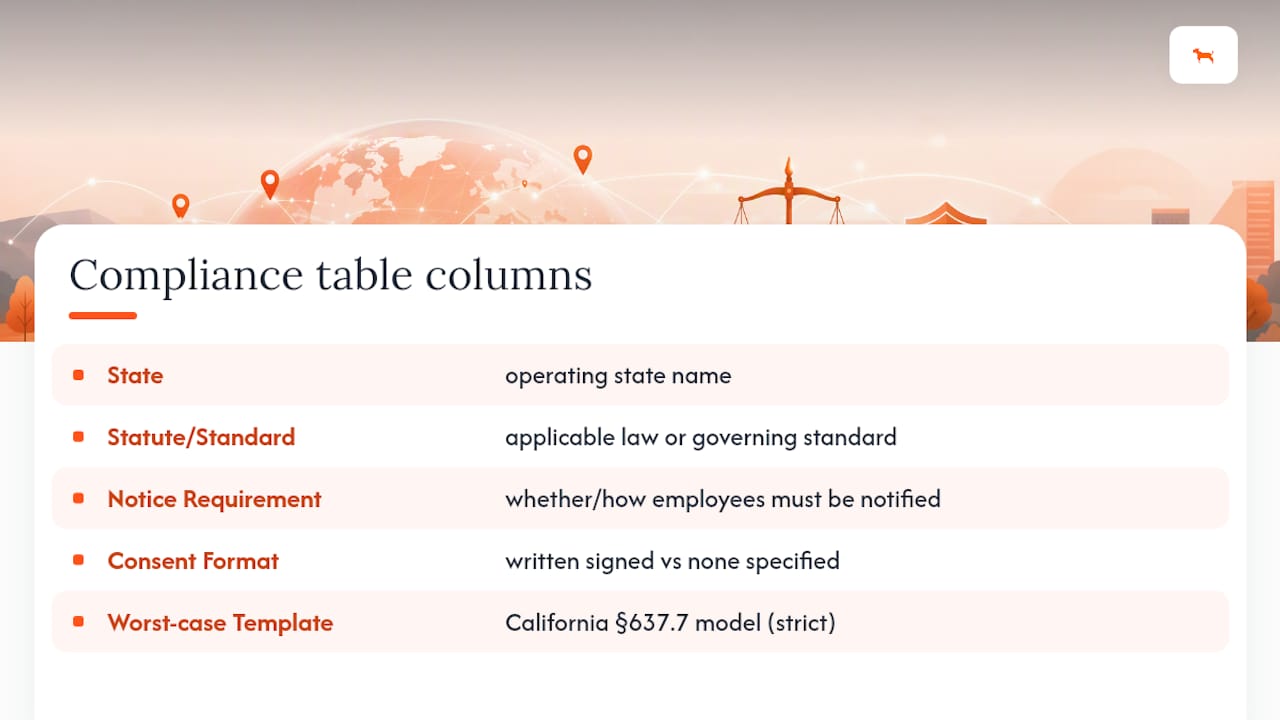
The fix is not complicated, but it does require discipline. Maintain a simple table with four columns: state, statute or governing standard, notice requirement, and consent format required (written versus none specified). Update it whenever you add a new operating state or hire a driver based somewhere new. Pair that table with an annual legal review checklist so a member of your HR or legal team confirms nothing has changed at the state level, because state legislatures amend these statutes more often than most employers expect.
Pro Tip: Do not wait for a legal review to catch a gap. If you are unsure which category a state falls into, default to the strictest tier, written notice plus signed acknowledgment, until counsel confirms otherwise. Overcompliance costs you a signature; undercompliance costs you a lawsuit.
The states with explicit statutory language deserve the most attention because they turn a policy failure into a criminal or civil exposure rather than just an HR headache. Treat California’s §637.7 model as your worst-case template: assume every state might adopt something similar eventually, and build your policy to that standard now rather than retrofitting it state by state as new laws pass.
Does It Matter if the Device or Vehicle Is Company-Owned?
Ownership is the single factor that most determines your legal footing, and courts treat it that way consistently. When a company owns the vehicle or the tracking hardware, it has broad latitude to monitor location, consistent with the reasoning National Law Review lays out in its guidance on employer monitoring programs. The vehicle is company property being used for company purposes, and location data tied to that asset falls closer to normal business oversight than personal surveillance.
Employee-owned devices flip that calculus entirely. Tracking a personal phone or a personally owned vehicle used occasionally for work requires narrower, more explicit consent, and it may trigger reimbursement obligations in states that require employers to cover business-use expenses on personal property. A “bring your own device” policy that assumes the same consent framework covering a company truck will not hold up if an employee argues they never agreed to have their personal phone monitored on weekends.
Practical controls for BYOD situations include:
- Limiting the tracking app’s permissions so it only activates during clocked-in hours, not around the clock.
- Building an off-hours toggle into the deployment so location collection stops automatically outside the shift.
- Requiring a separate, narrowly scoped consent form specific to personal-device tracking, distinct from your general employee handbook acknowledgment.
Pro Tip: If your fleet mixes company trucks with employee-owned vehicles used for mileage reimbursement, do not track the personal vehicles the same way. Consider a dedicated device like a subscription-free GPS tracker installed only in company assets, which keeps your ownership argument clean and avoids the personal-device consent problem altogether.
What Happens if You Track Employees After Hours?
Off-duty tracking is the single most common trigger for privacy litigation against employers, and it is almost entirely avoidable. Courts evaluating these disputes apply a reasonableness standard: was the intrusion proportionate to a legitimate business need? Tracking a delivery driver during a shift passes that test easily. Tracking the same driver’s weekend trip to a doctor’s appointment does not, and legal commentary consistently identifies this pattern as the leading cause of employer losses in court.
The wage-and-hour angle compounds the risk. GPS logs showing an employee’s vehicle moving before a shift officially starts, or during an unpaid lunch break, can become evidence in an FLSA claim. If the data shows work happening and payroll shows nothing recorded, the employer bears the burden of reconciling the discrepancy, and “we didn’t notice” is not a defense once the logs exist. Employers running GPS alongside a separate timekeeping system need a process to cross-check the two regularly, not just when a dispute arises.
Two operational rules cut this risk substantially.
- Configure your tracking system to stop collecting data outside scheduled work hours whenever the technology allows it, rather than relying on employees to trust your intentions.
- Restrict who inside the organization can access location logs, and prohibit any adverse employment action based solely on off-hours location data without independent corroboration.
That second point matters more than it sounds. GPS data can inadvertently reveal a medical appointment, a union meeting, or a job interview, and using that information against an employee, even unintentionally, creates exposure well beyond a simple privacy claim.
How Do You Build a Defensible GPS Tracking Policy?
A written policy is your best defense in litigation, and it needs to do more than say “we track company vehicles.” Employment counsel and privacy specialists converge on a consistent set of elements, and skipping any one of them weakens your position if a dispute lands in front of a judge.
- Define scope precisely. Name the specific assets tracked (vehicles, tablets, phones) and exclude anything not covered.
- State the business purpose explicitly, whether that is route optimization, theft prevention, or mileage reporting, and limit data use to that stated purpose, a principle Fisher Phillips treats as foundational to defensible programs.
- Set a retention schedule. Decide how long location logs are kept and delete data on a fixed schedule rather than indefinitely.
- Restrict access. Name the specific roles (dispatch, HR, fleet manager) authorized to view location data, and log who accesses it.
- Draft notice language and require a signed acknowledgment at hire or before activating monitoring, refreshing that consent whenever the scope changes.
- Build in disciplinary limits that prohibit using off-hours or ambiguous location data as the sole basis for termination or discipline.
The notice-and-consent step deserves extra care because courts have repeatedly rejected “implied consent,” meaning an employee who simply kept working after being told about tracking. A signed form, dated and stored in the personnel file, holds up far better than a verbal mention in a team meeting or a line buried in an employee handbook nobody reads twice.
Pro Tip: Configure the technology itself to enforce the policy, not just the paperwork. A device with a scheduled off-hours toggle and exportable audit logs removes the argument that tracking happened “by accident” outside a shift, because the system itself proves the boundary.
Document that a legal review occurred before rollout, even if it is a short memo from in-house or outside counsel confirming the policy meets your operating states’ requirements. That single document often matters more in a deposition than the policy text itself.
What Should Be on Your Compliance Checklist Before Launch?
Before activating any tracking device, complete an inventory of every vehicle and device that will carry one, confirm ownership status on each, and run a jurisdiction check against your compliance table. Draft the written policy, collect signed acknowledgments from every affected employee, and configure devices to match the policy’s off-hours and access rules before the first unit goes live.
- Pre-launch: inventory assets, confirm ownership, complete state-by-state legal review, draft and finalize policy, collect signed consents, configure device settings.
- Ongoing: schedule quarterly access-log audits, enforce the retention schedule, maintain an incident-response plan for data breaches, and communicate any policy changes to staff before they take effect.
- Who to loop in: employment counsel for the legal review, IT or security for data handling, HR for consent collection, and union representatives wherever a collective bargaining agreement covers the affected employees.
Skipping the union consultation step is a common and costly mistake. Monitoring provisions frequently fall under mandatory subjects of bargaining, and rolling out tracking without notifying a bargaining unit can trigger a labor grievance independent of any privacy claim.
How Moto Watchdog Supports Compliant GPS Deployments
Motowatchdog builds subscription-free GPS tracking hardware that fleet managers and business owners can configure directly around the compliance steps above, an approach that many businesses currently rely on for accuracy and consistency. Customizable geofencing alerts let you scope tracking to work sites rather than blanket monitoring, long battery life reduces the need for frequent device handling that could disrupt a consent chain, and detailed mileage reporting gives you an exportable log that supports both wage-and-hour reconciliation and audit requests.
Those features map directly onto the policy elements employment counsel recommends: off-hours toggles support purpose limitation, geofence activation supports data minimization, and exportable logs support the documented retention and access controls your written policy should already require.
The Real Gap in How Employers Approach This
Most compliance advice on employee GPS tracking laws treats the state statute as the finish line: check the box, get the signature, move on. That misses the bigger risk. The statutes are the floor, not the ceiling, and the employers who end up in litigation usually complied with the letter of their state’s law while still tracking someone during a doctor’s visit or using location data to justify a firing that had nothing to do with the stated business purpose.
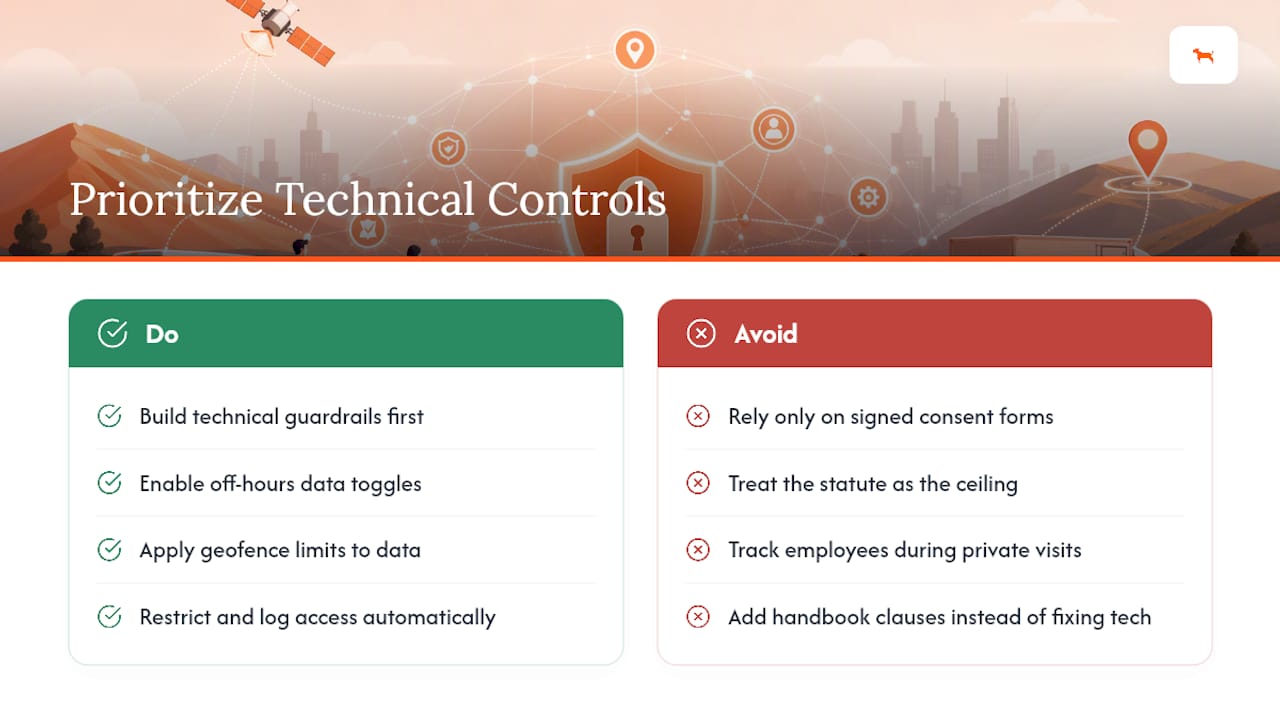
The conventional advice overweights the paperwork and underweights the technology configuration. A signed consent form does not protect you if the device itself keeps collecting data around the clock regardless of what the policy says. Employers should prioritize hardware and app settings that enforce the policy automatically, off-hours toggles, geofence limits, restricted access logs, over adding another clause to the handbook.
If you take one thing from this guide, make it this: build the technical guardrails first, then write the policy to match what the hardware actually does. Doing it backward is how well-intentioned employers end up as the next case study.
— Louis
This article is general information, not a substitute for advice from a qualified lawyer. Consult a qualified legal professional about your own circumstances before acting on anything here.
Sources
- 7 Best Privacy Practices for Employers When Using Geolocation Tools to Track Workers | Fisher Phillips LLP
- Is GPS Tracking Employees Legal? What Employers Must Know - LegalClarity
- California Penal Code §637.7
- Key Considerations When Monitoring Employees Using GPS Tracking Devices | National Law Review
- U.S. employee monitoring laws: 41 FAQs (2026)