

How to start saving money
Lorem ipsum dolor sit amet, consectetur adipiscing elit lobortis arcu enim urna adipiscing praesent velit viverra sit semper lorem eu cursus vel hendrerit elementum morbi curabitur etiam nibh justo, lorem aliquet donec sed sit mi dignissim at ante massa mattis.
- Neque sodales ut etiam sit amet nisl purus non tellus orci ac auctor
- Adipiscing elit ut aliquam purus sit amet viverra suspendisse potent
- Mauris commodo quis imperdiet massa tincidunt nunc pulvinar
- Excepteur sint occaecat cupidatat non proident sunt in culpa qui officia
Why it is important to start saving
Vitae congue eu consequat ac felis placerat vestibulum lectus mauris ultrices cursus sit amet dictum sit amet justo donec enim diam porttitor lacus luctus accumsan tortor posuere praesent tristique magna sit amet purus gravida quis blandit turpis.

How much money should I save?
At risus viverra adipiscing at in tellus integer feugiat nisl pretium fusce id velit ut tortor sagittis orci a scelerisque purus semper eget at lectus urna duis convallis. porta nibh venenatis cras sed felis eget neque laoreet suspendisse interdum consectetur libero id faucibus nisl donec pretium vulputate sapien nec sagittis aliquam nunc lobortis mattis aliquam faucibus purus in.
- Neque sodales ut etiam sit amet nisl purus non tellus orci ac auctor
- Adipiscing elit ut aliquam purus sit amet viverra suspendisse potenti
- Mauris commodo quis imperdiet massa tincidunt nunc pulvinar
- Adipiscing elit ut aliquam purus sit amet viverra suspendisse potenti
What percentege of my income should go to savings?
Nisi quis eleifend quam adipiscing vitae aliquet bibendum enim facilisis gravida neque. Velit euismod in pellentesque massa placerat volutpat lacus laoreet non curabitur gravida odio aenean sed adipiscing diam donec adipiscing tristique risus. amet est placerat in egestas erat imperdiet sed euismod nisi.
“Nisi quis eleifend quam adipiscing vitae aliquet bibendum enim facilisis gravida neque velit euismod in pellentesque”
Do you have any comments? Share them with us on social media
Eget lorem dolor sed viverra ipsum nunc aliquet bibendum felis donec et odio pellentesque diam volutpat commodo sed egestas aliquam sem fringilla ut morbi tincidunt augue interdum velit euismod eu tincidunt tortor aliquam nulla facilisi aenean sed adipiscing diam donec adipiscing ut lectus arcu bibendum at varius vel pharetra nibh venenatis cras sed felis eget.
Tow truck GPS tracking puts every truck, trailer and piece of hauled equipment on one live map, so dispatch assigns the closest driver instead of guessing and your customer gets an ETA you can stand behind. For a towing or heavy equipment rental fleet, the cheapest way to get there is hardware you buy once. Our trackers start at $124.99 one-off, with lifetime 4G data included and no monthly fees, so adding the tenth truck costs no more than the first.
TL;DR
- A live map of truck positions, job status and traffic lets dispatch pick the closest available driver rather than guess.
- Towing fleets get the most from trip history, speed, geofences, idle time, odometer-based maintenance and proof of where a unit was and when.
- Roll out in order: map your assets, mount the trackers, set geofences and alerts, then train drivers and post a notice.
- Federal rules do not require real-time tracking, and at least one state, New Jersey, requires written notice to employees in certain cases.
- A one-time purchase with no recurring fees keeps the cost of a growing fleet predictable.
Table of Contents
- Why towing and equipment rental fleets track by GPS
- How GPS tracking works on a tow truck
- What a towing fleet should record
- How live location speeds up dispatch and ETAs
- Tracking trailers and heavy equipment, not just trucks
- What it costs: one-time versus recurring
- A rollout plan for a towing or rental fleet
- Privacy and legal points for U.S. fleets
- Putting a tracker on your fleet
- Our view: pay for the hardware once
- FAQ
- Sources
Why towing and equipment rental fleets track by GPS
A tow truck is a business that lives or dies on response time. A stranded driver on a highway shoulder judges you on one thing: how soon someone arrives. Without a live location for every truck, dispatch works from phone calls and memory, and the closest truck is often not the one that gets the job.
Heavy equipment rental has a different version of the same problem. Your assets are expensive, they leave your yard on a lowboy or flatbed, and they sit on job sites you do not control. Knowing where a skid steer, excavator or trailer is, whether it is moving and whether it left the site it was rented to is the difference between a clean return and a recovery effort.
GPS tracking solves both from one dashboard. It tells you where each unit is now, where it has been, and how long it sat doing nothing.
How GPS tracking works on a tow truck
A tracker is a small device that reads its position from satellites and sends it over a cellular network to a map you view in an app or browser. Industry coverage describes two common setups: vehicle-installed black boxes that track the truck itself, and phone-based options that send addresses to a driver without black-box hardware.
For a fleet, a hardware tracker has an advantage that matters daily: it reports whether or not the driver has a phone in hand, is logged in, or remembers to tap anything. The truck reports itself.
Our trackers use a 4G connection, and the data plan is included for the life of the device. Positioning and the connection are the two things that usually generate a monthly bill with other systems. Here neither does. The app is free, and one dashboard supports unlimited vehicles and users, so dispatchers, the shop foreman and the owner can each look at the same map.
What a towing fleet should record
The more useful question is not whether to track, but what to look at. Tow Professional lists travel history, engine and PTO events, speed, geofences, VIN and odometer data, and service-delivery details among the things towing fleet tracking can capture. Here is how the core items translate into daily decisions.
Live location and trip history
Live location answers the dispatcher’s question. Trip history answers everyone else’s: where did truck 7 go yesterday, how long was it at the scene, and which route did it take back. A permanent record of each trip also settles disputes. When a customer says you arrived late or a driver says he was on site at 2:15, the log is the answer.
Geofences and alerts
A geofence is a virtual boundary you draw on the map. When a tracked unit crosses it, you get a push notification. Towing and rental fleets use them in practical ways:
- A boundary around your yard, so you know when a truck or trailer leaves after hours.
- A boundary around a rental job site, so you know when a machine leaves the address on the contract.
- A boundary around an impound or storage lot, so arrivals and departures are logged without a phone call.
Our geofencing is customizable, and alerts arrive as push notifications in the mobile app.
Idle time
Idle time is engine-on, going-nowhere time. For a tow truck it burns fuel at a scene or in a queue. For a rented generator or loader it shows how many hours the machine actually worked against the hours billed. Idle time tracking is built into our system, so you can compare trucks and spot the patterns that cost fuel.
Mileage and trip reports
Mileage tracking turns into reports you can hand to an accountant. Detailed trip and mileage reporting simplifies business reporting, and it replaces the notebook or the end-of-month guess about how far each truck went.
Maintenance reminders
Tow trucks work hard, and a missed service on a wrecker is a truck out of rotation on your busiest night. Maintenance reminders based on use let you schedule service by miles or time rather than by whoever remembers. Our system includes maintenance reminders for each vehicle on the dashboard.
How live location speeds up dispatch and ETAs
The biggest operational gain in towing is the first five minutes of a call. According to Tow Professional, a real-time map of truck locations, job status and traffic helps dispatchers choose the closest available driver rather than guess. It also notes that systems which are fully integrated can show location, truck type, status and jobs together, so the dispatcher knows not only who is near but who is near and has the right equipment.
In practice, this means a few habits:
- Look at the map before answering the customer. Quote an ETA from the truck’s actual position and the road, not from the last time the driver called in.
- Match truck type to job. A light-duty wrecker near a box truck breakdown is still the wrong truck. Name your units clearly on the dashboard (for example, “Flatbed 3” or “Lowboy 1”) so type is obvious at a glance.
- Watch for trucks about to clear a job. A truck finishing a tow two miles away can beat an idle truck ten miles away.
- Send the address once. Whichever dispatch method you use, the fewer times an address is repeated over the radio, the fewer errors.
If you run dispatch or billing software of your own, our business page lists API access for connecting tracker data to your systems. Pricing for API access is not published, so ask us about it directly.
Tracking trailers and heavy equipment, not just trucks
A towing company also owns dollies, trailers and sometimes yard equipment. A rental company owns the machines that matter most. The same hardware that goes on a truck can go on any unit you want to see.
- Trailers and lowboys: a tracker tells you whether the trailer is hooked to the right truck and whether it is parked where it should be.
- Rental equipment: a tracker hidden on the machine provides a location history for the contract, which supports billing and recovery.
- Support vehicles: pickup trucks and service vans fall under the same dashboard, so one login covers everything.
Because our devices have long battery life, they suit assets that do not have a vehicle power source, such as a trailer parked for weeks or a machine on a remote site. One account handles multiple devices, and sharing features let you give a customer or a site manager a view of a single unit without giving them the whole fleet.
What it costs: one-time versus recurring
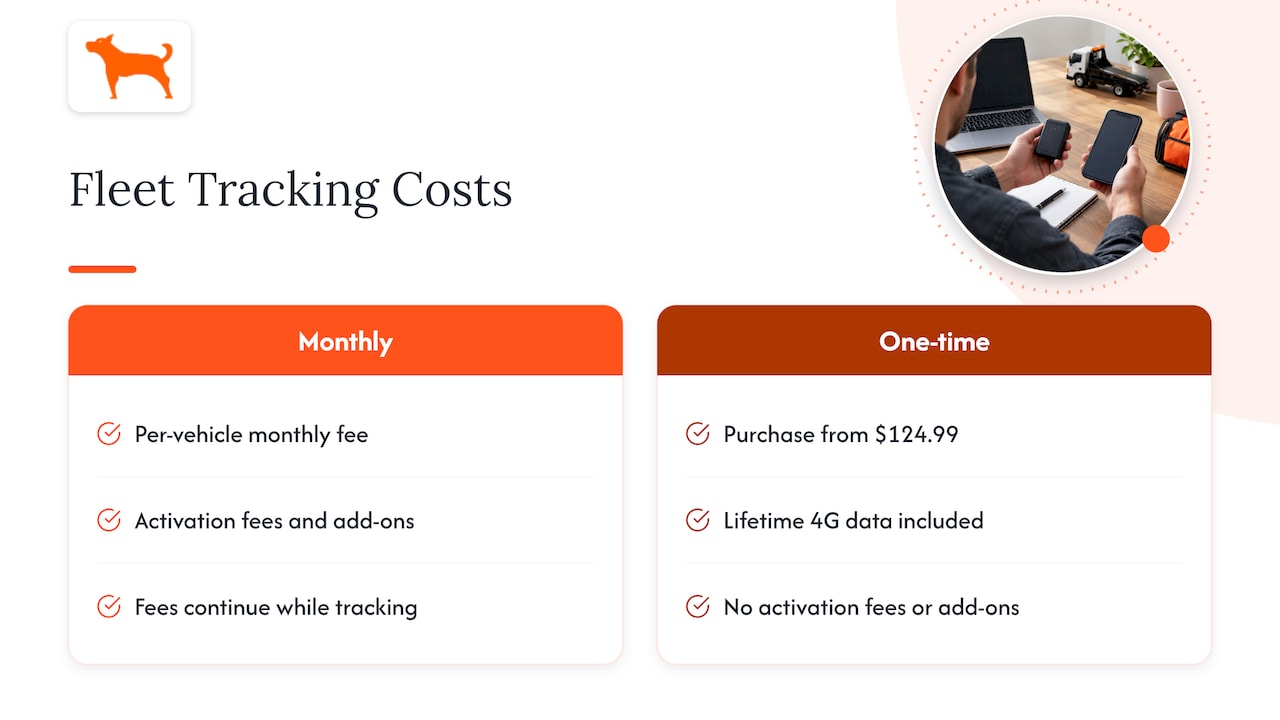
Most fleet telematics is priced per vehicle per month. That structure looks small on one truck and compounds fast: a thirty-unit fleet pays thirty monthly fees, every month, for as long as it wants the data. Add activation fees and feature add-ons, and the quoted price is rarely the price you pay.
We built our approach the other way around. A tracker is a one-time purchase starting at $124.99. Lifetime 4G data is included, there are no activation fees, and the full feature set comes with the device with no add-ons. Over a multi-year horizon, which is how towing and rental fleets actually hold equipment, the difference between a single payment and a recurring one is the difference between a fixed cost and an open-ended one.
To estimate your own savings, multiply the number of units you want to track by the monthly fee you have been quoted, multiply by the months you expect to run the units, and compare the total with the one-time price of the device. The comparison is easy to run because one side of it is a fixed number.
A rollout plan for a towing or rental fleet
A tracker bought is not yet a tracker working for you. This is the order that avoids rework.
1. List what you want to see
Write down every unit: trucks, trailers, rental machines. Mark which ones have vehicle power and which are stand-alone. Decide which units matter most. A fleet usually starts with the highest-value or most-stolen assets and the trucks that generate the most calls.
The common mistake here is tracking only the trucks and forgetting the trailers and equipment that are easiest to lose. With no per-unit monthly fee, there is no cost reason to leave any unit off the list.
2. Mount the trackers
Place each device where it has a clear view of the sky and is not easy to spot or reach. Setup is designed to be easy, and customers describe it that way. Name each device on the dashboard as you install it, because a list of unnamed serial numbers is how fleets end up unsure which dot is which truck.
The common mistake: mounting a device deep under metal, which can weaken signal. Test the position by watching the map as the unit moves.
3. Draw geofences and set alerts
Create your yard boundary first, then your regular customer sites, impound or storage lots and any restricted areas. Set alerts so the right person receives them: after-hours yard exits go to the owner or manager, site exits on rental machines go to whoever handles the contract.
The common mistake: setting every alert for every person. Alert fatigue means real alerts get ignored. Start narrow and widen.
4. Set maintenance and mileage tracking
Enter service intervals for each truck. Mileage tracking begins automatically once devices report, so the first monthly report gives you a baseline for each unit.
5. Tell your drivers and document it
Before anyone sees a map, tell drivers what is tracked, when and who can see it. The next section explains why this step is more than courtesy. Put it in writing in your employee handbook or a signed notice.
6. Review weekly, then act
Set a weekly ten-minute review: idle time by truck, after-hours movement, upcoming service. Tracking pays when someone looks at the data and changes something, such as a route, a schedule or a maintenance date.
Privacy and legal points for U.S. fleets
Tracking company vehicles is common and generally lawful, but a few points are worth knowing. This is general information, not legal advice. For your state’s specifics, ask an employment attorney.
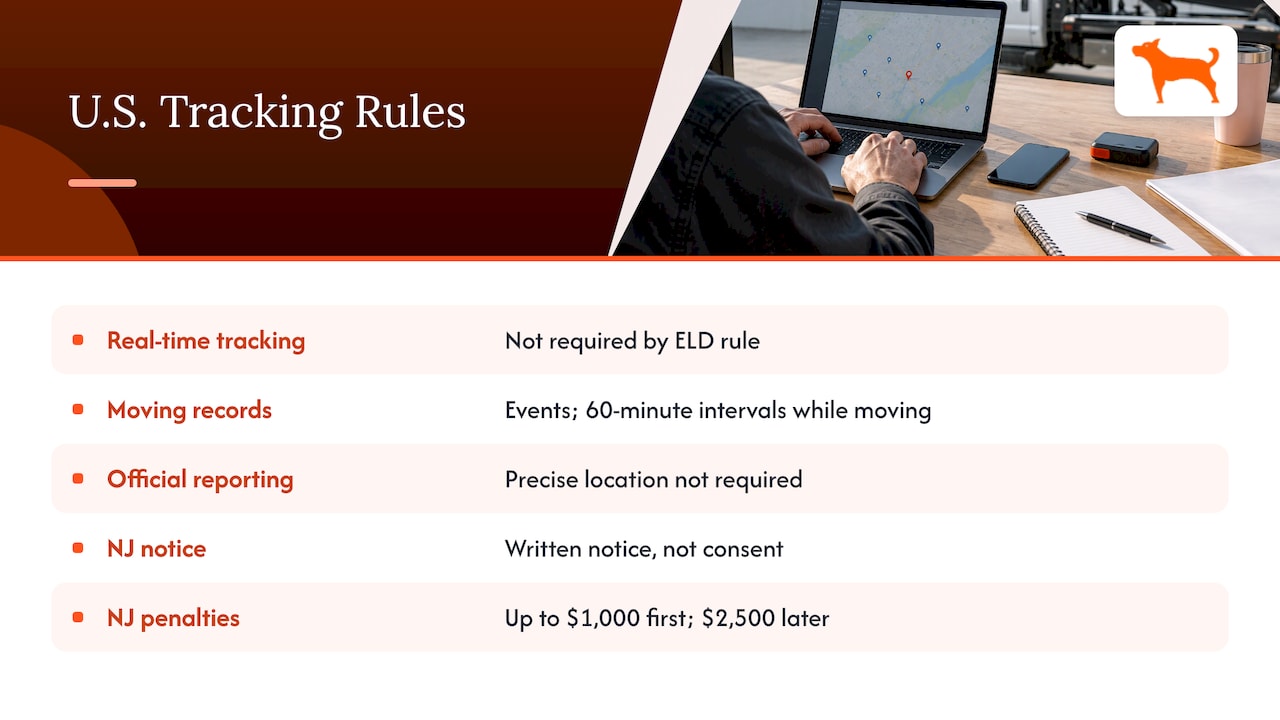
Federal trucking rules. If you run commercial motor vehicles under federal hours-of-service rules, the FMCSA states that the ELD rule does not require real-time tracking of vehicles, although carriers may use real-time tracking for business purposes as long as they avoid harassment and comply with other federal safety regulations. The final rule itself says required ELD location records include specified events and 60-minute intervals while moving and that the rule does not require precise location reporting to officials. Put simply, a business tracker and an ELD are separate things with separate purposes.
State notice laws. Some states regulate employee location tracking. A New Jersey bill would require an employer who knowingly uses a tracking device designed or intended solely to track movement in an employee’s vehicle to give written notice. A law firm’s analysis of the New Jersey law describes it as a notice requirement, not a consent requirement, with penalties of up to $1,000 for a first violation and $2,500 for later ones. If you operate in New Jersey, confirm the final law with your attorney.
Good practice everywhere. The same analysis recommends giving clear notice even where it is not expressly required, limiting location-data access to people who need it, and treating employees, contractors and others separately. For a fleet, that translates into three habits: a written tracking policy, dashboard logins only for dispatchers and managers, and a clear rule that tracking applies to company vehicles and equipment.
Putting a tracker on your fleet
If you want one dashboard for tow trucks, trailers and rental equipment, without a monthly bill per unit, our GPS trackers start at $124.99 as a one-time purchase. Lifetime 4G data is included, there are no activation fees, and one account supports unlimited vehicles and users. Over 1,000 businesses rely on our trackers, and our sales and support team replies the same day, with no sales sequence to sit through.
Businesses that want to connect tracker data to their own software can ask about API access on our business page.
Our view: pay for the hardware once
Fleets don’t tell us they dislike tracking. They dislike the bill that keeps growing after the install. Every tow company we talk to has the same arithmetic in mind: more trucks, more trailers, more monthly fees.
We designed Moto Watchdog around removing that arithmetic. You buy the device, the 4G data is included for life, and the full feature set is on the device from day one. Geofence alerts, idle time, trip and mileage reports and maintenance reminders aren’t tiers you climb. They are what the tracker does.
For a heavy equipment rental company, that matters most on the units you would otherwise skip: the older trailer, the small compressor, the machine that only goes out twice a month. When there is no monthly fee attached to a unit, there is no reason not to know where it is.
Our advice is simple. Track everything that can be driven off, towed away or left on a job site. Set a few good alerts. Review the data weekly. The savings and the control come from that routine, not from the dashboard alone.
Louis
FAQ
Can I track tow trucks and trailers on the same account?
Yes. Our system manages multiple devices from one dashboard, and it supports unlimited vehicles and users. You can name each device by truck, trailer or machine and give different team members access to the same map.
Do I need a monthly plan to use a tracker?
No. Our trackers are a one-time purchase starting at $124.99, with lifetime 4G data included and no activation fees. The companion mobile app is free.
Can a business legally track its company vehicles?
Generally yes. The FMCSA says carriers may use real-time tracking for business purposes if they avoid harassment and follow other federal safety rules. Some states, such as New Jersey, add written notice requirements, so give drivers a written notice and check your state’s rules with an employment attorney.
What can GPS tracking tell me about a tow truck’s day?
It shows live position, the route taken, speed, stops, idle time and mileage. Industry coverage also lists engine and PTO events, VIN and odometer data among what towing fleet tracking can record. With our trackers, you get geofence alerts, trip and mileage reports, idle time and maintenance reminders.
Sources
- GPS: From Tracking To Reinventing, Tow Professional
- Unified Fleet and Operations Management, Tow Professional
- FMCSA: Does the ELD rule require real-time tracking of commercial motor vehicles?
- Federal Register: ELD final rule, December 16, 2015
- State of New Jersey, Assembly bill 3950 (fourth reprint)
- Littler: New Jersey Joins the Trend of Increasing Privacy Protections for Employees’ Location

