

How to start saving money
Lorem ipsum dolor sit amet, consectetur adipiscing elit lobortis arcu enim urna adipiscing praesent velit viverra sit semper lorem eu cursus vel hendrerit elementum morbi curabitur etiam nibh justo, lorem aliquet donec sed sit mi dignissim at ante massa mattis.
- Neque sodales ut etiam sit amet nisl purus non tellus orci ac auctor
- Adipiscing elit ut aliquam purus sit amet viverra suspendisse potent
- Mauris commodo quis imperdiet massa tincidunt nunc pulvinar
- Excepteur sint occaecat cupidatat non proident sunt in culpa qui officia
Why it is important to start saving
Vitae congue eu consequat ac felis placerat vestibulum lectus mauris ultrices cursus sit amet dictum sit amet justo donec enim diam porttitor lacus luctus accumsan tortor posuere praesent tristique magna sit amet purus gravida quis blandit turpis.

How much money should I save?
At risus viverra adipiscing at in tellus integer feugiat nisl pretium fusce id velit ut tortor sagittis orci a scelerisque purus semper eget at lectus urna duis convallis. porta nibh venenatis cras sed felis eget neque laoreet suspendisse interdum consectetur libero id faucibus nisl donec pretium vulputate sapien nec sagittis aliquam nunc lobortis mattis aliquam faucibus purus in.
- Neque sodales ut etiam sit amet nisl purus non tellus orci ac auctor
- Adipiscing elit ut aliquam purus sit amet viverra suspendisse potenti
- Mauris commodo quis imperdiet massa tincidunt nunc pulvinar
- Adipiscing elit ut aliquam purus sit amet viverra suspendisse potenti
What percentege of my income should go to savings?
Nisi quis eleifend quam adipiscing vitae aliquet bibendum enim facilisis gravida neque. Velit euismod in pellentesque massa placerat volutpat lacus laoreet non curabitur gravida odio aenean sed adipiscing diam donec adipiscing tristique risus. amet est placerat in egestas erat imperdiet sed euismod nisi.
“Nisi quis eleifend quam adipiscing vitae aliquet bibendum enim facilisis gravida neque velit euismod in pellentesque”
Do you have any comments? Share them with us on social media
Eget lorem dolor sed viverra ipsum nunc aliquet bibendum felis donec et odio pellentesque diam volutpat commodo sed egestas aliquam sem fringilla ut morbi tincidunt augue interdum velit euismod eu tincidunt tortor aliquam nulla facilisi aenean sed adipiscing diam donec adipiscing ut lectus arcu bibendum at varius vel pharetra nibh venenatis cras sed felis eget.
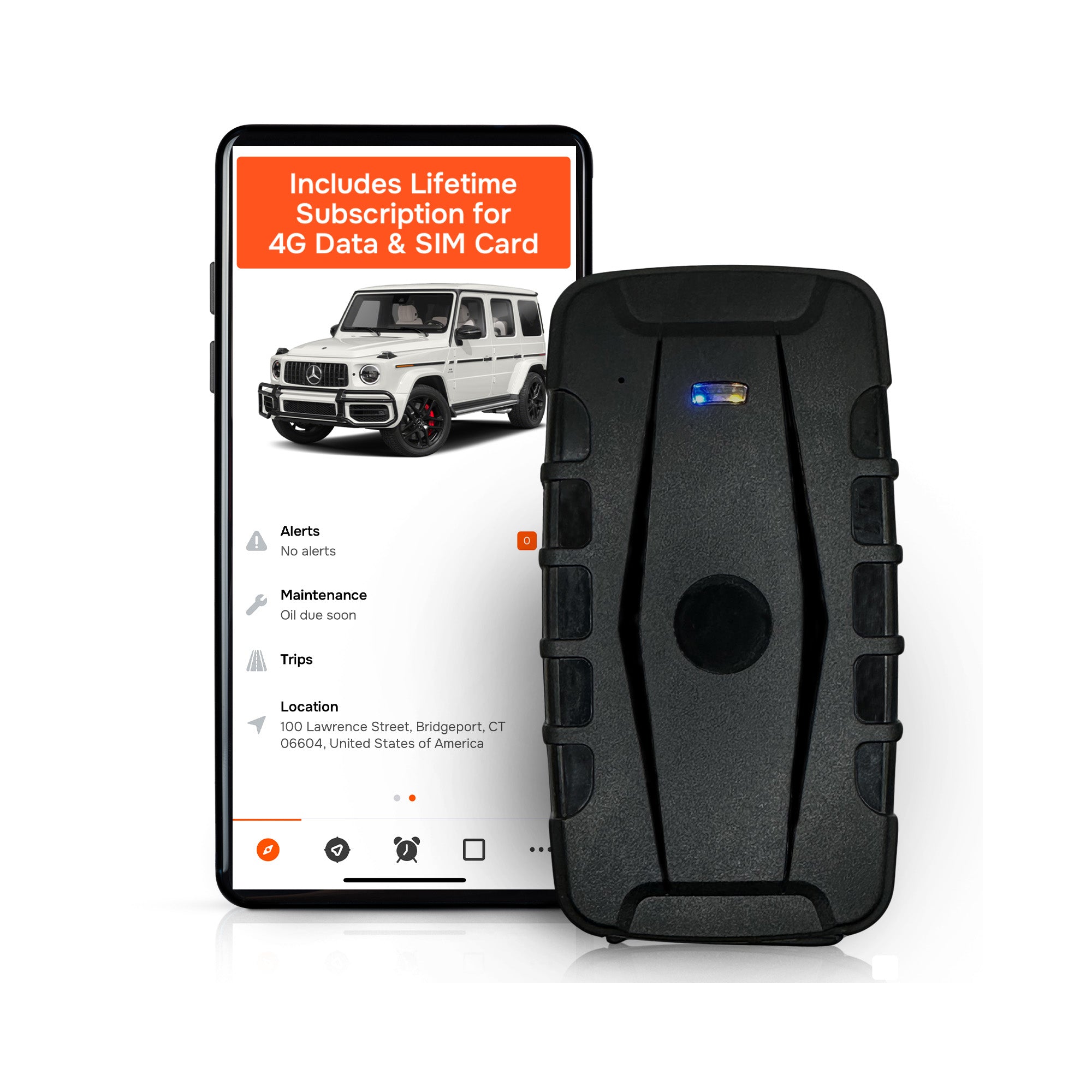
Subscription-free GPS tracking is a workable, cost-effective solution for land-based trailers, storage containers, and portable cargo. It puts real-time location, geofencing, and mileage data in your hands without a monthly bill. The two decisions that determine whether it actually performs in the field are how you power the device on an unpowered asset and how you configure geofences so alerts stay useful instead of noisy.
TL;DR:
- Subscription-free GPS trackers like Moto Watchdog include lifetime data, eliminating recurring fees, but require proper setup for power and geofence configurations.
- Battery life varies significantly based on power strategy, ping interval, and mounting, so testing in actual conditions is critical for reliable operation.
- Using multiple geofence zones for yard, job sites, and customer locations reduces false alerts, especially when combined with time windows and alert filtering.
- Privacy and data-sharing policies are essential to review, as location data can be sensitive and is regulated by multiple federal agencies, with enforcement actions pointing to strict controls.
- Starting with a small pilot of three to five units, tested over four to eight weeks, helps identify operational issues before scaling up the fleet.
Table of Contents
- How Shipping Container GPS Tracking Works Without a Subscription
- How Do You Choose the Right Tracker for a Trailer or Container?
- Installation and Power Strategies for Unpowered Trailers
- What Geofence Settings Actually Reduce False Alerts?
- Who Can See Your Container’s Location Data?
- What Moto Watchdog Sees in the Field
- Start a Subscription-Free Pilot With Moto Watchdog
- Sources
- FAQ
How Shipping Container GPS Tracking Works Without a Subscription
“Subscription-free” doesn’t mean the same thing across every product on the market, and that distinction matters before you buy anything. You’ll generally run into three models.
- Lifetime-data-included devices: the manufacturer bundles cellular data into the purchase price for the life of the unit, so there’s no recurring bill at all.
- BYOD SIM or prepaid plans: you buy the hardware, then supply your own SIM card and pay for data separately, often on a prepaid basis you control.
- Proprietary subscriptions disguised as one-time sales: the hardware is cheap, but the app or platform access locks behind a monthly fee later.
Each has tradeoffs. Lifetime-data devices simplify budgeting but limit you to the manufacturer’s network. BYOD gives flexibility but adds a task to manage. The third model is the one to watch for, since it defeats the entire point of buying subscription-free.
Whichever model you choose, the hardware is only half the equation. The app and backend need real-time location, stored location history, a dashboard that handles multiple trailers or containers at once, configurable alerts and geofences, and mileage or trip logs for reporting. The FMCSA’s ELD resource on trailer tracking features confirms that current location plus breadcrumb-style history are standard expectations for trailer-tracking tools, so verify both before you commit a fleet’s budget to one product.
How Do You Choose the Right Tracker for a Trailer or Container?
Buying decisions here go wrong when people shop on price alone and skip the operational details that determine whether a device still reports six months from now.
- Power strategy first. Decide whether the asset can be hardwired, needs a battery-only unit, or benefits from solar assist, before you look at anything else.
- Battery life versus update interval. A device rated for 90 days at a 12-hour ping interval will not last 90 days if you set it to report every 15 minutes.
- Mounting and IP rating. Confirm the housing is rated for outdoor exposure and that the mounting method survives vibration on a moving trailer.
- Reporting granularity. Ask whether location history is stored for weeks or just cached for the current session.
- Multi-asset visibility. If you manage more than one trailer or container, the dashboard needs to show all of them on one screen, not one app instance per unit.
Calculating two-year total cost of ownership takes more than the sticker price. Add data costs if you’re on a BYOD plan, expected battery or replacement costs, and, critically, the cost of retrieving or replacing a unit that disappears with a stolen trailer, plus the labor to remount or rehardwire a replacement.
Pro Tip: Watch for three red flags during a demo: no visible location history in the app, a data-sharing policy that won’t name who can see your location data, and no low-battery or idle alert option. Any one of those should end the evaluation.
Installation and Power Strategies for Unpowered Trailers
Trailers and portable containers rarely have a power source waiting for you, which makes the mounting decision as important as the device itself.
- Hardwiring works well on trailers with an existing electrical system, giving you continuous power and no battery anxiety.
- Magnetic or concealed battery mounts suit containers and equipment with no wiring, trading some battery-life planning for install speed.
- Solar-assisted units extend runtime for assets that sit outdoors for weeks, though performance still depends on sun exposure and mounting angle.
Metal enclosures create their own signal challenges. Mount near seams, access panels, or thinner sections of the container rather than the center of a solid steel wall, since GPS and cellular signal both degrade inside a fully enclosed metal box. Coverage also varies by region, so check cellular coverage expectations for the areas your trailers actually travel through.
Once mounted, test the unit exactly where it will live in daily operation, not on a workbench. Enable low-battery alerts immediately, and assign one person as the maintenance owner responsible for checking device health on a set schedule. Guidance on powering a trailer tracker and tracking trailers with no power source covers both scenarios in more depth.
What Geofence Settings Actually Reduce False Alerts?
Raw GPS coordinates tell you where something is. Geofences tell you when something matters. Argonne National Laboratory’s ARG-US TRAVELER program demonstrates how server-based geofence zones trigger arrival and violation alarms automatically, turning a continuous data stream into a short list of events worth your attention.
- Build separate zones for the yard, active jobsites, and customer locations, rather than one blanket radius.
- Set time-windowed trips so a trailer leaving the yard during business hours doesn’t trigger the same alarm as one leaving at 2 a.m.
- Distinguish motion alerts from heartbeat alerts, so you know the difference between “it moved” and “it’s still reporting in.”
- Test thresholds on one or two units before rolling geofences out across the whole fleet.
Pro Tip: Group low-priority notifications, like routine yard departures, into a daily digest instead of a push alert. Save instant alerts for the events that need a same-hour response, like unauthorized movement after hours.
Who Can See Your Container’s Location Data?
Vehicle and cargo geolocation data is sensitive enough that multiple federal agencies have a stake in how it’s collected and shared. The Congressional Research Service’s overview of vehicle geolocation data names the FTC, FCC, NHTSA, the Commerce Department, and the Justice Department as stakeholders in how this data gets used. The FTC’s 2025 enforcement action against a major automaker for sharing drivers’ precise location data shows regulators will act when sharing practices go unchecked.
Before deployment, confirm:
- How long location history is retained, and whether you can shorten it.
- Who has dashboard access, and whether that access is role-based.
- Whether multi-factor authentication is available for account logins.
- Whether you’ve documented tracking practices for employees or family members riding in or near tracked vehicles.
Limit dashboard access to people who need it, turn on MFA where offered, and keep retention as short as your reporting needs allow.
What Moto Watchdog Sees in the Field
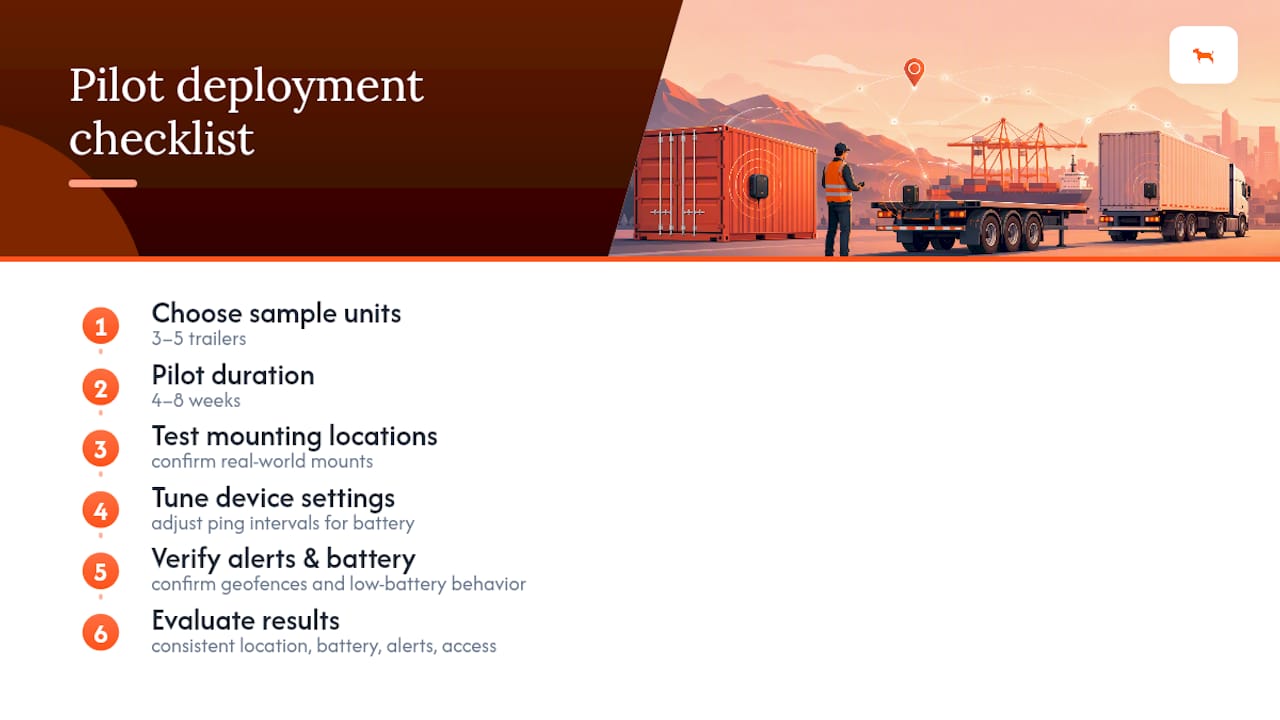
Deploying subscription-free tracking works best as a small pilot before a fleet-wide rollout. A customer base of more than 1,000 business users points to a consistent pattern: real-time tracking, geofencing, long battery life, and mileage reporting hold up when the install and settings match the asset.
Run 3 to 5 units on representative trailers for four to eight weeks. Test the actual mounting location, tune ping intervals against battery drain, confirm geofences fire correctly, and verify low-battery behavior before you scale up. Success looks like consistent location reports, battery life that matches your operational window, alerts that flag real events instead of noise, and access controls that satisfy privacy expectations. Setup stories from customers tracking teen drivers echo the same theme: the install itself is quick, but a short pilot period is what catches surprises before they cost you a trailer’s worth of blind spots.
— Louis
Start a Subscription-Free Pilot With Moto Watchdog
Moto Watchdog eliminates the recurring fee that most GPS tracking providers charge, with lifetime 4G data included and no activation costs layered on top. That means the pilot plan above, with three to five units running for a few weeks, doesn’t quietly turn into a monthly line item on your books six months later.

The product line covers real-time location, customizable geofencing, long battery life, and mileage and trip reporting built for exactly the unpowered-trailer and portable-cargo scenarios covered above, with mileage accuracy and speed and movement alert settings you configure yourself. Fleet managers running multiple trailers can look at API access for business integrations, while contractors managing job-site equipment will find the use cases built for contractor fleets map closely to what a pilot needs to prove out.
If your pilot checklist is mounting, testing in place, tuning geofences, and confirming battery life against your ping interval, the next step is ordering enough units to actually run it. Trackers start at $124.99 one-off, with no monthly fee attached to a single one of them.
Sources
- Vehicle geolocation data collection: issues for the 119th Congress (CRS)
- FTC press release: enforcement on precise location sharing
- ARG‑US Traveler geofence program (Argonne National Laboratory conference paper)
- FMCSA ELD resource on device features and trailer tracking
FAQ
Does Subscription-Free Really Mean No Recurring Costs?
It depends on the model. Devices with lifetime data included, like Moto Watchdog’s trackers, carry no recurring bill after purchase, while BYOD options still require you to pay for your own SIM data separately.
How Long Does a Tracker Battery Last on an Unpowered Trailer?
Battery life depends heavily on ping interval, temperature, and motion, so treat any “up to” figure as a ceiling rather than a planning number. Test the device in its actual mounting location and enable low-battery alerts so you catch drain issues before the unit goes dark.
Can Someone Else See My Trailer’s Location Without My Permission?
Only if your account settings, role-based access, or data-sharing preferences allow it, which is why checking a vendor’s retention and sharing policy matters before deployment. Regulators have already taken enforcement action against improper location sharing, so verify these settings rather than assume default privacy.
How Many Geofences Should One Trailer or Container Have?
Most operations do well with three zones: the home yard, active jobsites, and customer or delivery locations. Time-windowed trips within those zones, as described in Argonne’s geofence research, cut down on false alerts triggered by normal business-hours movement.
What Does a Moto Watchdog Tracker Cost?
Trackers start at $124.99 one-off, with no monthly subscription fee attached. Business or API pricing is available on request through the business page.

