
How to start saving money
Lorem ipsum dolor sit amet, consectetur adipiscing elit lobortis arcu enim urna adipiscing praesent velit viverra sit semper lorem eu cursus vel hendrerit elementum morbi curabitur etiam nibh justo, lorem aliquet donec sed sit mi dignissim at ante massa mattis.
- Neque sodales ut etiam sit amet nisl purus non tellus orci ac auctor
- Adipiscing elit ut aliquam purus sit amet viverra suspendisse potent
- Mauris commodo quis imperdiet massa tincidunt nunc pulvinar
- Excepteur sint occaecat cupidatat non proident sunt in culpa qui officia
Why it is important to start saving
Vitae congue eu consequat ac felis placerat vestibulum lectus mauris ultrices cursus sit amet dictum sit amet justo donec enim diam porttitor lacus luctus accumsan tortor posuere praesent tristique magna sit amet purus gravida quis blandit turpis.

How much money should I save?
At risus viverra adipiscing at in tellus integer feugiat nisl pretium fusce id velit ut tortor sagittis orci a scelerisque purus semper eget at lectus urna duis convallis. porta nibh venenatis cras sed felis eget neque laoreet suspendisse interdum consectetur libero id faucibus nisl donec pretium vulputate sapien nec sagittis aliquam nunc lobortis mattis aliquam faucibus purus in.
- Neque sodales ut etiam sit amet nisl purus non tellus orci ac auctor
- Adipiscing elit ut aliquam purus sit amet viverra suspendisse potenti
- Mauris commodo quis imperdiet massa tincidunt nunc pulvinar
- Adipiscing elit ut aliquam purus sit amet viverra suspendisse potenti
What percentege of my income should go to savings?
Nisi quis eleifend quam adipiscing vitae aliquet bibendum enim facilisis gravida neque. Velit euismod in pellentesque massa placerat volutpat lacus laoreet non curabitur gravida odio aenean sed adipiscing diam donec adipiscing tristique risus. amet est placerat in egestas erat imperdiet sed euismod nisi.
“Nisi quis eleifend quam adipiscing vitae aliquet bibendum enim facilisis gravida neque velit euismod in pellentesque”
Do you have any comments? Share them with us on social media
Eget lorem dolor sed viverra ipsum nunc aliquet bibendum felis donec et odio pellentesque diam volutpat commodo sed egestas aliquam sem fringilla ut morbi tincidunt augue interdum velit euismod eu tincidunt tortor aliquam nulla facilisi aenean sed adipiscing diam donec adipiscing ut lectus arcu bibendum at varius vel pharetra nibh venenatis cras sed felis eget.
An OBD tracker is safe to use only when the device itself is secure, the installation is clean and the tracking is disclosed. The plug-in format is convenient, but it connects a third-party gadget directly to your vehicle’s diagnostic network and to a port that is always powered. For a contractor fleet or an equipment rental yard, that trade-off deserves a closer look before you buy dozens of units.
This guide covers what the research says about the real risks, how to install and remove OBD trackers safely, what privacy duties come with tracking drivers, and how to find a tracker nobody told you about.
TL;DR
- An OBD tracker talks to the same network your vehicle uses for engine, brake and throttle data, so a poorly built device can become an entry point for attackers.
- Published security research on aftermarket OBD-II devices found weak or missing authentication in most of the wireless dongles tested.
- Safe use means buying from a vendor that patches firmware, limiting who can log in, and inspecting the port on a schedule.
- Tell drivers they are tracked and write a retention policy. Some states require written notice.
- For trailers, excavators and other equipment, an OBD port is often not available at all, so a self-powered tracker is the practical choice.
Table of Contents
- What an OBD tracker is and why the port matters
- The cybersecurity risk: your vehicle’s CAN bus
- The physical risks: power, drain and port wear
- How to install, inspect and remove OBD trackers safely
- Privacy and consent when you track drivers
- Can someone track a vehicle without the driver knowing?
- How to check for an unauthorized tracker
- When a self-powered tracker is the safer choice
- Our perspective
- Trackers for fleets and rental equipment
- FAQ
- Sources
What an OBD tracker is and why the port matters
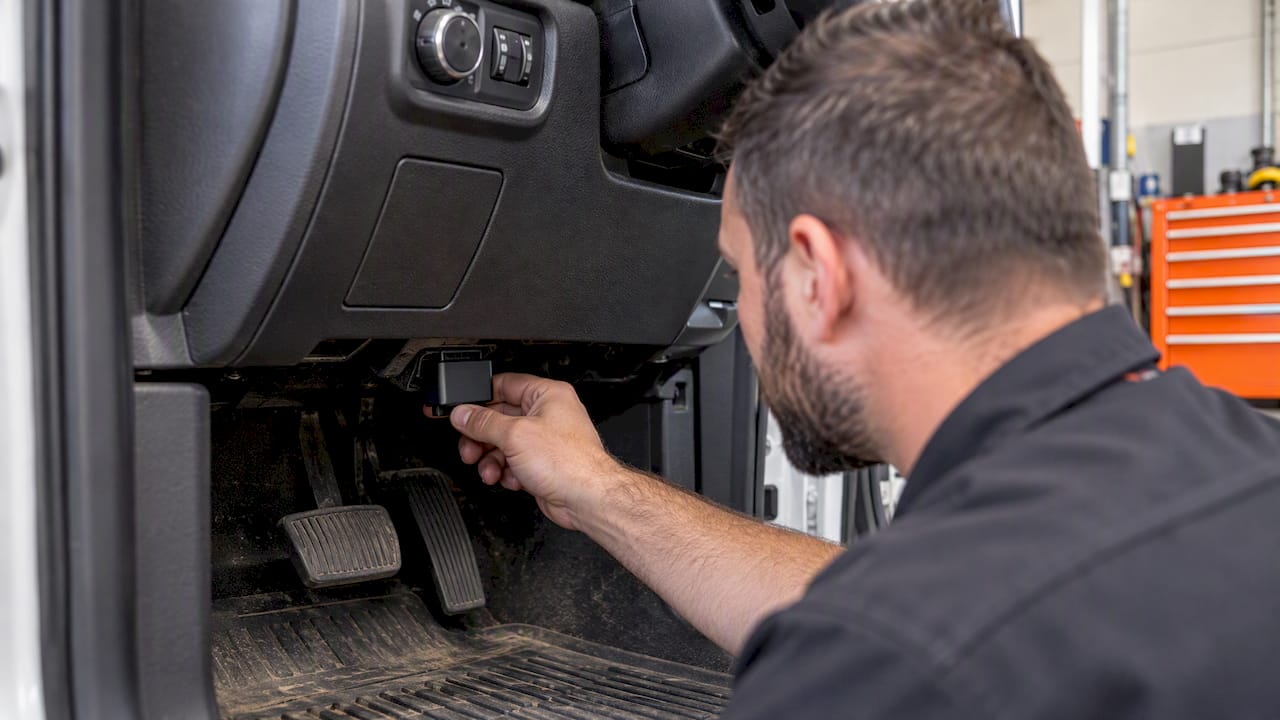
The U.S. Environmental Protection Agency states that all 1996-and-newer cars and trucks carry second-generation On-Board Diagnostics (OBD-II), a computer system that monitors vehicle operation and emissions and reports problems through the check-engine light. The standard port, usually under the dashboard near the driver’s knees, gives a plugged-in device access to that data and to constant 12V power.
An OBD GPS tracker uses both. It draws power from the port, reads some vehicle data, and reports location over a cellular connection. That is why setup takes under a minute and why these devices are popular with small fleets. If you want the fundamentals first, our overview of how a GPS tracker works covers the location and cellular side.
The same convenience creates the safety questions. The port is not just a power outlet. It is a doorway into the vehicle’s internal network.
The cybersecurity risk: your vehicle’s CAN bus
Most vehicles use a Controller Area Network, or CAN bus, to let the engine, brakes, transmission and other modules communicate. The OBD-II port connects to it. Researchers have studied what happens when cheap aftermarket devices sit on that connection.
Here is what the published work shows:
- A study of 77 wireless OBD-II dongles sold on Amazon in the U.S. in February 2019 found that around 85% had neither connection-layer nor application-layer authentication, which gave a nearby attacker arbitrary access to the CAN bus. Some dongles allowed safety-critical commands, such as gear shifting, to be sent to the vehicle.
- In a 2015 analysis of an aftermarket telematics unit, researchers found it was vulnerable to local and remote attacks. After compromise, an attacker could inject payloads into the CAN bus and control systems including throttle and brakes.
- The Software Engineering Institute at Carnegie Mellon concluded in 2016 that the security bar for aftermarket OBD devices seemed pretty low.
- The Federal Motor Carrier Safety Administration notes that aftermarket electronics linked to the CAN databus can offer a potential point of entry to subsystems such as braking, throttle or steering.
These studies are not a reason to avoid all telematics. They are a reason to treat the device like any other networked equipment: it needs vendor support, updates and access controls.
A real recall shows the pattern
In 2024, NHTSA’s recall report covered approximately 140,000 IOSiX devices. According to the recall filing, outdated firmware could let a skilled attacker reach the vehicle data bus and potentially stall some vehicles, raising crash risk. The remedy was an over-the-air update to firmware version 360 or newer.
Two lessons follow. First, the fix was a firmware update, which only works if the vendor can push updates to devices in the field. Second, a fleet that did not know which devices it had installed could not know whether it was exposed. Keep an inventory.
The physical risks: power, drain and port wear
Cybersecurity gets the headlines, but day-to-day problems are more common in a working fleet.
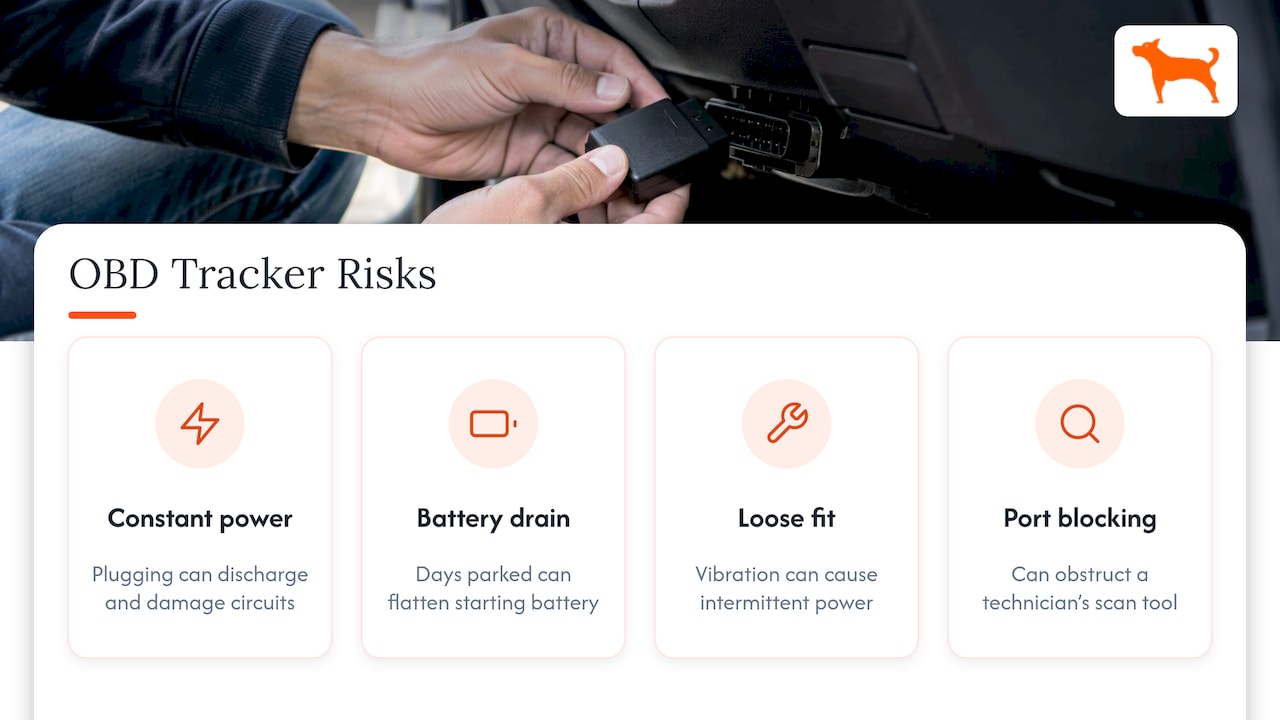
Constant power. The OBD-II port is supplied with 12V at all times. One engineering write-up notes that this can cause electrostatic discharge during plug and unplug operations, potentially reaching hundreds of volts and damaging electrical circuits. In practice, that is a reason to handle installation with the vehicle off and to avoid repeated swapping of devices.
Battery drain. A device that draws power while the truck sits for days can flatten the starting battery. This matters for seasonal equipment haulers and rental vehicles that wait in the yard between jobs. Ask any vendor what the device draws in sleep mode, and test on a vehicle that sits for a week before you roll it out.
Loose fit. Heavy-duty trucks and off-road vehicles vibrate. A device that works loose can lose power intermittently, show false trip data or sit half-seated against the pins. Check the fit during routine inspections.
Port blocking. A tracker in the port can get in the way of a technician’s scan tool. Shops may unplug it and forget to put it back, which creates gaps in your data.
How to install, inspect and remove OBD trackers safely
The steps below are good practice drawn from the risks above. They are not a manufacturer requirement, so follow the instructions that come with your specific device first.
Before you buy
- Ask how firmware updates are delivered and for how long the vendor supports a device.
- Ask whether the connection to the vehicle is wired or wireless. A short-range wireless link to a phone is the weakest design in the research above.
- Ask who can log in, whether you can set roles, and how data is encrypted. The Department of Energy’s federal fleet guidance advises consulting IT experts, understanding data encryption and privacy protections, and configuring role-based access controls.
- Confirm the sleep-mode power draw.
Installation
- Turn the ignition off and remove the key.
- Locate the port and look for bent pins, corrosion or debris.
- Seat the device firmly. Do not force it.
- Log the vehicle ID, the device serial number, the date and the technician.
- Start the vehicle and confirm it reports location and that no new warning lights appear.
Routine inspection
Check seating and the dashboard for warning lights during regular maintenance. If a driver reports a new fault light or starting trouble after installation, unplug the tracker and have a qualified technician diagnose the vehicle. Do not assume the tracker is innocent or guilty without testing.
Removal and disposal
Before a truck is sold or a rental unit returns to a customer, unplug the tracker with the ignition off, deactivate it in your account and remove the vehicle from your dashboard. Departing employees who had admin access should lose it the same day.
Privacy and consent when you track drivers
Safety is not only about the vehicle. Location data is personal data when it is tied to a driver.
The Federal Trade Commission’s order against General Motors is a useful signal of how regulators think. It defines covered driver data to include precise location and specified driving events linked to a U.S. consumer, and it requires data minimization and retention schedules. That order binds GM, not your fleet, but the principles translate: collect what you need, keep it for a defined period, and be open about it.
Employee notice rules differ by state. A few states, including New York, Connecticut and Delaware, have electronic monitoring notice laws that can reach GPS tracking, and others may follow. Confirm current requirements with your state labor department or employment counsel before you start, because these rules change.
A practical policy covers five points:
- Which vehicles and equipment are tracked, and why.
- Whether tracking continues after hours or on personal use.
- Who can see location data and in what role.
- How long data is kept.
- A signed acknowledgment from each driver.
We go deeper on this in our fleet GPS data privacy setup guide.
The same logic applies to rental equipment. If your rental agreement lets you track a machine, say so in the contract and tell the renter where the tracker is installed and what data you collect.
Can someone track a vehicle without the driver knowing?
Yes. Trackers are small, cheap and widely sold, and an OBD device can pass for a normal diagnostic dongle. A stranger can do this only by installing a device on a vehicle, which is a practical hurdle, though a former partner or someone with access to your vehicle could manage it. Connected cars and phone apps are separate routes and need their own checks.
Tracking a vehicle you own is generally lawful. Placing a tracker on someone else’s vehicle without permission can be illegal, and rules vary by state, so a person who believes they are being tracked should treat it as a potential safety matter.
How to check for an unauthorized tracker
Start where the research says to start: the OBD-II port, then the rest of the vehicle.
- Look at the OBD port. Anything plugged in that you or your shop did not put there is a flag. Photograph it in place before touching it.
- Check the cabin. Look under seats, inside the glove box and console, behind panels and in the cargo area.
- Check the exterior. Magnetic cases are common in wheel wells, bumpers and the frame underside.
- Notice patterns. Someone appearing wherever you park, or a battery that drains faster than usual, are signals but not proof.
- Do not destroy it. The device may be evidence. Record serial numbers or markings.
If you are worried about personal safety, contact local law enforcement or a domestic violence advocate before removing a device, because a sudden removal can alert the person who placed it. For a business vehicle, ask your fleet manager or a licensed technician to inspect it.
When a self-powered tracker is the safer choice
OBD trackers fit light vehicles well. They fit poorly where fleet owners and rental companies have the most to lose.
- Trailers, skid steers, excavators and generators have no OBD-II port or use different diagnostic connectors.
- Rental equipment is moved between customers, and a plug-in device is easy to unplug.
- Theft risk is high for equipment, and a visible port device can be taken out in seconds.
A battery-powered tracker mounts anywhere on the asset and does not touch the vehicle’s network. That removes the CAN bus question altogether for those assets. For a comparison of approaches, see our guide to types of fleet GPS systems, and for gear without engines, small equipment GPS tracking.
A useful checklist before you buy any hardware is our fleet GPS hardware checklist.
Our perspective
We build trackers for fleets and heavy equipment rental companies, and we see the same mistake repeatedly: buyers compare price per month and never ask what the device is connected to. Subscription fees are a visible cost. A device on your diagnostic bus with no update path is an invisible one.
Our view is simple. Keep the tracker as separate from the vehicle’s control network as the job allows. Use self-powered units where there is no port, for trailers, attachments and rented machines. Choose a vendor that explains its data handling in plain words. And track assets, not people’s private lives: set geofences and alerts for work hours and work sites, write the policy and tell your drivers.
Safe tracking also means not paying for access twice. With no monthly fees, there is no pressure to cut devices from the roster to save recurring cost, so every trailer and machine can have coverage.
— Louis
Trackers for fleets and rental equipment
Moto Watchdog GPS trackers are sold as a one-time purchase, from $124.99, with no monthly fees. They offer real-time location, geofence alerts, trip and mileage reports, idle time tracking and maintenance reminders, managed from a mobile app and a single dashboard for multiple devices. Because the devices are battery powered, you can place them on trailers and equipment without relying on a vehicle’s port.

If you want to connect tracking data to your own software, our API access page is the place to start. For background on live location, see our guide to real-time vehicle tracking, and for the cost side, fleet tracking without a subscription.
Our earlier article on GPS trackers for the car OBD port explains the port in more detail.
FAQ
Are OBD trackers safe for my vehicle?
Most do their job without issue, but safety depends on the specific device. Research on aftermarket OBD-II devices found weak authentication in many wireless models, and a 2024 NHTSA recall involved firmware that could expose the vehicle data bus. Buy from a vendor that issues updates, and watch for battery drain and warning lights after installation.
Can an OBD tracker drain my car battery?
Yes, it can if the device draws power while the vehicle sits for long periods, because the port is always powered. Ask for the sleep-mode draw and test on a vehicle that is parked for a week. Vehicles that sit between rentals or seasons are most at risk.
How do I know if a tracker is on my car?
Check the OBD port first, then the cabin, wheel wells, bumpers and underside. Photograph anything you find and record serial numbers before touching it. If you feel unsafe, contact law enforcement before removing the device.
Do I have to tell employees their vehicles are tracked?
In some states, yes. New York, Connecticut and Delaware have monitoring notice laws that can apply, and the rules change. Confirm with your state labor department or an employment attorney, and give drivers a written policy either way.
Sources
- EPA: What to do with the Check Engine Light
- Plug-N-Pwned: Comprehensive Vulnerability Analysis of OBD-II Dongles (USENIX Security 2020)
- Fast and Vulnerable: A Story of Telematic Failures (USENIX WOOT 2015)
- On Board Diagnostics: Risks and Vulnerabilities of the Connected Vehicle (Software Engineering Institute)
- FMCSA: Cybersecurity Best Practices for Integration/Retrofit of Telematics
- NHTSA recall report 24E-077 (IOSiX)
- Semtech: OBD-II Systems and Protocols, Part One
- U.S. Department of Energy: Telematics for Federal Fleets
- FTC: General Motors Decision and Order

