

How to start saving money
Lorem ipsum dolor sit amet, consectetur adipiscing elit lobortis arcu enim urna adipiscing praesent velit viverra sit semper lorem eu cursus vel hendrerit elementum morbi curabitur etiam nibh justo, lorem aliquet donec sed sit mi dignissim at ante massa mattis.
- Neque sodales ut etiam sit amet nisl purus non tellus orci ac auctor
- Adipiscing elit ut aliquam purus sit amet viverra suspendisse potent
- Mauris commodo quis imperdiet massa tincidunt nunc pulvinar
- Excepteur sint occaecat cupidatat non proident sunt in culpa qui officia
Why it is important to start saving
Vitae congue eu consequat ac felis placerat vestibulum lectus mauris ultrices cursus sit amet dictum sit amet justo donec enim diam porttitor lacus luctus accumsan tortor posuere praesent tristique magna sit amet purus gravida quis blandit turpis.

How much money should I save?
At risus viverra adipiscing at in tellus integer feugiat nisl pretium fusce id velit ut tortor sagittis orci a scelerisque purus semper eget at lectus urna duis convallis. porta nibh venenatis cras sed felis eget neque laoreet suspendisse interdum consectetur libero id faucibus nisl donec pretium vulputate sapien nec sagittis aliquam nunc lobortis mattis aliquam faucibus purus in.
- Neque sodales ut etiam sit amet nisl purus non tellus orci ac auctor
- Adipiscing elit ut aliquam purus sit amet viverra suspendisse potenti
- Mauris commodo quis imperdiet massa tincidunt nunc pulvinar
- Adipiscing elit ut aliquam purus sit amet viverra suspendisse potenti
What percentege of my income should go to savings?
Nisi quis eleifend quam adipiscing vitae aliquet bibendum enim facilisis gravida neque. Velit euismod in pellentesque massa placerat volutpat lacus laoreet non curabitur gravida odio aenean sed adipiscing diam donec adipiscing tristique risus. amet est placerat in egestas erat imperdiet sed euismod nisi.
“Nisi quis eleifend quam adipiscing vitae aliquet bibendum enim facilisis gravida neque velit euismod in pellentesque”
Do you have any comments? Share them with us on social media
Eget lorem dolor sed viverra ipsum nunc aliquet bibendum felis donec et odio pellentesque diam volutpat commodo sed egestas aliquam sem fringilla ut morbi tincidunt augue interdum velit euismod eu tincidunt tortor aliquam nulla facilisi aenean sed adipiscing diam donec adipiscing ut lectus arcu bibendum at varius vel pharetra nibh venenatis cras sed felis eget.
Multi-user GPS tracking lets several people view the real-time location of one or more devices from their own phone or dashboard. For families, phone-based location sharing is usually enough. For contractors, fleets, and asset owners, a dedicated tracker paired with a shared platform works better. Moto Watchdog offers that second path without a monthly subscription.
TL;DR:
- Dedicated GPS trackers with a shared platform are better suited for assets or fleets exceeding five or six units, as bulk management becomes essential.
- GPS update rates typically range from 10 to 30 seconds, with accuracy between 2 and 30 meters depending on terrain and signal quality.
- Cellular coverage on actual routes influences tracker reliability more than hardware specs, so checking carrier coverage beforehand is crucial.
- Privacy laws in many states require explicit consent for tracking individuals, and shorter data retention periods improve privacy protection.
- Choosing the appropriate setup depends on the asset type, with battery-powered trackers ideal for unpowered equipment and role-based access control supporting larger, multi-asset management.
Table of Contents
- What Are the Main Multi-User GPS Tracking Options?
- How Does Real-Time Multi-User Tracking Actually Work?
- What Multi-User Features Actually Matter?
- How Do You Set Up Tracking for Multiple Users?
- Is Multi-User GPS Tracking Legal, and What About Privacy?
- Which Setup Fits Your Situation?
- Why Subscription-Free Tracking Changes the Multi-User Math
- Get Started With Subscription-Free Multi-User Tracking
- Sources
- FAQ
What Are the Main Multi-User GPS Tracking Options?
Three approaches dominate the market, and each fits a different scale of problem.
Phone-based sharing uses apps already on most smartphones. It costs nothing extra, works well for families of two to six people, and requires every tracked person to carry a charged phone with location services on. The catch: it only tracks phones, not vehicles, trailers, or equipment, and it stops working the moment a phone dies or gets left behind.
Dedicated GPS trackers paired with a cloud platform solve that gap. A small hardware unit sits in a vehicle, on equipment, or inside a trailer, and transmits its position to a shared dashboard that multiple users can log into. This is the standard for small fleets, rental equipment companies, and families tracking a car rather than a person.
OBD-II and hardwired installs plug directly into a vehicle’s diagnostic port or wiring, drawing constant power and often reporting richer data such as engine diagnostics alongside location.
- Phone apps: free, fast to set up, limited to devices with active cellular service and battery
- Dedicated trackers: work on anything, including unpowered assets, and scale to dozens of users
- OBD-II/hardwired: best for vehicles you own outright. Offers diagnostic depth beyond location
Pick phone sharing for a family of drivers. Pick dedicated trackers for trailers, trucks, or a mixed fleet where multiple managers need the same live map. Bulk device management becomes the deciding factor once you pass five or six units.
How Does Real-Time Multi-User Tracking Actually Work?
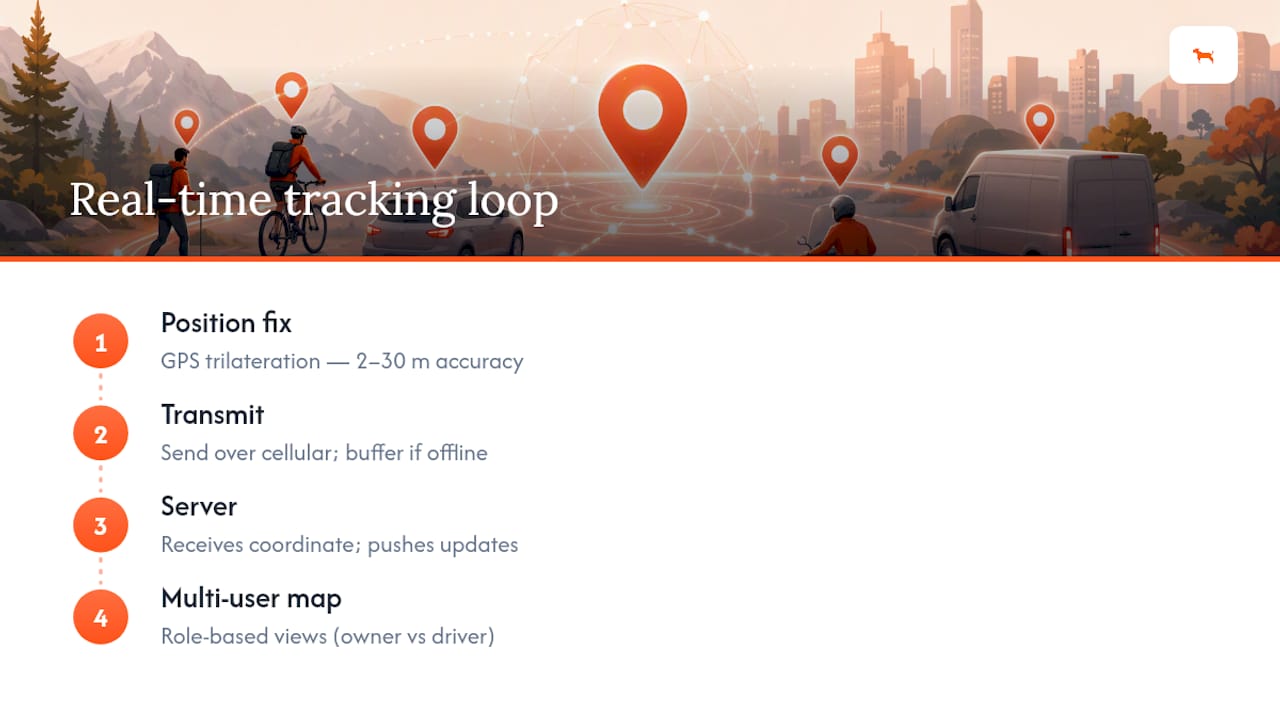
A tracker calculates its position using GPS trilateration, then sends that coordinate over a cellular network to a server, which pushes it to every logged-in user’s map. That’s the entire loop, repeated every few seconds.
Update frequency and accuracy vary more than most buyers expect. Fleet-grade systems typically report position every 10 to 30 seconds, and accuracy runs 2 to 5 meters in open sky but drops to 10 to 30 meters in dense urban blocks, where buildings scatter the satellite signal. Tree cover, tunnels, and parking garages cause similar degradation.
By the Numbers: Expect 10 to 30 second refresh rates and 2 to 30 meter accuracy depending on terrain. A tracker reporting once a minute in open highway conditions likely has a weak antenna placement or a carrier signal issue, not a defective GPS chip.
Cellular dead zones cause a different kind of gap. When a tracker loses signal, most platforms don’t just drop the data. They buffer the location history locally and upload it in a batch once the connection returns, which is why a trip log can show a straight line through an area with no live pings during that stretch.
Multi-user display works through role-based access on a cloud dashboard. Every user logs into the same backend, but the platform filters what they see based on permission level: a fleet owner might view all twelve vehicles, while a single driver sees only their assigned unit. Carrier coverage across your actual routes matters more here than raw device specs, since a tracker with excellent accuracy is useless if it can’t reach a tower.
What Multi-User Features Actually Matter?
Not every feature on a spec sheet affects daily use. These do:
- Group maps and role permissions. Admins should be able to set who sees what, whether that’s a fleet manager viewing all vehicles or a parent viewing only their teen’s car.
- Geofencing and alert types. Enter/exit alerts, speed thresholds, and tow/tamper detection cover most real needs; look for the ability to set different alert rules per device or per user.
- Trip history and export. Mileage logs that export to CSV or PDF save hours on expense reporting and reimbursement.
- Bulk device management. Naming conventions and group tags matter once you’re past ten trackers; renaming units one by one in a dashboard gets old fast.
- Data retention controls. You want the ability to shorten how long location history is stored, not just accept a default.
Pro Tip: Before buying trackers for a team, test how speed alerts route notifications. Some platforms send every alert to every user by default, which buries important warnings in noise once you have more than three or four devices active.
Carrier coverage deserves its own line item. A platform can have every feature above and still fail if its cellular partner has weak coverage on the routes your vehicles actually travel, so verifying coverage before deploying at scale avoids a costly reinstall later.
How Do You Set Up Tracking for Multiple Users?
Getting a group tracking system running correctly takes about thirty minutes per device once you know the order of operations.
- Choose your device type first. Match the tracker to the asset: OBD-II for a vehicle you own, a battery unit for a trailer or piece of equipment, hardwired for anything needing permanent power.
- Set up the admin account before installing hardware. Create the master account, confirm your subscription-free or paid tier, and get the mobile app installed on your own phone.
- Enroll devices in bulk if you have more than a handful. Most platforms let you scan or enter serial numbers in a batch rather than one at a time, and naming them by vehicle or asset (not by serial number) saves confusion later.
- Invite users and assign roles. Send invitations by email or phone number, then set each person’s visibility level: full fleet, single device, or a specific group.
- Configure notification channels per user. Decide who gets push alerts, who gets email, and who gets nothing beyond the occasional check-in on the group map.
- Test the full loop before relying on it. Move one tracked device, confirm every invited user sees the update, and trigger a test geofence alert to check routing works as expected.
Buffered uploads mean a brief signal gap during testing isn’t necessarily a failure. Give a tracker a few minutes to reconnect before assuming something is broken.
Is Multi-User GPS Tracking Legal, and What About Privacy?
Tracking your own vehicle or a device you own is legal in every state. Tracking a person, or a vehicle you don’t own, without consent is where the risk starts.
Consent is the line that matters most. Several states have comprehensive privacy laws that treat precise geolocation as sensitive personal data, which generally means you need opt-in consent before collecting it, not just a notice buried in fine print. Separately, many states and Washington, D.C. have statutes that address unauthorized tracking directly, sometimes treating it as a form of stalking with criminal penalties attached.
By the Numbers: Nineteen states classify precise location as sensitive data requiring opt-in consent, and 26+ states plus D.C. criminalize unauthorized tracking outright.
For employers, the safest path is written consent. Experts recommend getting explicit written acknowledgment before tracking a company vehicle, along with a clear policy on whether tracking continues after hours or only during work shifts.
Retention is the other half of the privacy equation. Location data attracts interest from data brokers, insurers, and even law enforcement, and reviewers warn against overcollection that outlives its usefulness. A common industry default is 90 days of trip history, but shorter, configurable retention limits your exposure if a device or account is ever compromised.
Practical steps worth adopting:
- Get written consent before tracking any employee vehicle
- Set retention to the shortest period that still serves your reporting needs
- Only track devices you own or where you have documented permission
- Review your state’s specific consent requirements before rolling out group tracking
Which Setup Fits Your Situation?
Different tracking problems call for different configurations, and matching the two correctly avoids buying more hardware than you need.
- Family safety: phone-based sharing with a short retention window and an explicit opt-in from every tracked family member covers most needs without any hardware purchase.
- Small contractors and fleets: OBD-II or subscription-free hardware trackers with driver-level access controls and automated mileage reporting handle daily dispatch and tax documentation in one system.
- Trailers and equipment: battery-powered trackers with tow and tamper alerts protect assets that sit unattended for days, and proper power setup extends battery life significantly on unpowered units.
- Event or team coordination: temporary groups with time-limited permissions work well for a weekend event or a short project, letting you grant access and then revoke it cleanly when the job ends.
Fleet owners juggling several use cases at once, say, company trucks, a couple of trailers, and rental equipment, often need more than one device type running on the same platform rather than a single one-size-fits-all tracker.
Why Subscription-Free Tracking Changes the Multi-User Math
Most fleet platforms charge per device, per month, which turns a ten-truck operation into a recurring bill that grows every time you add a vehicle. Moto Watchdog built its model around a one-time hardware purchase instead, which changes the calculation for anyone managing more than a couple of devices.
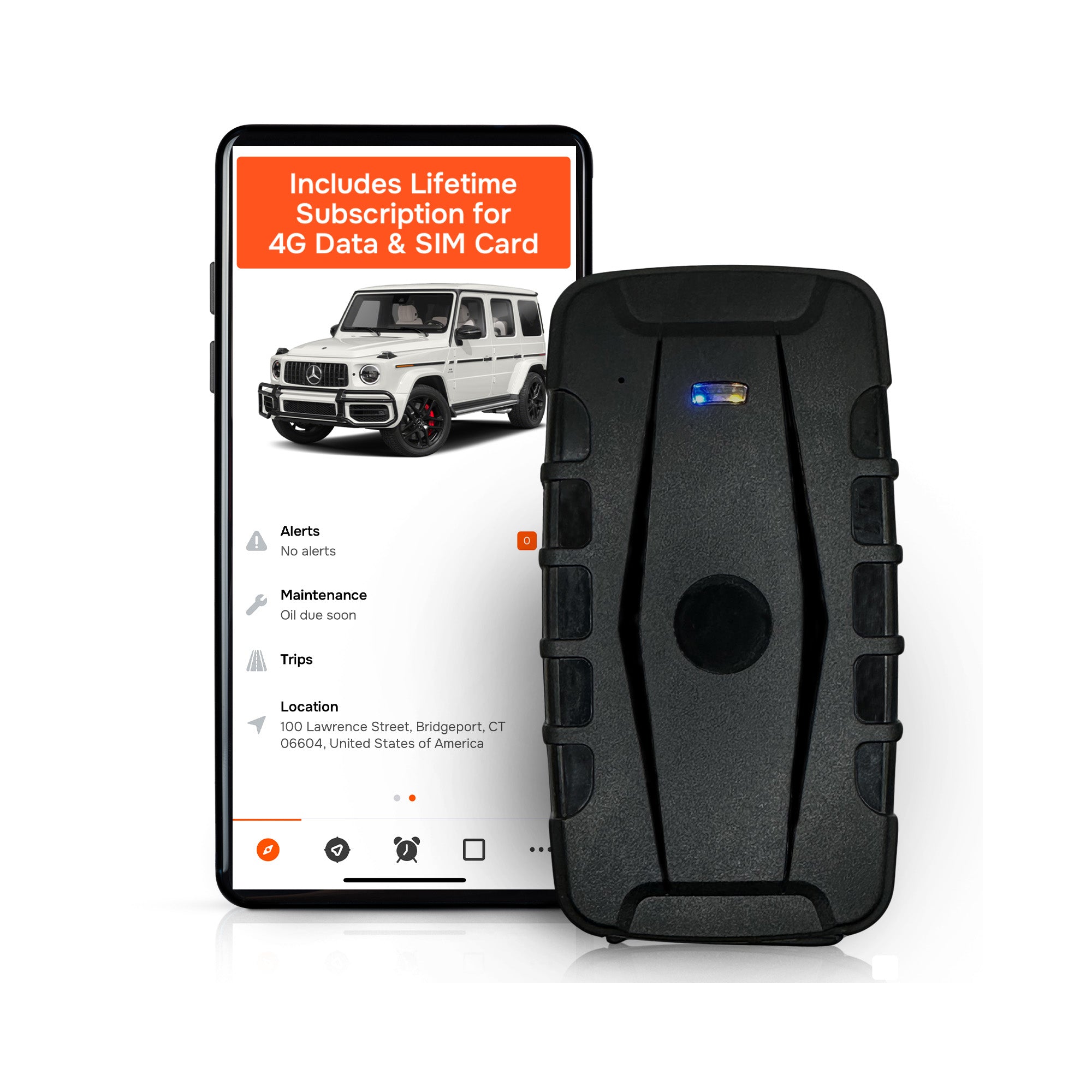
That structure benefits two groups most: small fleet owners and contractors who want mileage reporting and geofencing without a growing monthly line item, and families who want to track a vehicle long-term without paying indefinitely for a feature they use occasionally. Long battery life on portable units, customizable geofencing, and a user base of businesses using the platform reflect a product built for sustained, multi-device use.
The honest trade-off is worth stating plainly. Large enterprise SaaS platforms sometimes offer deeper API integrations or predictive maintenance layers that a subscription-free model doesn’t prioritize. If your operation needs that level of software depth, a subscription platform may serve you better. For most contractors, fleet managers, and families who just need reliable multi-user visibility without a recurring bill, the trade-off favors owning the hardware outright.
— Louis
Get Started With Subscription-Free Multi-User Tracking
There are subscription-free alternatives to monthly fleet software for anyone managing more than one vehicle, trailer, or asset. With these, you pay once for the hardware and keep the geofencing alerts, mileage reports, and multi-device dashboard running indefinitely, with no recurring bill eating into the savings tracking is supposed to deliver.

That structure matters most for contractors juggling a growing fleet and families who want peace of mind without a subscription creeping into the monthly budget. The multi-device management tools support bulk enrollment and role-based access, so adding a fifth or fifteenth tracker doesn’t mean untangling a new pricing tier. If insurance costs factor into your decision, tracking and reporting can also open the door to discount programs worth checking with your provider.
Ready to see the hardware and pricing? Visit Moto Watchdog’s product lineup to find the tracker that matches your fleet, trailer, or family setup.
Sources
- How GPS Fleet Tracking Works 2026: Technology, Accuracy & Setup Guide
- Geolocation data privacy: Federal and state legal framework
- Vehicle geolocation data collection: issues for the 119th Congress
- Privacy risks in the collection, brokerage and use of geospatial location data
FAQ
What Is the Best GPS Tracker for Family Members?
Phone-based location sharing works well for tracking family members directly, since most people already carry a charged smartphone. For tracking a shared family vehicle instead of a person, a dedicated tracker like Moto Watchdog gives you location history and geofence alerts without a monthly fee.
Can Someone Track Your Location Without You Knowing?
Yes, technically, but doing so without consent is illegal in most states. At least 26 states and D.C. have statutes treating unauthorized tracking as a form of stalking, with criminal penalties attached.
Is It Illegal to Track Someone With a GPS Tracker?
It depends on ownership and consent. Tracking a vehicle or device you own, or one where you have documented consent from the user, is legal; tracking a person or someone else’s property without permission violates unauthorized tracking laws in most states.
What Is the Best Hidden GPS Tracker for a Person?
Covertly tracking a person without their knowledge is illegal in the vast majority of states, so the better question is which tracker works best for legitimate, consented use, such as tracking a shared vehicle or a company asset with driver awareness and written consent in place.
How Many Users Can Share One GPS Tracker’s Location?
Most multi-user platforms support dozens of invited users per account, with role-based permissions controlling who sees which devices. The practical limit usually comes from how you organize groups and permissions, not a hard cap on user count.

