
How to start saving money
Lorem ipsum dolor sit amet, consectetur adipiscing elit lobortis arcu enim urna adipiscing praesent velit viverra sit semper lorem eu cursus vel hendrerit elementum morbi curabitur etiam nibh justo, lorem aliquet donec sed sit mi dignissim at ante massa mattis.
- Neque sodales ut etiam sit amet nisl purus non tellus orci ac auctor
- Adipiscing elit ut aliquam purus sit amet viverra suspendisse potent
- Mauris commodo quis imperdiet massa tincidunt nunc pulvinar
- Excepteur sint occaecat cupidatat non proident sunt in culpa qui officia
Why it is important to start saving
Vitae congue eu consequat ac felis placerat vestibulum lectus mauris ultrices cursus sit amet dictum sit amet justo donec enim diam porttitor lacus luctus accumsan tortor posuere praesent tristique magna sit amet purus gravida quis blandit turpis.

How much money should I save?
At risus viverra adipiscing at in tellus integer feugiat nisl pretium fusce id velit ut tortor sagittis orci a scelerisque purus semper eget at lectus urna duis convallis. porta nibh venenatis cras sed felis eget neque laoreet suspendisse interdum consectetur libero id faucibus nisl donec pretium vulputate sapien nec sagittis aliquam nunc lobortis mattis aliquam faucibus purus in.
- Neque sodales ut etiam sit amet nisl purus non tellus orci ac auctor
- Adipiscing elit ut aliquam purus sit amet viverra suspendisse potenti
- Mauris commodo quis imperdiet massa tincidunt nunc pulvinar
- Adipiscing elit ut aliquam purus sit amet viverra suspendisse potenti
What percentege of my income should go to savings?
Nisi quis eleifend quam adipiscing vitae aliquet bibendum enim facilisis gravida neque. Velit euismod in pellentesque massa placerat volutpat lacus laoreet non curabitur gravida odio aenean sed adipiscing diam donec adipiscing tristique risus. amet est placerat in egestas erat imperdiet sed euismod nisi.
“Nisi quis eleifend quam adipiscing vitae aliquet bibendum enim facilisis gravida neque velit euismod in pellentesque”
Do you have any comments? Share them with us on social media
Eget lorem dolor sed viverra ipsum nunc aliquet bibendum felis donec et odio pellentesque diam volutpat commodo sed egestas aliquam sem fringilla ut morbi tincidunt augue interdum velit euismod eu tincidunt tortor aliquam nulla facilisi aenean sed adipiscing diam donec adipiscing ut lectus arcu bibendum at varius vel pharetra nibh venenatis cras sed felis eget.
Yes, landscaping fleets should adopt GPS and telematics tracking, and the highest-impact starting point is combining live location visibility with asset-specific digital inspections. That single pairing exposes wasted drive time and mechanical risk before either one costs you a job. From there, maintenance automation, fuel monitoring, and equipment tags round out a system that pays for itself within a season.
TL;DR:
- Combining live location tracking with digital inspections can significantly reduce wasted drive time and mechanical failures within one to two seasons.
- Prioritizing tracking features like asset location, inspections, and maintenance scheduling delivers the most operational impact for landscaping fleets.
- Equipment such as trailers and mowers require separate, routine monitoring through device-specific tags and accountability logs to prevent loss or theft.
- Weekly monitoring of idle time, unplanned stops, and fuel purchases helps identify hidden costs and improve crew behavior.
- Starting with a small pilot of location and inspection integration enables efficient adoption and avoids overwhelming crews with excessive features early on.
Table of Contents
- Why Landscaping Fleet Tracking Pays Off Faster Than You Expect
- Key Features Landscaping Fleet Managers Must Prioritize
- How Do You Track Trailers, Mowers, and Small Equipment?
- What Fuel and Idle Costs Should You Be Watching?
- How Should You Roll Out Fleet Tracking Without Overloading Your Team?
- Why Small Pilots Beat Feature-Heavy Launches
- How Moto Watchdog Fits the Starting Priority
- Where to Learn More
- Sources
Why Landscaping Fleet Tracking Pays Off Faster Than You Expect
Most landscaping owners assume GPS tracking is about catching slackers. That misses the bigger opportunity. Live location data lets dispatchers reassign the closest crew to an urgent callback instead of pulling one from across town, and it verifies attendance and travel time without a supervisor riding along in every truck, according to Buddy Punch’s analysis of GPS use in landscaping.
The financial upside compounds across three areas:
- Route efficiency: Fewer overlapping drives and faster reassignment based on proximity means more billable stops per truck per day.
- Uptime: Preventive maintenance scheduling catches failing belts and low fluid levels before they strand a mower crew mid-route.
- Asset recovery: Trailers and mowers tagged with location data are far easier to recover after theft, and insurers increasingly expect that documentation.
Pro Tip: Small percentage gains in reducing dead-mile driving across a truck fleet often save more in a month than the tracking hardware costs for the whole year. Small percentage gains multiply because landscaping routes run daily, all season, across every truck in the fleet.
Key Features Landscaping Fleet Managers Must Prioritize
Not every telematics feature deserves equal weight when you’re building or upgrading a landscaping fleet tracking program. Rank these by operational impact, not by what a sales rep pitches first.
- Live location and multi-stop routing — the foundation for dispatch decisions and customer arrival estimates.
- Asset tracking for trailers, mowers, and shared attachments — non-powered equipment disappears from visibility the moment it leaves the truck bed.
- Digital inspection forms that auto-generate work orders — a cracked hitch or worn blade gets flagged and routed to the shop without a phone call.
- Maintenance scheduling triggered by miles, engine hours, calendar date, or season — mowers wear on hours, trucks wear on miles, and both need separate logic.
- Idle time, PTO run time, and fuel monitoring — these numbers reveal cost leaks that a windshield check never will.
- Mobile access for crews — a foreman checking a trailer in from a phone in the field beats a paper clipboard every time.
Pro Tip: Build your evaluation checklist around asset types first, feature lists second. A platform that tracks trucks beautifully but treats mowers and trailers as afterthoughts will leave your most theft-prone equipment invisible.
How Do You Track Trailers, Mowers, and Small Equipment?
Equipment tracking for landscaping vehicle fleets breaks down the moment non-powered assets get ignored. Trailers, walk-behind mowers, and shared attachments need their own workflow, separate from the trucks hauling them.
- Set a daily checkout and check-in routine. Crews log which trailer and mower set left with which truck each morning, creating an accountability trail if something goes missing.
- Match the device to the asset. Battery-powered GPS tags suit trailers and mowers that move independently of a vehicle; Bluetooth tags work for smaller tools kept in a locked box; hardwired trackers make more sense for trucks and powered equipment with a reliable electrical system, as detailed in this GPS tracker hardwiring guide.
- Set movement alerts for off-hours. A trailer that moves from the yard at 2 a.m. on a Sunday should trigger a notification before it becomes a police report.
- Log parts and service history per asset. This protects resale value and gives you a documented maintenance record when a mower finally gets sold or traded, a practice recommended in Whip Around’s fleet management guidance.
Mixed fleets that lack built-in telematics on smaller gear benefit most from clear assignment records tied to that morning checkout habit, according to Whip Around’s technology analysis for landscaping firms.
What Fuel and Idle Costs Should You Be Watching?
Idle time, unplanned fuel stops, and route overlap quietly drain landscaping fleet budgets more than most owners realize, according to Fuel Logic’s breakdown of hidden fleet fuel costs. PTO run time on mower decks and irrigation equipment adds another layer that’s easy to overlook because it doesn’t show up as drive time at all.
Track these four numbers weekly:
- Idle minutes per vehicle, isolated from PTO-related idling.
- PTO run time against job hours logged.
- Unplanned stops that don’t match a scheduled job address.
- Fuel-card purchases that don’t line up with a vehicle’s actual route.
The EPA’s idle-reduction guidance offers a useful benchmark for setting internal idle policies and gives you a credible outside reference when explaining new rules to crews. Reports only change behavior when someone actually reads them and follows up.
How Should You Roll Out Fleet Tracking Without Overloading Your Team?
Trying to activate every feature on day one is the most common way landscaping fleet tracking programs stall. Practitioners consistently recommend picking one high-impact priority, whether that’s security, idle reduction, or payroll verification, and scaling only after the workflow around it is solid.
- Pick your one metric. Location visibility plus digital inspections is the strongest combined starting point because it protects both your trucks and your crews’ time.
- Run a 30 to 60 day pilot on a subset of vehicles, maybe four or five trucks, before fleet-wide rollout.
- Train crews on the exact daily actions they need to take: checkout logs, inspection submissions, and how alerts reach them.
- Set basic data rules upfront: who reviews location history, how long inspection records are kept, and who gets alerted on movement outside work hours.
- Add maintenance automation and parts tracking once the pilot proves out, followed by integrations with your scheduling or invoicing software, such as those outlined in this fleet GPS data integration guide.
Pro Tip: Resist the urge to buy the biggest package your budget allows in month one. A tight pilot that crews actually adopt beats a full-featured rollout that gets ignored after two weeks.
Why Small Pilots Beat Feature-Heavy Launches
The biggest mistake I see landscaping owners make isn’t picking the wrong software. It’s turning on every feature simultaneously and expecting crews to absorb it all in one week. A foreman who’s asked to log inspections, review idle reports, and learn a new dispatch app on the same Monday will do none of it well.

A better pattern looks like this: month one, live location and basic checkout logs only. Month two, add digital inspections once crews trust the location data isn’t being used to micromanage them. Month three, layer in maintenance alerts once inspection data starts flagging real patterns. By month four, you’re looking at fuel and idle reports with enough historical baseline to actually coach against.
Adoption, not feature count, determines whether landscaping fleet tracking earns its keep.
— Louis
How Moto Watchdog Fits the Starting Priority
If your first move is live location plus digital inspections, some GPS tracking providers are built around exactly that combination, without adding a monthly bill to your overhead. The devices deliver real-time location tracking, customizable geofencing alerts for yards and job sites, detailed mileage reporting for job costing, and long battery life that suits trailers and mowers sitting idle between jobs.

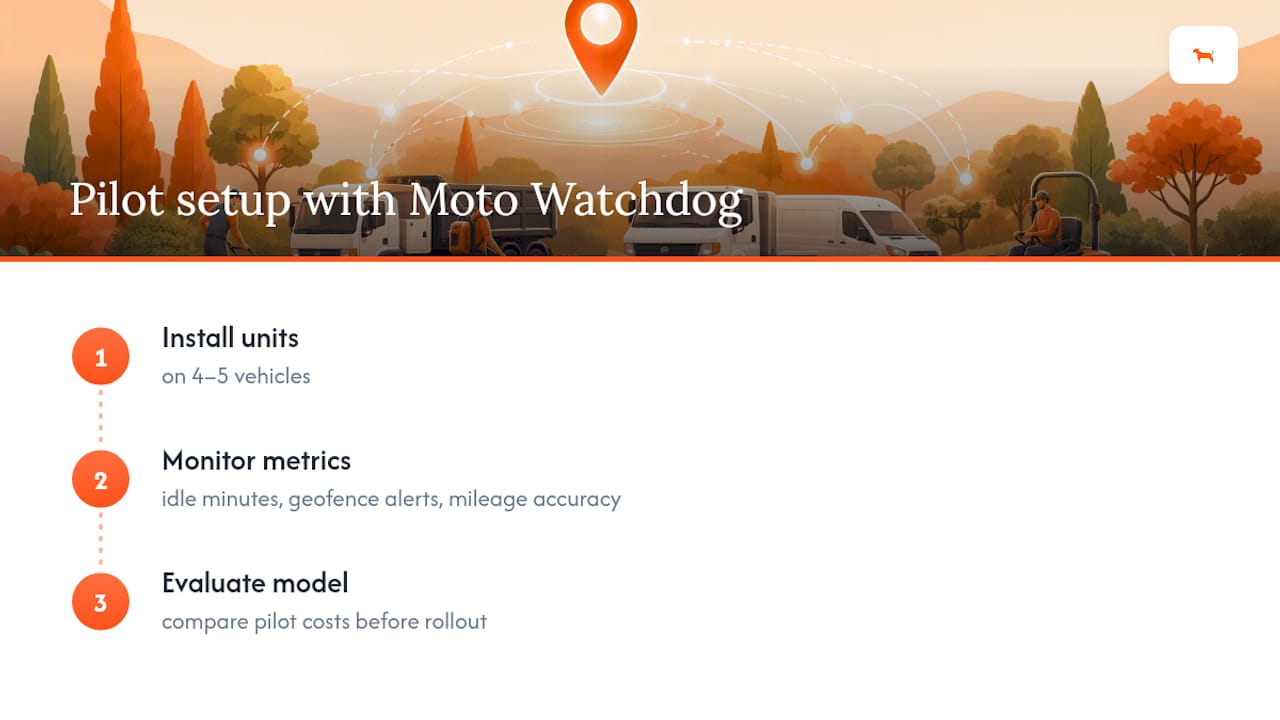
During a pilot, install units on the four or five vehicles you’re testing and track three things: idle minutes per truck, geofence alerts for after-hours movement, and mileage accuracy against your existing job logs. Because there’s no subscription fee eating into your pilot budget, you can test the subscription-free model across a small fleet before committing to the full crew. Many businesses rely on some GPS tracking providers for exactly this kind of no-frills, no-lock-in accuracy.
Ready to see how it fits your trucks and trailers? Explore Moto Watchdog’s contractor tracking page and start your pilot this month.
Where to Learn More
For deeper regulatory context, review the EPA’s idle-reduction resources and Whip Around’s landscaping fleet management guide for inspection workflow templates.
Sources
- EPA — Idle Reduction
- The Hidden Fuel Costs Are Slowing Landscaping Fleets - Fuel Logic
- Landscaping fleet management: How to keep vehicles and equipment job-ready - Whip Around

