
How to start saving money
Lorem ipsum dolor sit amet, consectetur adipiscing elit lobortis arcu enim urna adipiscing praesent velit viverra sit semper lorem eu cursus vel hendrerit elementum morbi curabitur etiam nibh justo, lorem aliquet donec sed sit mi dignissim at ante massa mattis.
- Neque sodales ut etiam sit amet nisl purus non tellus orci ac auctor
- Adipiscing elit ut aliquam purus sit amet viverra suspendisse potent
- Mauris commodo quis imperdiet massa tincidunt nunc pulvinar
- Excepteur sint occaecat cupidatat non proident sunt in culpa qui officia
Why it is important to start saving
Vitae congue eu consequat ac felis placerat vestibulum lectus mauris ultrices cursus sit amet dictum sit amet justo donec enim diam porttitor lacus luctus accumsan tortor posuere praesent tristique magna sit amet purus gravida quis blandit turpis.

How much money should I save?
At risus viverra adipiscing at in tellus integer feugiat nisl pretium fusce id velit ut tortor sagittis orci a scelerisque purus semper eget at lectus urna duis convallis. porta nibh venenatis cras sed felis eget neque laoreet suspendisse interdum consectetur libero id faucibus nisl donec pretium vulputate sapien nec sagittis aliquam nunc lobortis mattis aliquam faucibus purus in.
- Neque sodales ut etiam sit amet nisl purus non tellus orci ac auctor
- Adipiscing elit ut aliquam purus sit amet viverra suspendisse potenti
- Mauris commodo quis imperdiet massa tincidunt nunc pulvinar
- Adipiscing elit ut aliquam purus sit amet viverra suspendisse potenti
What percentege of my income should go to savings?
Nisi quis eleifend quam adipiscing vitae aliquet bibendum enim facilisis gravida neque. Velit euismod in pellentesque massa placerat volutpat lacus laoreet non curabitur gravida odio aenean sed adipiscing diam donec adipiscing tristique risus. amet est placerat in egestas erat imperdiet sed euismod nisi.
“Nisi quis eleifend quam adipiscing vitae aliquet bibendum enim facilisis gravida neque velit euismod in pellentesque”
Do you have any comments? Share them with us on social media
Eget lorem dolor sed viverra ipsum nunc aliquet bibendum felis donec et odio pellentesque diam volutpat commodo sed egestas aliquam sem fringilla ut morbi tincidunt augue interdum velit euismod eu tincidunt tortor aliquam nulla facilisi aenean sed adipiscing diam donec adipiscing ut lectus arcu bibendum at varius vel pharetra nibh venenatis cras sed felis eget.
To install a battery GPS tracker, charge or activate the device, confirm it reports a location outdoors, choose a hidden spot with open sky above it and a solid surface under it, secure it with a magnet, strap or adhesive, then walk away and verify the position on your app. The whole job takes about 15 minutes. The part that decides whether the tracker helps you when something goes missing is placement, not wiring.
This guide is written for contractors, rental yards and fleet managers who need to put trackers on trailers, skid steers, generators and other assets with no power source. It covers the full process, the mistakes that cost the most, and the legal basics.
TL;DR
- A battery tracker needs no wiring. Activate it, test it outdoors, mount it where it has sky view and cannot be seen, then confirm the location in the app.
- Hidden placement matters more than convenience. Thieves routinely rip out the visible OEM tracker, so a second concealed unit is often what leads to recovery.
- Set a geofence and a trip or movement alert on the same day you install, or the tracker only tells you where an asset was.
- Only install trackers on assets you own or lease, and record the install in your asset log with hour-meter reading and unit ID.
- Moto Watchdog trackers start at $124.99 one-time, with no monthly fees.
Table of Contents
- Battery-powered vs. hardwired: which one fits the asset
- Before you start
- Step-by-step: installing the tracker
- Common mistakes that cost you the asset
- Battery life: what to plan for
- Where this fits in rental and fleet operations
- Our perspective: install it like you expect it to be found
- Legal basics before you install
- Where our trackers fit
- FAQ
- Sources
Battery-powered vs. hardwired: which one fits the asset
A hardwired tracker connects to a vehicle’s positive and negative terminals, draws constant power and is meant to stay put for years. A battery tracker carries its own power and attaches anywhere. Each has a job.
| Factor | Battery-powered | Hardwired |
|---|---|---|
| Best for | Trailers, towable equipment, containers, attachments, tool storage | Pickups, vans, trucks and machines with a stable 12V or 24V supply |
| Install time | Minutes, no tools | 30 to 60 minutes, basic electrical work |
| Placement freedom | Almost anywhere | Near the battery or fuse box |
| Ongoing task | Check battery level, recharge or replace | Check connection, protect the wiring |
| Theft resistance | High when concealed | Medium; wire runs can be found and cut |
Many fleets run both. The hardwired unit covers daily reporting and mileage. The battery unit is the quiet backup. That pairing is the pattern behind recoveries described in trade press: theft recovery often succeeds because of secondary, hidden battery-powered trackers placed where thieves do not look, such as under trailer beams or behind panels, rather than because of the primary OEM unit, which thieves tend to tear out.
If you are also adding a tracker to a daily-driver, our guide to adding a tracker to a car covers that side in more detail.
Before you start
Ten minutes of preparation prevents most failed installs.
- Charge the device fully. A tracker that ships half-charged will give you a misleading first week of battery data.
- Install the app and register the unit. Add the device to your account while you have good cell signal, and name it by asset number (for example, “Trailer 14, tag 7731”), not “Tracker 3.”
- Test it outdoors first. Let it acquire a fix in the open. Indoors, a cold start can take much longer and tells you nothing about the device.
- Record the asset’s details. Write down the serial number, current hour-meter or odometer reading, the install date and the exact mounting spot.
- Gather your mounting kit. Depending on the surface: a strong magnet case, stainless zip ties or a strap, structural adhesive tape, or a small bracket and bolts.
If your team will do the installs, keep the process simple enough for a non-specialist. Fleet-wide rollouts tend to stall when mounting is complicated, and trackers built for construction environments have to survive water spray, vibration and debris, so a repeatable, tool-light method is part of the design, not an afterthought.
Step-by-step: installing the tracker
Step 1: Power on and confirm a fix
Switch the device on or activate it according to its manual, then take it outside. Wait until the app shows a live position that matches where you are standing. Do not mount a tracker you have not seen report.
Step 2: Choose the mounting location
Two physical requirements drive every good spot:
- Sky view in at least one direction. GPS and cellular antennas work through plastic and fiberglass but poorly through thick steel. Mount under a plastic cover, on the outside of a frame rail facing down or outward, or behind a non-metal panel.
- A solid, low-vibration surface. A tracker bouncing on a loose bracket will fall off or fail early.
Then apply the hiding rule: if you can see it from walking around the asset, a thief can too. Good candidates on common assets:
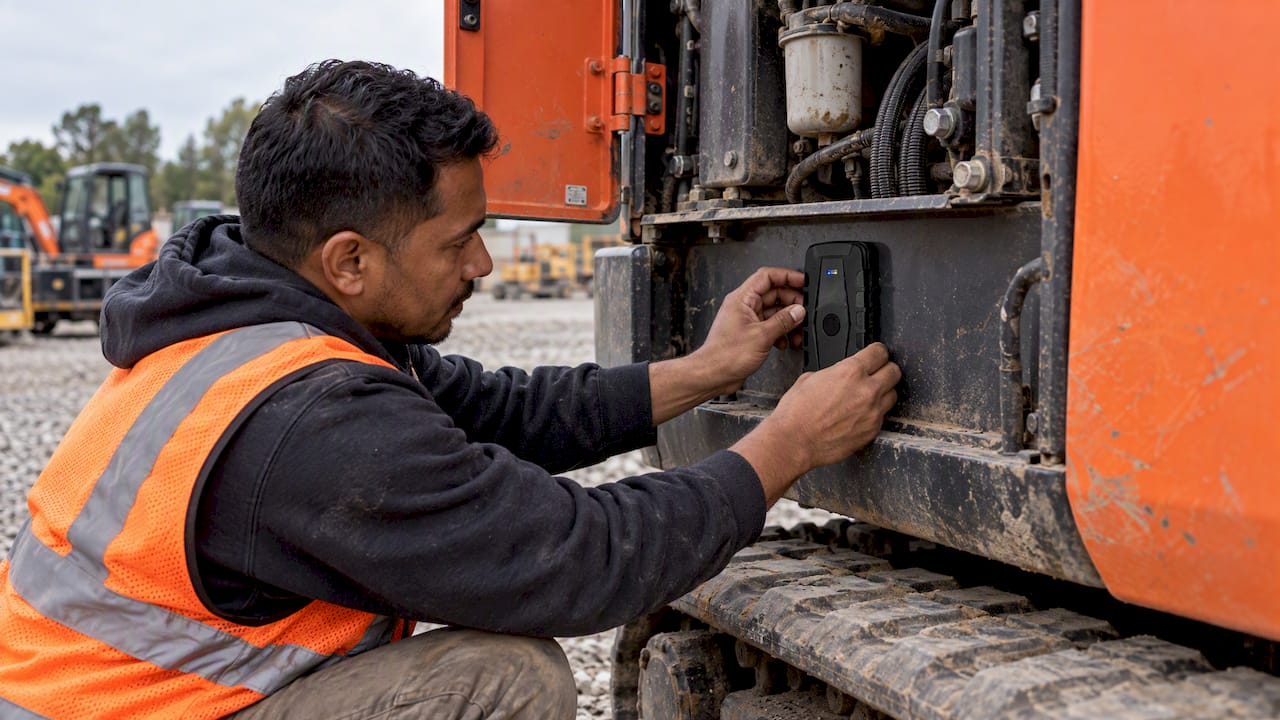
- Enclosed and flatbed trailers: inside a frame rail, above the axle on the underside of the deck beam, or behind a trim panel near the tongue.
- Skid steers and compact loaders: inside the cab pillar cover, behind a side panel, or in an enclosed compartment away from the engine heat.
- Excavators and dozers: inside the counterweight cavity or toolbox, avoiding direct contact with hydraulic lines and exhaust.
- Generators, light towers and compressors: inside the housing, away from the engine and muffler.
- Attachments such as breakers and buckets: a welded or bolted small steel box with the tracker inside, since these have no hiding cavity.
Step 3: Secure it
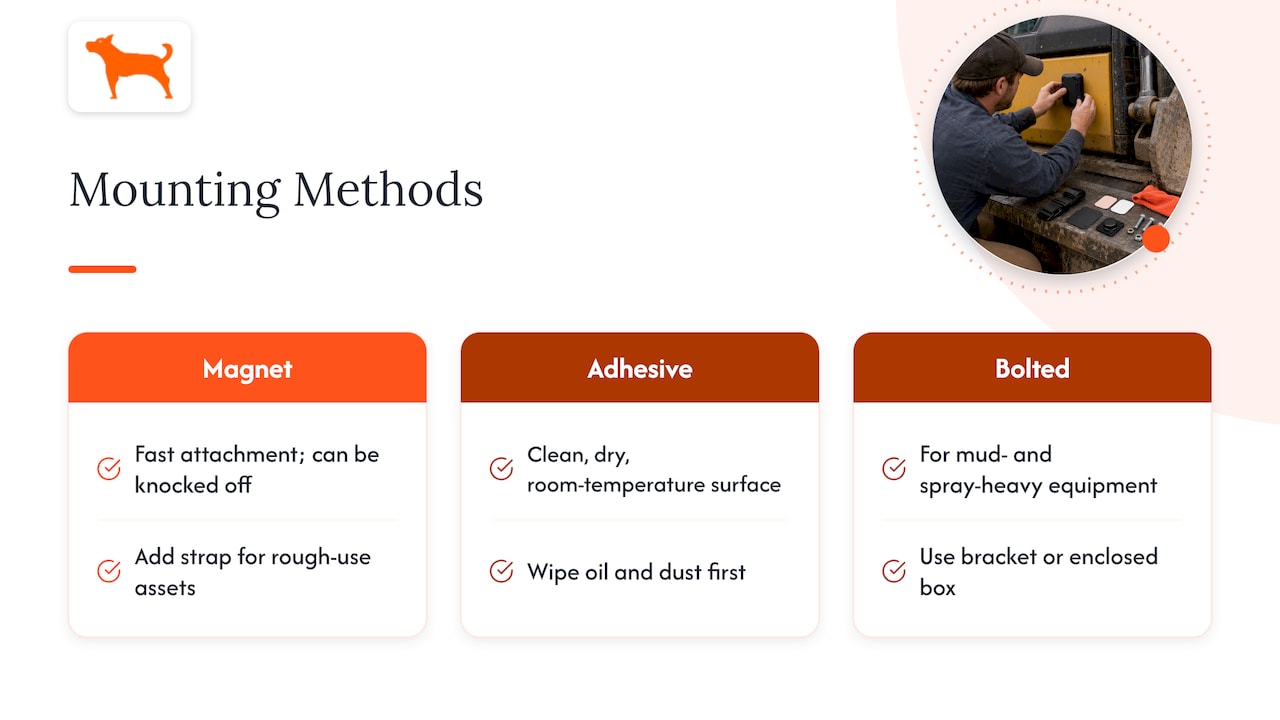
Match the fastener to the vibration. Magnets are fast but can be knocked off or discovered by someone who sweeps a steel frame with their hand, so combine a magnet with a zip tie or strap on rough-use assets. Adhesive pads work on clean, dry, room-temperature surfaces; wipe oil and dust first. For heavy equipment that works in mud and spray, a bolted bracket or enclosed box beats any adhesive.
Keep the tracker away from direct engine heat, exhaust components and moving parts, and keep any seals closed and undamaged so water stays out.
Step 4: Verify from the app
Walk 50 yards from the asset, or drive it around the lot if it is towable. Check that the app shows the new position within the expected update interval. If the position is off by a long distance or stale, move the unit to a spot with better sky view before you finish.
Step 5: Set alerts the same day
A tracker without alerts is a map you have to remember to open. Before you leave:
- Draw a geofence around the yard, shop or job site.
- Turn on exit and entry alerts with push notifications to the people who can act on them.
- Add an after-hours movement alert if your app supports a schedule.
- Turn on low-battery notifications.
The same logic is what industry guidance recommends for rentals: use geofencing to alert when equipment leaves the designated job site or moves during unauthorized hours, and log location and hour-meter readings at both check-out and return.
Step 6: Log it
Add the unit ID, asset number, mounting spot (with a photo), install date and who did it to your asset record. When a tracker is hidden well, you will not remember where it is in eighteen months. A photo and a note saves a technician an afternoon.
Common mistakes that cost you the asset
- Mounting on a metal-shielded surface. A tracker tucked inside a sealed steel box with no opening can report poorly or not at all.
- Skipping the test. Installing a unit that never had a fix means you find out during a theft.
- Putting it where everyone looks. Dashboard, battery box and the obvious bumper corner are the first places a thief checks.
- Forgetting about battery maintenance. Battery trackers trade wiring for upkeep. Set a calendar reminder tied to the low-battery alert, and check the level in your weekly yard walk.
- Leaving geofences too tight. A fence that hugs a yard boundary will trigger on GPS drift. Add a buffer so the alerts you get are the ones that matter.
- Treating the tracker as the only defense. Locks, chains, hitch locks and lighting still matter. The tracker is the layer that works after those are beaten.
Battery life: what to plan for
Battery life depends on how often the tracker reports, signal quality, temperature and whether it moves. A device that updates every few seconds will drain faster than one that wakes on motion and reports every few hours. Cold weather also cuts capacity. Some manufacturers choose non-rechargeable lithium cells specifically because they offer low self-discharge and handle temperature extremes well, which matters for equipment that sits in a yard all winter.
Practical rules:
- Match the update rate to the asset. A trailer parked for weeks does not need second-by-second reporting; a rental machine in transit does.
- Keep a replacement or spare charged unit on the shelf.
- Note the date you last charged each unit in the asset log.
- After the first two weeks, review actual battery drop and adjust.
Where this fits in rental and fleet operations
For a rental business, a tracker works best as part of a routine, not a one-time install. At check-out and return, record the location and the hour-meter reading. During the rental, the geofence and movement alerts watch the machine. When something goes wrong, the location history is evidence. A Bobcat case study describes a thief who repainted a stolen machine, rebranded it and removed the serial plate and sensors, and still the telematics data helped lead to its recovery. A hidden second tracker gives you the same fallback if the primary unit is removed.
Insurance is worth a call, too. The American Rental Association’s insurance program, for one, waives the rental store’s deductible for theft or conversion of equipment monitored via GPS or RFID, and the same source recommends registering equipment with the National Equipment Register alongside tracking. Check your own policy terms with your agent before assuming a discount or waiver applies to you.
For more on how tracking reduces losses across asset types, see our piece on five ways GPS asset tracking prevents theft and loss, and for towables specifically, our guide to GPS trackers for trailers.

Our perspective: install it like you expect it to be found
We design around one assumption: the first tracker on any valuable machine is the one a thief looks for. So we tell customers to think in layers. Put a visible, obvious deterrent on the asset, and put a quiet one where nobody checks.
We also see the same install mistakes repeatedly, and almost none of them are technical. They are skipped tests, no alerts and no record of where the unit went. A tracker that is mounted, tested, named and tied to a geofence on day one is worth far more than a better device installed carelessly.
The other half of our view is cost. A tracker you pay for every month eventually gets removed from the older trailer, the idle attachment, the machine that “never leaves the yard,” and those are precisely the assets that walk off. Without recurring fees, you can put a unit on every asset worth protecting and leave it there. Our trackers include 4G data for the life of the device, with unlimited vehicles and users on one dashboard and no activation fees.
— Louis
Legal basics before you install
In the U.S., placing a GPS tracker on a vehicle you own is generally legal, whether an employee or contractor drives it. Tracking a vehicle that is not yours is typically not, and state rules vary. For example, California Penal Code 637.7 prohibits using an electronic tracking device to determine a person’s location, with an exception for the vehicle’s owner, lessor or lessee.
Two practical steps for fleets and rental companies:
- Tell drivers and renters in writing. A short policy and a clause in the rental agreement avoid disputes. Consent matters: recent FTC actions, including the order finalized against GM and OnStar in January 2026, center on collecting precise location data without clear consent.
- Limit who can see and use location data. Do not share it with third parties without a reason you can explain.
For employee tracking policies and anything involving a tracked person rather than an asset, ask your employment attorney. State law differs, and this guide is not legal advice.
Where our trackers fit
If you want battery-powered tracking for trailers, equipment and vehicles without a monthly bill, Moto Watchdog trackers start at $124.99, one-time. They include real-time location, customizable geofencing and alerts, trip and mileage reporting, idle time tracking, maintenance reminders and multi-device management in a free mobile app. If you want to build tracking into your own dispatch or rental software, our API access page explains how to get started.
FAQ
Can you put a tracker on a battery?
Yes, but it depends on what you mean. A hardwired tracker connects to a vehicle’s 12V battery terminals for power, while a battery-powered tracker has its own cell and needs no connection. Do not open or modify tool batteries such as lithium-ion packs to hide a tracker inside; it risks damaging the cells and creating a fire hazard. Use an enclosure beside the battery instead.
How long does a battery-powered GPS tracker last?
It depends on the model, the update interval, signal quality and temperature. Frequent reporting and cold weather shorten life, while motion-triggered reporting extends it. Check the manufacturer’s stated figures for your reporting settings, then compare against the real drop you see in the first two weeks.
How do I set up a GPS tracker?
Charge or activate the device, add it to your app, and confirm it reports a location outdoors. Then mount it, check the position from the app, and set a geofence and alerts. Record the unit ID and mounting spot in your asset log.
Where is the best place to hide a tracker on a trailer or machine?
Choose a spot that is out of sight but has open sky or a non-metal cover above it. Common choices are inside a frame rail, behind a trim panel, or in a closed compartment away from engine heat. Avoid sealed steel boxes with no opening, and avoid the places a thief checks first.
Sources
- ARA Insurance: a valued theft prevention tech resource
- Rental Center: Arvada Rent-Alls, Pro Contractor Rentals
- Designing a Tracker You Rarely Touch
- The Case of the Counterfeit Bobcat: Machine IQ Outsmarts Equipment Thief
- GPS Tracking Laws by State, FreightWaves Checkpoint
- FTC finalizes order settling allegations GM and OnStar collected and sold geolocation data

