
How to start saving money
Lorem ipsum dolor sit amet, consectetur adipiscing elit lobortis arcu enim urna adipiscing praesent velit viverra sit semper lorem eu cursus vel hendrerit elementum morbi curabitur etiam nibh justo, lorem aliquet donec sed sit mi dignissim at ante massa mattis.
- Neque sodales ut etiam sit amet nisl purus non tellus orci ac auctor
- Adipiscing elit ut aliquam purus sit amet viverra suspendisse potent
- Mauris commodo quis imperdiet massa tincidunt nunc pulvinar
- Excepteur sint occaecat cupidatat non proident sunt in culpa qui officia
Why it is important to start saving
Vitae congue eu consequat ac felis placerat vestibulum lectus mauris ultrices cursus sit amet dictum sit amet justo donec enim diam porttitor lacus luctus accumsan tortor posuere praesent tristique magna sit amet purus gravida quis blandit turpis.

How much money should I save?
At risus viverra adipiscing at in tellus integer feugiat nisl pretium fusce id velit ut tortor sagittis orci a scelerisque purus semper eget at lectus urna duis convallis. porta nibh venenatis cras sed felis eget neque laoreet suspendisse interdum consectetur libero id faucibus nisl donec pretium vulputate sapien nec sagittis aliquam nunc lobortis mattis aliquam faucibus purus in.
- Neque sodales ut etiam sit amet nisl purus non tellus orci ac auctor
- Adipiscing elit ut aliquam purus sit amet viverra suspendisse potenti
- Mauris commodo quis imperdiet massa tincidunt nunc pulvinar
- Adipiscing elit ut aliquam purus sit amet viverra suspendisse potenti
What percentege of my income should go to savings?
Nisi quis eleifend quam adipiscing vitae aliquet bibendum enim facilisis gravida neque. Velit euismod in pellentesque massa placerat volutpat lacus laoreet non curabitur gravida odio aenean sed adipiscing diam donec adipiscing tristique risus. amet est placerat in egestas erat imperdiet sed euismod nisi.
“Nisi quis eleifend quam adipiscing vitae aliquet bibendum enim facilisis gravida neque velit euismod in pellentesque”
Do you have any comments? Share them with us on social media
Eget lorem dolor sed viverra ipsum nunc aliquet bibendum felis donec et odio pellentesque diam volutpat commodo sed egestas aliquam sem fringilla ut morbi tincidunt augue interdum velit euismod eu tincidunt tortor aliquam nulla facilisi aenean sed adipiscing diam donec adipiscing ut lectus arcu bibendum at varius vel pharetra nibh venenatis cras sed felis eget.
The most audit-resilient way to track IFTA miles is automated GPS-based state-by-state logging, backed by an odometer start/end reading and reconciled against fuel receipts. This hybrid approach gives auditors three independent data sources instead of one, which is exactly what they look for. Keep raw GPS exports and receipts for four years, make sure your system exports to CSV or XLS, and confirm your device samples location often enough to catch every state line you cross.
TL;DR:
- A hybrid approach using GPS, odometer readings, and fuel receipts provides the most audit-resistant way to track IFTA miles, with raw data stored for four years.
- GPS devices sampling every five to ten minutes and exporting raw data to CSV or XLS meet the strictest audit standards, unlike ELDs or manual logs alone.
- Accurate quarterly reporting depends on detailed records, proper rounding, and consistent retention of GPS, odometer, and fuel receipt documentation for four years.
- Common audit pitfalls include missing raw GPS data, long sampling intervals, reliance solely on ELDs, and unarchived fuel receipts, all fixable with regular data exports and record-keeping.
- Using an affordable, subscription-free device with lifetime data, such as Moto Watchdog, supports compliance and cost-efficiency for small fleets and owner-operators.
Table of Contents
- What Is the Best Way to Track IFTA Mileage by State?
- What Do IFTA Auditors Actually Require in Your Records?
- How Do You Choose and Configure an IFTA Mileage Tracking System?
- What Mistakes Cause the Most IFTA Audit Adjustments?
- How Moto Watchdog’s Tracking Features Map to IFTA Audit Requirements
- What Should You Check Before Filing a Quarterly IFTA Return?
- Ready to Put an Audit-Ready Tracker on Your Trucks?
- Where to Find the Official IFTA Forms and Manuals
- Sources
- FAQ
What Is the Best Way to Track IFTA Mileage by State?
Every method of collecting IFTA miles falls into one of three camps: GPS-based systems, electronic logging devices (ELDs), and odometer or trip-sheet logs. Each has a different relationship with what an IFTA auditor actually wants to see, and understanding that relationship is what separates a clean audit from a costly one.
GPS and telematics devices record your truck’s coordinates at set intervals, then use a calculation method called point-in-polygon combined with Haversine distance formulas to determine exactly when you crossed from, say, Ohio into Indiana and how many miles you logged in each. This is the closest thing the industry has to an automated jurisdictional breakdown, and it’s why tested tracking platforms consistently rank sampling frequency and background tracking reliability as the biggest factors separating audit-ready systems from basic fleet trackers.
ELDs tell a different story. They’re built primarily for hours-of-service compliance, not fuel tax jurisdiction reporting, and many ELD exports simply don’t break mileage down state by state in a format IFTA auditors expect. If your ELD does happen to produce jurisdiction-level data, it can serve as a supplemental source, but don’t assume it will pass an audit on its own without checking the export first.
Odometer and trip-sheet logs remain fully acceptable to IFTA auditors when they’re complete. For every trip, a driver needs to record the date, starting and ending odometer readings, origin and destination, and total miles. Handwritten logs still work, provided nothing is missing.
The strongest workflow combines all three: use GPS as your primary source for the state-by-state split, record odometer readings at the start and end of each trip as a total-mile cross-check, and tie both to fuel receipts before you file. Industry testing on GPS versus odometer accuracy finds GPS totals can run 1 to 4 percent lower than odometer totals depending on how frequently the device samples location, which is exactly why a single data source isn’t enough.
- GPS/telematics: automated jurisdictional detail, but accuracy depends on sampling rate
- ELDs: reliable for hours-of-service, often insufficient for state-by-state IFTA detail
- Odometer/trip sheets: manual but fully audit-acceptable when complete
- Hybrid: GPS plus odometer plus fuel receipts, the most defensible combination
Pro Tip: A device that only pings every 15 or 20 minutes can miss a quick pass through a small state entirely. Look for background tracking that samples closer to every 5 to 10 minutes, especially if your routes cut through states like Delaware or Rhode Island.
What Do IFTA Auditors Actually Require in Your Records?
Every quarterly return runs through two forms: IFTA-100 and its supporting schedule, IFTA-101. The IFTA-101 instructions require you to report total IFTA miles, total non-IFTA miles, total fuel volume, and your average fleet miles per gallon, with every mileage and volume figure rounded to a whole number. Jurisdiction rate codes come from IFTA-105, and getting those codes wrong is one of the more common filing errors fleet managers make.
Retention is not optional or negotiable on timeline. You must keep every supporting record, including raw GPS points, odometer readings, trip sheets, fuel receipts, and copies of filed returns, for four years from the quarterly return due date. Auditors also apply a common tolerance of around 4 percent variance between your GPS totals and your odometer totals before they start asking harder questions.
The IFTA Procedures Manual spells out exactly what an electronic tracking system needs to produce to satisfy an audit:
- Location pings at least every 10 minutes while the engine is running
- Latitude and longitude recorded to four decimal places
- A vehicle ID tied to every record
- Odometer or ECM readings alongside GPS data
- Export capability to CSV, XLS, or another delimited electronic format
Screenshots and PDFs of a dashboard do not meet this standard. Auditors need raw, exportable data they can independently verify, not a static image of your app.
The consequences for showing up without adequate records are steep. The same procedures manual allows auditors to force your reported fuel economy down to a flat 4.00 MPG, or apply a 20 percent reduction to your average fuel consumption, when your recordkeeping falls short. Either adjustment can inflate your tax liability significantly across every jurisdiction you operate in. Auditors typically pull a sample period, cross-check it against your fuel receipts and odometer entries, then extrapolate any discrepancy across the full audit window, so a single weak quarter of records can distort your entire assessment.
How Do You Choose and Configure an IFTA Mileage Tracking System?
Not every GPS device or app on the market is built with IFTA in mind, and the differences show up fast once an auditor starts asking for exports. Before you commit to a system, run it against a short checklist:
- Sampling rate of 10 minutes or finer, ideally closer to 5 minutes for routes near small states
- Reliable background tracking that keeps logging even when the app or screen is closed
- Point-in-polygon state detection built into the platform, not a manual add-on
- Raw-data export to CSV or XLS, not just summary reports
- A retention policy that stores data for the full four-year window
- Offline caching for dead zones, so you don’t lose miles in areas without signal
- Support for vehicle ID tagging across your fleet
- Clear data-access policies so you control who can pull records
Once you’ve picked a system, configuration matters as much as the hardware itself. Set your sampling interval as tight as the device allows, enable background location permissions on every unit, and assign a consistent unit number to each vehicle so records don’t get mixed up during a busy quarter. Turn on fuel-stop tagging and receipt capture if your platform supports it, and set a fixed export cadence, ideally monthly, rather than waiting until filing deadlines force your hand.
Operationally, build a habit around three checkpoints: a monthly reconciliation between GPS and odometer totals, a quarterly export and archive of everything, and a driver checklist requiring odometer entries at the start and end of every trip. Running a test audit on one sample quarter before you actually need to defend one is one of the cheapest insurance policies a fleet manager can buy. If you’re comparing a subscription-based platform against a subscription-free GPS device, weigh the trade-off carefully: a one-time hardware cost with no recurring fee often wins out for owner-operators running a handful of trucks, while larger fleets may value the deeper integration some subscription platforms offer.
Pro Tip: Run your first export within a week of installing any new tracking system. Catching a sampling-rate problem or a missing vehicle ID in week one is far cheaper than discovering it during an actual audit two years later.
What Mistakes Cause the Most IFTA Audit Adjustments?
Auditors see the same red flags over and over, and most of them come down to habits that are easy to fix once you know what to watch for.
- Missing raw GPS archives, only summary reports survive past the filing deadline
- Sampling intervals set too long, missing short crossings through small states
- Relying solely on ELD exports or driver memory instead of a dedicated IFTA source
- Deadhead miles left out of trip records entirely
- Fuel receipts that never get archived or attached to the trips they belong to
The fixes are just as straightforward. Export and archive your raw data weekly rather than letting it pile up until quarter’s end. Put one person in charge of quarterly reconciliation so the job doesn’t fall through the cracks between drivers and dispatch. Require start and end odometer readings for any trip over a set mileage threshold, and attach fuel receipts to trip records the same day they’re purchased, not weeks later when the memory has faded.
If an audit notice does arrive, don’t panic and don’t scramble. Pull the sample week or period the auditor specifies, confirm your exports are complete and readable, and prepare a short reconciliation note showing how your GPS, odometer, and fuel data line up. Organized quarterly archives consistently speed up audits and reduce the odds of an adverse adjustment, because auditors spend less time chasing missing pieces and more time confirming what you already have is correct.
How Moto Watchdog’s Tracking Features Map to IFTA Audit Requirements
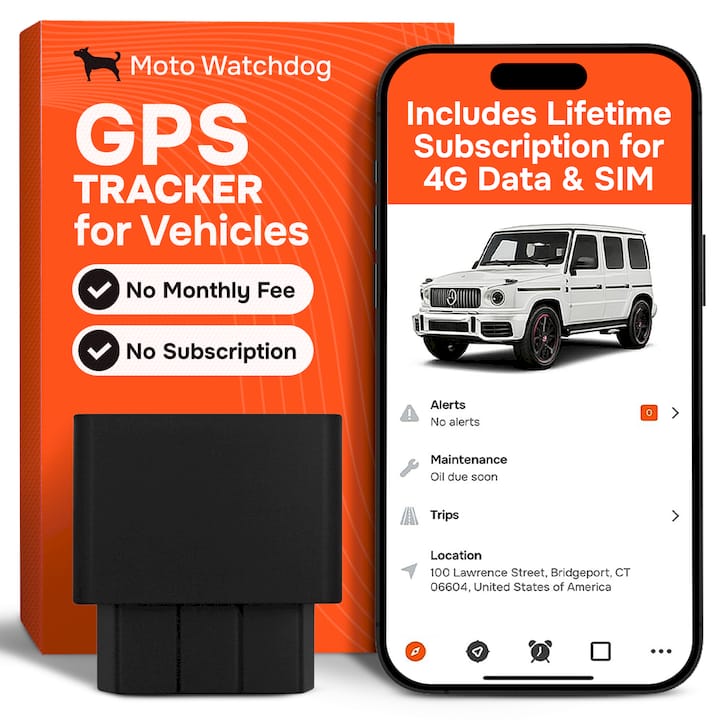
Moto Watchdog’s subscription-free devices were built around the kind of long-term, always-on tracking that IFTA compliance demands. The lifetime 4G data connection means your device keeps logging without a recurring bill interrupting service, and trip and mileage reporting exports in formats that satisfy the auditor’s requirement for raw, reviewable data rather than static screenshots.
- Vehicle ID tagging across multiple units on one dashboard
- Long battery life that keeps sampling consistent without frequent charging interruptions
- CSV export supporting the four-year retention window auditors expect
A quick setup routine helps here: mount the device where it has a clear signal path, assign each unit a consistent number matching your fleet roster, set a monthly export schedule, and run one validation drive across a state line to confirm your point-in-polygon detection and sampling interval are working as expected before you rely on it for a full quarter.
What Should You Check Before Filing a Quarterly IFTA Return?
Before any return goes out, run through the same six checks every time. It takes fifteen minutes and it catches almost everything that trips up a fleet later.
Confirm your raw export is present and complete. Reconcile odometer totals against GPS totals. Verify fuel receipts are attached to their trips. Double check IFTA-101 rounding on every mileage and volume figure. Make sure jurisdiction totals add up to your total miles. Zip and archive the whole quarter before you move on.
— Louis
Ready to Put an Audit-Ready Tracker on Your Trucks?
Moto Watchdog is the alternative to subscription-based fleet tracking for IFTA compliance: a one-time device purchase starting at $124.99 with lifetime 4G data included, no monthly bill working against your bottom line every quarter. That matters more than it sounds for owner-operators and small fleets, where a recurring subscription fee on every truck adds up fast over a four-year retention window you’re required to keep anyway.

Certain GPS tracking devices are designed to support workflows with long battery life for consistent sampling, multi-device management on one dashboard, and trip and mileage reporting that exports cleanly for quarterly archives. If you’re running trailers or heavy equipment across state lines alongside your trucks, the same installation approach works across your fleet without adding a second monthly bill for each asset type.
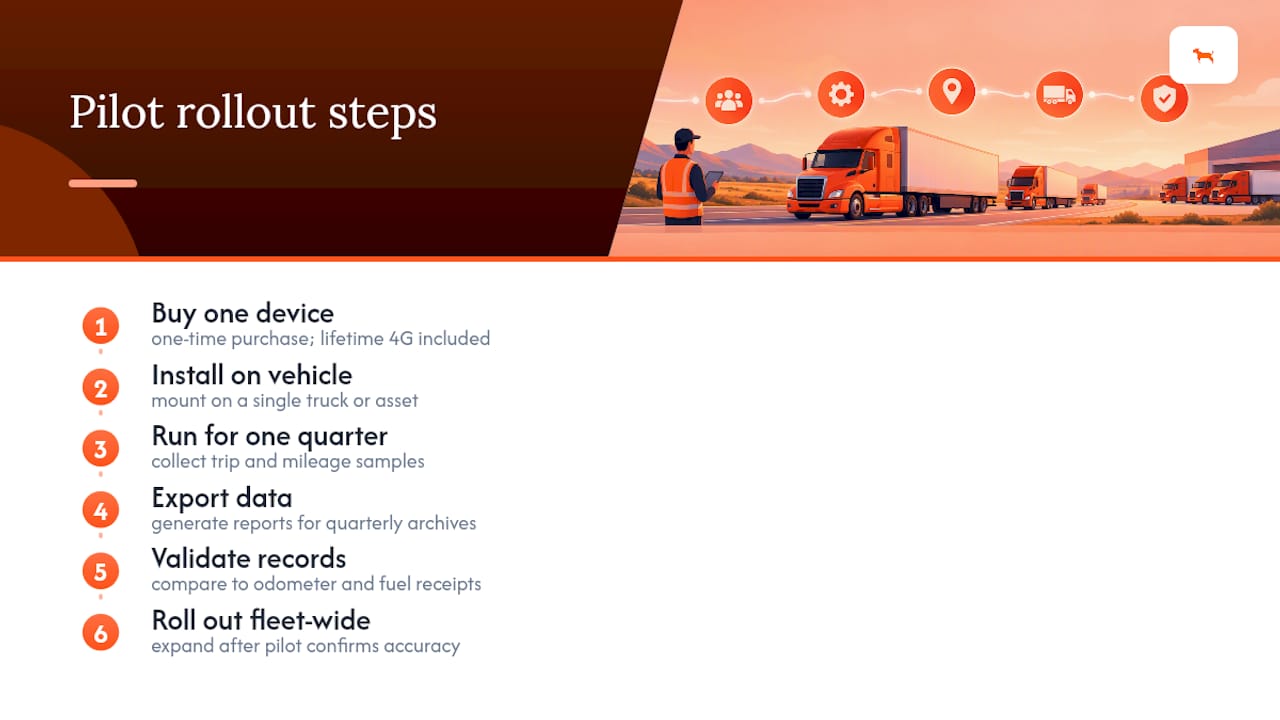
Start with a pilot: put one device on a single vehicle for a quarter, export the data, and validate it against your odometer and fuel receipts before rolling it out further. Fleet managers integrating exports into back-office systems can check the business and API access page for fleet-level setup, or browse the full tracker lineup to get started today.
Where to Find the Official IFTA Forms and Manuals
Keep these sources bookmarked, not just cited. The IFTA Procedures Manual lays out exactly what auditors expect from your electronic records. The IFTA-101 schedule instructions walk through the quarterly filing fields line by line. Check your base jurisdiction’s own IFTA or motor-carrier services page for state-specific rate tables and submission portals before you file.
Sources
- IRP and IFTA audit record-keeping requirements — Minnesota DPS
- IFTA Quarterly Fuel Tax Schedule (IFTA-101) — Pennsylvania Department of Revenue
- IFTA Procedures Manual — 2026
- IFTA audit preparation guide — OTrucking
FAQ
How Do You Track Mileage for IFTA?
The most reliable method combines GPS-based tracking for state-by-state detail with a manual odometer reading at the start and end of each trip. Reconcile both against fuel receipts before filing, and keep the raw exports for four years in case of an audit.
Which States Don’t Require IFTA Reporting?
Alaska, Hawaii, and the District of Columbia are not part of the IFTA agreement, so miles driven there aren’t reported on your IFTA return. Carriers operating in those areas typically handle fuel tax through separate state-specific permits instead.
What Is the Best IFTA Tracking App or Device?
The strongest option is one that samples location every 5 to 10 minutes, keeps tracking in the background, and exports raw data to CSV or XLS rather than just summary screens. A subscription-free device like Moto Watchdog fits that criteria without adding a recurring cost per truck, which matters for fleets tracking multiple vehicles over a multi-year retention window.
What Are the Core IFTA Reporting Requirements?
Every quarterly return needs total IFTA miles, taxable miles, total fuel volume, and average fleet MPG, all rounded to whole numbers as required on the IFTA-101 schedule. You also need four years of supporting records, including raw GPS exports, odometer logs, and fuel receipts, available in case of an audit.