

How to start saving money
Lorem ipsum dolor sit amet, consectetur adipiscing elit lobortis arcu enim urna adipiscing praesent velit viverra sit semper lorem eu cursus vel hendrerit elementum morbi curabitur etiam nibh justo, lorem aliquet donec sed sit mi dignissim at ante massa mattis.
- Neque sodales ut etiam sit amet nisl purus non tellus orci ac auctor
- Adipiscing elit ut aliquam purus sit amet viverra suspendisse potent
- Mauris commodo quis imperdiet massa tincidunt nunc pulvinar
- Excepteur sint occaecat cupidatat non proident sunt in culpa qui officia
Why it is important to start saving
Vitae congue eu consequat ac felis placerat vestibulum lectus mauris ultrices cursus sit amet dictum sit amet justo donec enim diam porttitor lacus luctus accumsan tortor posuere praesent tristique magna sit amet purus gravida quis blandit turpis.

How much money should I save?
At risus viverra adipiscing at in tellus integer feugiat nisl pretium fusce id velit ut tortor sagittis orci a scelerisque purus semper eget at lectus urna duis convallis. porta nibh venenatis cras sed felis eget neque laoreet suspendisse interdum consectetur libero id faucibus nisl donec pretium vulputate sapien nec sagittis aliquam nunc lobortis mattis aliquam faucibus purus in.
- Neque sodales ut etiam sit amet nisl purus non tellus orci ac auctor
- Adipiscing elit ut aliquam purus sit amet viverra suspendisse potenti
- Mauris commodo quis imperdiet massa tincidunt nunc pulvinar
- Adipiscing elit ut aliquam purus sit amet viverra suspendisse potenti
What percentege of my income should go to savings?
Nisi quis eleifend quam adipiscing vitae aliquet bibendum enim facilisis gravida neque. Velit euismod in pellentesque massa placerat volutpat lacus laoreet non curabitur gravida odio aenean sed adipiscing diam donec adipiscing tristique risus. amet est placerat in egestas erat imperdiet sed euismod nisi.
“Nisi quis eleifend quam adipiscing vitae aliquet bibendum enim facilisis gravida neque velit euismod in pellentesque”
Do you have any comments? Share them with us on social media
Eget lorem dolor sed viverra ipsum nunc aliquet bibendum felis donec et odio pellentesque diam volutpat commodo sed egestas aliquam sem fringilla ut morbi tincidunt augue interdum velit euismod eu tincidunt tortor aliquam nulla facilisi aenean sed adipiscing diam donec adipiscing ut lectus arcu bibendum at varius vel pharetra nibh venenatis cras sed felis eget.
The right GPS tracker depends on what you are tracking. Powered vehicles can use a hardwired or plug-in unit. Trailers, generators and heavy equipment usually need a battery-powered tracker that survives rough sites. Whatever the asset, compare total cost of ownership, not the sticker price, because monthly service fees often cost more than the hardware over a few years.
This guide walks through the tracker types, the features that matter on a job site, the real cost math, the privacy rules a US fleet owner should know, and a checklist you can use before you buy.
TL;DR
- Match the tracker to the asset: battery-powered for trailers and equipment, hardwired or OBD for daily-driven vehicles.
- Add up total cost of ownership. Monthly fees for traditional fleet trackers often run $15 to $35 per device, while one-time-purchase hardware exists for basic location needs.
- For equipment rental and construction, prioritize ruggedized housings, long battery life and geofence alerts for movement outside a job site.
- Tell employees in writing that vehicles are tracked, and ask every vendor who owns the data.
- Start with a small pilot, then scale once alerts and reports fit how your crew works.
Table of Contents
- Start with the asset, not the device
- The three types of GPS tracker
- Features that matter on a job site
- What a GPS tracker really costs
- Where RFID and Bluetooth trackers fit
- Privacy and legal points for US fleets
- Our perspective
- Your pre-purchase checklist
- Where to start
- FAQ
- Sources
Start with the asset, not the device
Most bad purchases begin with a feature list instead of a job. Before you compare models, write down what you are protecting and what decision the data should help you make.
Ask yourself:
- Is the asset powered (a pickup, a dump truck) or unpowered (a trailer, a light tower, a generator)?
- Does it move daily, or sit for weeks between rentals?
- Do you need to know where it is right now, or also how it was driven, how long it idled and when it needs service?
- How many people need to see it: one owner, a dispatcher, a whole office?
The answers point to one of three categories. Industry guidance groups GPS solutions into simple location trackers, location-and-usage monitors, and full engine-data telematics, with cost rising as you move up the list.
The three types of GPS tracker
| Type | Power | Best for | What you get | Watch out for |
|---|---|---|---|---|
| Battery-powered location tracker | Internal battery | Trailers, generators, attachments, rental equipment | Location, movement alerts, geofencing | Battery life drops as reporting frequency rises |
| Hardwired or plug-in tracker | Vehicle power | Trucks, vans, service vehicles | Location, trips, mileage, idle time | Installation time, tampering if the unit is visible |
| Engine-data telematics (OBD II or CAN bus) | Vehicle port or harness | Heavy trucks, fleets with maintenance programs | Diagnostic codes, engine hours, fuel data | Higher cost and more data to manage |
Battery-powered trackers
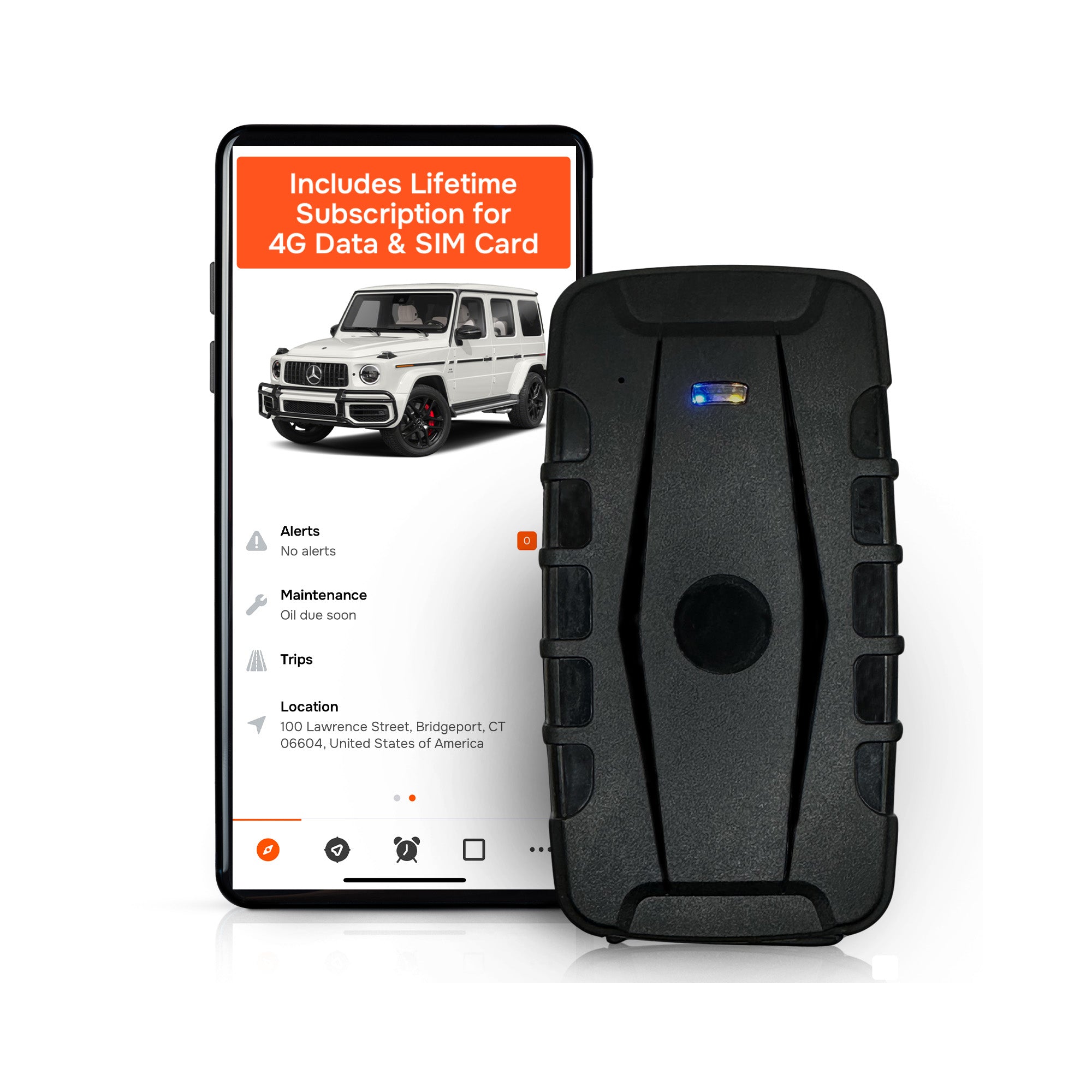
These need no wiring, so they can be hidden or bolted to almost anything in a few minutes. That makes them the default for unpowered assets. The tradeoff is simple: the more often a tracker reports its position, the faster it drains. Ruggedized units built for heavy equipment can run 12 to 18 months on a charge depending on reporting frequency, versus roughly 2 to 3 months for smaller personal trackers that update more often. Ask any vendor what reporting interval its battery claim assumes.
Hardwired and plug-in trackers
A tracker that draws vehicle power never needs charging and can report frequently, which suits trucks that move all day. Plug-in versions are quick to install but also quick for a thief or an unhappy driver to unplug. Hardwired installs take longer and are harder to defeat.
Engine-data telematics
These read diagnostic information from the vehicle, which feeds maintenance planning. They are valuable for mixed, high-mileage fleets. They are overkill if all you need is to know where a trailer is. Fleet managers often buy feature-heavy systems when basic location tracking would do.
A mixed fleet usually needs a mixed approach
The same source suggests a best-of-breed setup: low-cost battery trackers for non-powered assets such as trailers and generators, and hardwired or engine-diagnostic systems for active vehicles. If you rent out heavy equipment, that split is often the most economical way to cover everything.

Features that matter on a job site
Heavy equipment lives in mud, dust, rain and vibration, often without a power outlet within a mile. Judge every tracker against the conditions it will actually face.
Durability and water resistance
Look for an ingress protection rating. IP67 water and dust resistance is a common benchmark for equipment trackers. Also check the mounting: a strong magnet suits a trailer frame, but a screw-down or enclosed install is safer on an excavator or skid steer.
Battery life and reporting frequency
Two numbers matter together: how long the battery lasts and how often the unit reports. A tracker that reports every few minutes while moving and rarely while parked can stretch its battery much further than one that reports constantly. For rental equipment that sits idle between jobs, long battery life is worth more than second-by-second updates.
Geofencing and alerts
Geofencing is the feature that turns a map dot into a security system. You draw a boundary around a yard, a job site or a customer location, and the tracker alerts you when an asset crosses it. Useful setups for equipment owners:
- A geofence around the yard, so you know the moment a machine leaves.
- A geofence around each active job site, so you know when equipment drifts outside it.
- After-hours alerts, so any movement on a weekend or overnight gets your attention immediately.
The most useful alerts flag movement, excessive idling or a geofence crossing. Make sure alerts arrive as push notifications, not just in a dashboard nobody opens.
Trip, mileage and idle reporting
For vehicles, trip history and mileage reports save hours at tax and billing time. Idle time reports show where fuel is being burned for nothing. For rental equipment, usage and idle data helps you bill accurately and spot machines that are underused.
Maintenance reminders
Reminders based on mileage or engine hours keep service on schedule without a spreadsheet. If you run more than a handful of machines, this feature can pay for itself by preventing a single avoidable breakdown.
Multi-device management and sharing
Once you own more than a few trackers, the software matters as much as the hardware. You want every device on one dashboard, with the ability to share access with a dispatcher, a partner or a customer without sharing a single login. Check whether the vendor limits the number of users or devices.
What a GPS tracker really costs
The most common buying mistake is comparing hardware prices only. Fleet management experts point to total cost of ownership, which includes subscriptions, integration and the staff time needed to manage alerts, as the number that matters.
A simple cost model
Use this formula for each device:
Total cost = hardware + activation fees + (monthly fee x months) + accessories + replacement batteries
Take a 20-unit fleet and a three-year horizon, using the low and high ends of the typical range of $15 to $35 per device per month:
| Item | At $15/month | At $35/month |
|---|---|---|
| Monthly fee for 20 devices | $300 | $700 |
| Over 36 months | $10,800 | $25,200 |
Those figures are service fees alone, before any hardware. Now compare that to hardware you pay for once. If a no-subscription tracker costs more up front, the gap closes quickly. This is the arithmetic that makes one-time-purchase trackers attractive to contractors and rental companies with many assets.
Questions to ask about any quote
- Is there an activation fee?
- Is the data plan included for the life of the device, or only for a term?
- What happens to features if I stop paying?
- Is there a contract, and what are the cancellation terms?
- Are there extra charges for more users, more devices or reports?
- Who pays when the cellular network technology changes?
Why cellular type matters
A tracker is only as good as the network behind it. Look for a unit that uses 4G LTE, and ask whether the data coverage is included in the price. Cheaper 2G or 3G devices can lose service when carriers retire those networks.
Where RFID and Bluetooth trackers fit
Not every asset needs a cellular GPS device. Tags work for short-range checks, such as confirming that tools are in a truck at the end of a shift. They cannot tell you where a machine went once it left the lot. If you are weighing the two approaches, our comparison of RFID versus GPS tracking explains where each one makes sense.
Privacy and legal points for US fleets
Location data is sensitive. The Federal Trade Commission says geolocation data deserves the same care as the data collected by mobile phones, and it warns businesses not to let business incentives outweigh privacy safeguards. If you track vehicles that employees drive, take these steps:
- Write a policy. State that company vehicles are tracked, what data is collected, and how it is used. Government fleets, for example, publish telematics policies that spell out why vehicle location and activity are monitored.
- Limit access. Only people who need the data should see it.
- Track company property only. Do not track a personal vehicle without the owner’s knowledge. State laws on tracking differ, so check yours or ask an employment attorney before you roll out a program.
- Keep tracking to business hours where practical. Some employers set tracking rules for after-hours personal use of a company vehicle.
The topic is also on lawmakers’ radar. A Congressional Research Service report from June 2026 reviews issues around vehicle geolocation data collection, so rules may keep changing.
Data ownership and lock-in
If you serve government clients or just want flexibility, ask who owns the location history and whether you can export it. Federal fleet guidance advises asking about data ownership, and notes that many commercial providers do not default to giving customers full ownership or export of diagnostic logs, which can lead to vendor lock-in. The same guidance covers FedRAMP compliance for government contractors, so ask about it if that applies to you.
Our perspective
We build GPS trackers for people who track things for a living: contractors, fleet managers and equipment rental owners. Here is what we have learned from that.
First, recurring fees are the part of a tracking program that surprises people. A tracker looks cheap until the third year of invoices. We designed our devices so that lifetime 4G data is included, there are no activation fees, and there are no add-ons for features. You pay once for the hardware.
Second, a tracker you cannot manage at scale becomes a burden. That is why one dashboard supports unlimited vehicles and users, with geofencing alerts, mileage and trip reports, idle tracking, maintenance reminders and push notifications in a mobile app.
Third, buyers should talk to a human quickly. We reply to sales and support questions the same day, and there is no sales sequence to sit through.
Our advice is to buy for the job in front of you: put a long-battery tracker on the unpowered asset, set a yard geofence, and see what the data tells you in the first month. More than 1,000 businesses already use our trackers that way.
— Louis
Your pre-purchase checklist
- List the assets and mark each as powered or unpowered.
- Set a reporting need for each: live tracking, daily check-in, or after-hours alerts only.
- Check durability: water and dust rating, mounting method, operating temperature.
- Confirm battery life at the reporting interval you plan to use.
- Verify the network: 4G coverage, and whether data is included for the life of the device.
- Calculate three-year total cost with every fee included.
- Test the app: alerts, geofence setup, sharing, reports.
- Review privacy steps: written policy, access limits, data ownership and export.
- Pilot first with a few units on your highest-value or most stolen assets.
- Plan the response: decide who gets each alert and what they do when it fires.
Where to start
If you want hardware with no monthly fees, our subscription-free GPS trackers start from $124.99 as a one-time purchase, with real-time location, geofencing, trip and mileage reporting, and app-based management of multiple devices. If you need to connect tracking data to your own systems, see API access for business. For vehicle security specifically, our overview of anti-theft car tracking device benefits and features covers what to look for.
FAQ
How much does a GPS tracker cost?
It depends on the type and whether service is billed monthly. Traditional fleet trackers often carry service fees of $15 to $35 per device each month, and one-time-purchase options exist for basic location needs. Our trackers start from $124.99 as a one-time price.
Do GPS trackers work without a subscription?
Yes, some do. Subscription-free models are available, but check what is included, especially cellular data and app access. Ask whether the data plan lasts for the life of the device.
Where is the best place to put a GPS tracker?
Place it where it has a clear view of the sky and is hard to spot or remove. On a trailer, that might be inside the frame or under a cover. On heavy equipment, use an enclosed or bolted mount away from moving parts. Use only on property you own or have permission to track.
Do I need to tell employees about tracking?
Yes, as a best practice, and some states require notice. Put the policy in writing and have employees acknowledge it. Ask an employment attorney about your state’s rules before you launch.
Is battery or hardwired better for equipment?
For unpowered or intermittently powered assets, battery-powered trackers are usually the practical choice because they need no wiring. For vehicles that run daily, a hardwired or plug-in unit avoids charging altogether.
Sources
- How to Choose the Right Telematics Solution for Your Fleet
- Best GPS Trackers For Construction Fleet Management 2025, CCR Magazine
- Cars & Consumer Data: On Unlawful Collection & Use, Federal Trade Commission
- Telematics for Federal Fleets, US Department of Energy
- Telematics Universal Policy, Colorado State Fleet Management
- Vehicle Geolocation Data Collection: Issues for the 119th Congress, Congress.gov

