

How to start saving money
Lorem ipsum dolor sit amet, consectetur adipiscing elit lobortis arcu enim urna adipiscing praesent velit viverra sit semper lorem eu cursus vel hendrerit elementum morbi curabitur etiam nibh justo, lorem aliquet donec sed sit mi dignissim at ante massa mattis.
- Neque sodales ut etiam sit amet nisl purus non tellus orci ac auctor
- Adipiscing elit ut aliquam purus sit amet viverra suspendisse potent
- Mauris commodo quis imperdiet massa tincidunt nunc pulvinar
- Excepteur sint occaecat cupidatat non proident sunt in culpa qui officia
Why it is important to start saving
Vitae congue eu consequat ac felis placerat vestibulum lectus mauris ultrices cursus sit amet dictum sit amet justo donec enim diam porttitor lacus luctus accumsan tortor posuere praesent tristique magna sit amet purus gravida quis blandit turpis.

How much money should I save?
At risus viverra adipiscing at in tellus integer feugiat nisl pretium fusce id velit ut tortor sagittis orci a scelerisque purus semper eget at lectus urna duis convallis. porta nibh venenatis cras sed felis eget neque laoreet suspendisse interdum consectetur libero id faucibus nisl donec pretium vulputate sapien nec sagittis aliquam nunc lobortis mattis aliquam faucibus purus in.
- Neque sodales ut etiam sit amet nisl purus non tellus orci ac auctor
- Adipiscing elit ut aliquam purus sit amet viverra suspendisse potenti
- Mauris commodo quis imperdiet massa tincidunt nunc pulvinar
- Adipiscing elit ut aliquam purus sit amet viverra suspendisse potenti
What percentege of my income should go to savings?
Nisi quis eleifend quam adipiscing vitae aliquet bibendum enim facilisis gravida neque. Velit euismod in pellentesque massa placerat volutpat lacus laoreet non curabitur gravida odio aenean sed adipiscing diam donec adipiscing tristique risus. amet est placerat in egestas erat imperdiet sed euismod nisi.
“Nisi quis eleifend quam adipiscing vitae aliquet bibendum enim facilisis gravida neque velit euismod in pellentesque”
Do you have any comments? Share them with us on social media
Eget lorem dolor sed viverra ipsum nunc aliquet bibendum felis donec et odio pellentesque diam volutpat commodo sed egestas aliquam sem fringilla ut morbi tincidunt augue interdum velit euismod eu tincidunt tortor aliquam nulla facilisi aenean sed adipiscing diam donec adipiscing ut lectus arcu bibendum at varius vel pharetra nibh venenatis cras sed felis eget.
A geofence alert is an automatic notification triggered when a tracked vehicle or asset crosses a virtual boundary, whether by entering, exiting, or lingering too long inside it. For fleet managers and equipment rental operators, the payoff is immediate: fewer unauthorized-use surprises, automatic proof of service, and utilization data that used to require a phone call. The catch is that badly configured alerts create more noise than signal, so severity and timing matter as much as the boundary itself.
TL;DR:
- Properly configuring alert severity and timing is crucial to avoid noise and ensure meaningful notifications, especially for high-value assets and after-hours movements.
- Starting with a few targeted zones based on specific business decisions and testing them in report-only mode reduces false positives and alert fatigue.
- Combining geofencing with additional data inputs like ignition or door sensors increases confidence in theft or unauthorized movement alerts.
- Regularly reviewing and updating zones on a weekly or monthly basis prevents drift and maintains relevance as routes and site conditions change.
- Subscription-free GPS trackers like Moto Watchdog offer customizable alerts and long device life without ongoing costs, making them suitable for small rental or contractor fleets.
Table of Contents
- How Do Geofencing Alerts Actually Work?
- Where Geofencing Alerts Pay Off Fastest
- How to Set Up Geofence Alerts Step by Step
- Building an Alert Strategy That Doesn’t Burn People Out
- Keeping Geofence Rules From Drifting Out of Date
- Why Geofence Alerts Sometimes Misfire
- A Working Example: Moto Watchdog in the Field
- What to Do This Week
- The Overlooked Part of Geofencing Alerts
- Get Geofence Alerts Without the Monthly Bill
- Sources
How Do Geofencing Alerts Actually Work?
Every geofence alert starts with a location fix. A GPS device on the vehicle or asset reports its position at set intervals, and a server checks that position against boundaries you’ve defined. Geofencing creates virtual boundaries that trigger alerts or actions when tracked assets enter, exit, or remain inside them, and that evaluation happens server-side, not on the device itself, which is why connectivity gaps matter later.
The shape of the zone changes what it’s good for:
- Circles work for job sites, yards, and single-location zones. Fast to draw, easy to explain to a crew.
- Polygons fit irregular property lines, like a rental yard that hugs a river or a construction site with an odd lot shape.
- Corridors track movement along a route, useful for flagging detours or confirming a delivery truck stayed on its assigned path.
You can also stack conditions. A “no-go after 7 PM” rule combines a zone with a time window. Pairing location with ignition or motion data raises confidence further; a vehicle sitting in a restricted zone with the engine running reads differently than one parked and locked. When a device loses signal, most systems buffer the last known points and replay them once connectivity returns, so you still get an entry or exit event, just not instantly.
Where Geofencing Alerts Pay Off Fastest
The clearest returns show up in five areas, and most operators start with one before expanding.
- Theft and unauthorized movement. An after-hours exit alert on a parked skid steer or trailer gives you a head start on recovery instead of discovering the loss the next morning.
- Proof of service and billing. Arrival and departure timestamps at a client site remove the guesswork from invoicing and dispute resolution. Geofencing supports arrival confirmation and route deviation alerts that improve billing accuracy, which matters most for operators billing by job or by hour.
- Utilization and idle tracking. Rental equipment sitting outside a yard boundary for three days tells a different story than equipment cycling in and out weekly, and that data drives fleet-sizing decisions.
- Route deviation and restricted areas. A hauler that leaves an approved corridor may be taking a shortcut through a weight-restricted road or, worse, heading somewhere it shouldn’t.
- Customer notifications. Automated “your technician is five minutes away” messages, triggered by a geofence around the customer’s address, cut down on the “where’s my driver” calls.
Rental operators tend to prioritize utilization and unauthorized-exit alerts first, since both connect directly to revenue. Contractors usually start with job-site arrival and departure for billing accuracy.
How to Set Up Geofence Alerts Step by Step
Setup goes faster when you resist the urge to draw every zone you can think of on day one. Start narrow, prove the concept, then expand.
- Name the business outcome before drawing the zone. Ask what decision this alert will actually help you make. If you can’t answer that, skip the zone.
- Choose a shape and a realistic size. Point zones like yards or job sites generally need a minimum radius of 100 to 150 meters, while route corridors work better at 300 to 500 meters to absorb normal GPS drift and lane variation.
- Pick your triggers. Entry, exit, dwell, and no-report (a device that stops checking in) each serve different purposes. Limit them to the time windows that matter, like after-hours exits only.
- Assign an owner and a channel. Every alert needs a person responsible for it and a delivery method, whether that’s SMS, email, push notification, or an API feed into dispatch software.
- Test live before going active. Drive or move the asset through the boundary yourself and confirm the timestamp, the notification, and who actually received it.
Pro Tip: Run new zones in “report only” mode for the first week. You’ll catch false triggers from GPS drift or an oddly shaped lot before they start paging your on-call driver at 2 AM.
Building an Alert Strategy That Doesn’t Burn People Out
Alert fatigue, not bad hardware, is the reason most geofence programs get abandoned within a few months. Separating visibility geofences from alert geofences and routing by severity is the fix that keeps the system usable.
A simple triage model does most of the work:
- Critical: after-hours unauthorized movement of high-value equipment. Push notification plus SMS, immediate response expected.
- High: route deviation on a hazardous-material load. Push notification, response within the hour.
- Medium: late arrival at a scheduled job site. Email or in-app flag, reviewed same day.
- Informational: routine yard check-ins. Logged only, no live notification.
Alert fatigue is a measurable problem, not a vague complaint. Track three numbers monthly: total alert volume, the percentage that get opened and acted on, and the false-positive rate. If action rates drop while volume climbs, you have too many zones firing on things nobody needs to see.
Keeping Geofence Rules From Drifting Out of Date
Zones that made sense in January often stop making sense by summer, when routes change or a job wraps up. Run weekly checks during the first month after launch, then shift to monthly or quarterly reviews once things stabilize.
Each review should look for the same three problems:
- Zones generating repeated false positives from a shape that’s too tight or a radius that’s too small.
- Temporary zones, like a finished job site, that nobody remembered to archive.
- Ownership gaps, where an alert routes to someone who left the company or changed roles.
Archive anything that no longer maps to a business decision. A zone that exists just because it once seemed useful is a zone generating noise for nothing.
Why Geofence Alerts Sometimes Misfire
GPS accuracy has limits, and knowing them prevents wasted troubleshooting time. Urban canyons, dense tree cover, and parking garages can push a location fix off by 50 meters or more, which is exactly why point zones need that 100 to 150 meter minimum radius as a buffer.
- Expect buffered, not instant, events when a device loses signal; define what “real-time” means for your workflow before you rely on it during a dispute.
- Shorter reporting intervals improve responsiveness but drain battery and use more data, so match the interval to how urgent the alert actually is.
- Combining geofence data with ignition or door-sensor input catches false theft alerts caused by a vehicle simply parked near a boundary line, a technique that raises confidence in genuine security events. For assets without stable power, it also helps to understand how trackers behave when disconnected from a power source.
A Working Example: Moto Watchdog in the Field
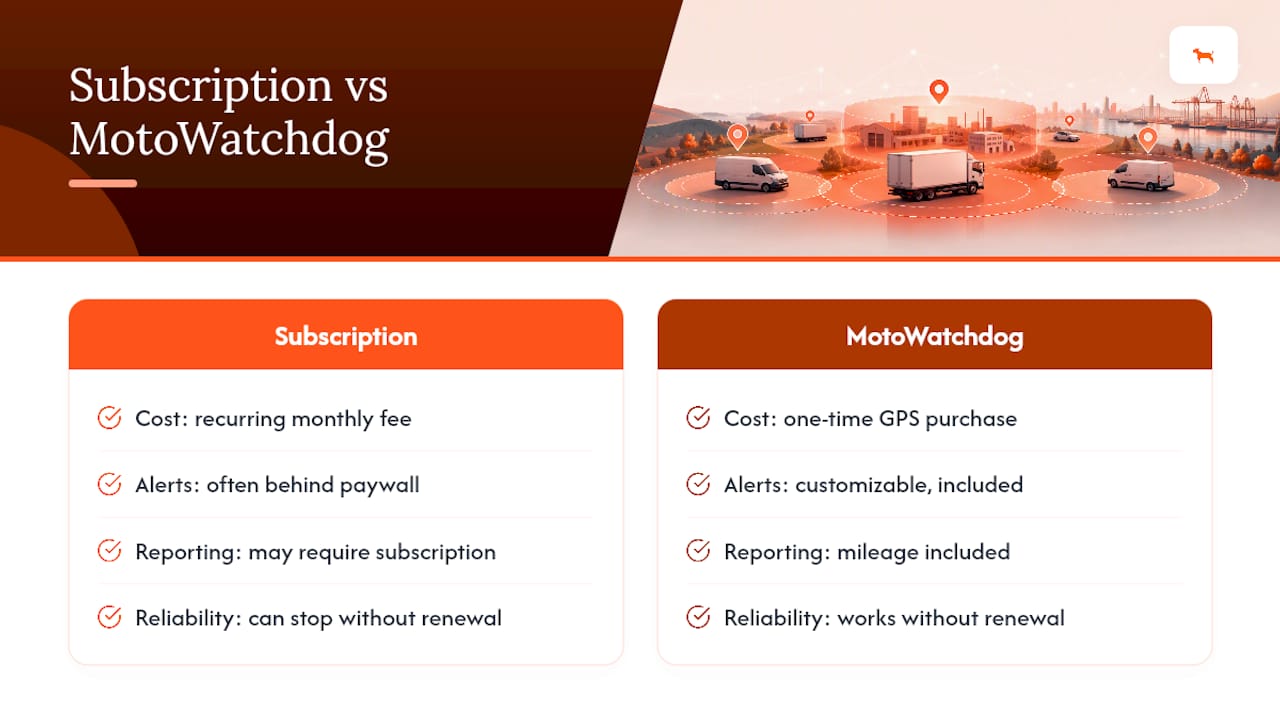
Moto Watchdog runs on a subscription-free model, meaning fleets pay once for the hardware and keep customizable geofence alerts, long device battery life, and detailed mileage reporting without a recurring bill eating into margins over time.
A small rental fleet running six trailers might set it up like this:
- Yard boundary, circle shape, 150 meter radius, entry/exit triggers, owner is the yard supervisor.
- After-hours exit rule (10 PM to 6 AM), critical severity, SMS to the on-call manager.
- Job-site corridor for delivery routes, 400 meter width, deviation alert routed to dispatch by email.
Businesses using contractor-focused GPS tracking report fewer unauthorized-use incidents once after-hours exit alerts are paired with clear escalation ownership, along with faster recovery when equipment does go missing.
What to Do This Week
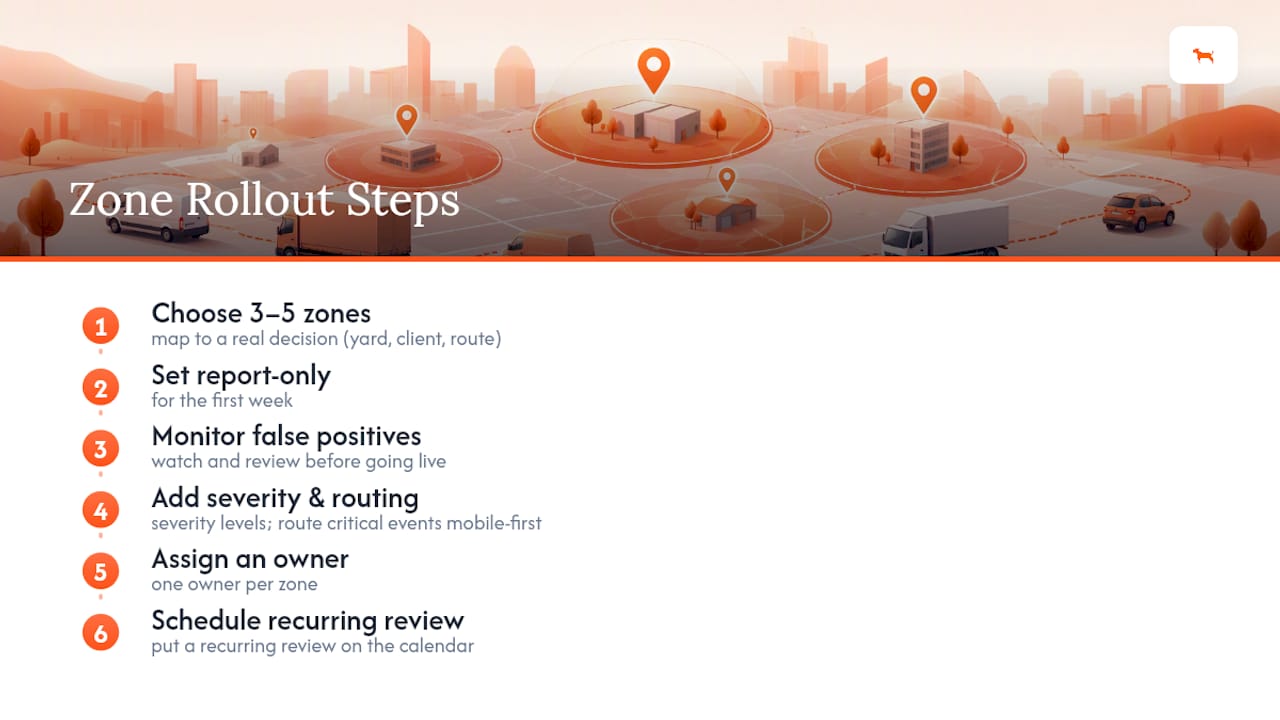
Pick three to five zones that map directly to a real decision, whether that’s a yard, a repeat client site, or a high-risk route. Set them to report-only for the first week and watch for false positives before flipping them live. Add severity levels and route critical events to a mobile-first channel, keeping everything else logged quietly. Assign one owner per zone and put a recurring review on the calendar. If avoiding a monthly bill matters to your bottom line, a subscription-free GPS tracker is worth comparing against subscription-based options before you commit fleet-wide.
The Overlooked Part of Geofencing Alerts
Most guides treat geofencing as a mapping exercise: draw a shape, pick a trigger, done. That framing misses the actual failure point: the technology rarely fails, but the judgment behind it does. Teams draw too many zones, set every trigger to “urgent,” and wonder why nobody trusts the alerts six months later.
The conventional advice to “set up alerts for your key locations” skips the harder question: which alert actually changes what someone does next? A dwell alert on a piece of equipment that always sits still for three days anyway isn’t information, it’s clutter. The fleets that get real value from geofencing are the ones willing to run fewer, sharper zones and hold themselves to the discipline of reviewing what’s firing and why.
If you take one thing from this guide, take the report-only testing habit. It costs nothing, catches almost every bad zone before it wastes anyone’s attention, and it’s the single step most operators skip because they’re eager to see the system “working.” Working shouldn’t mean noisy. It should mean quiet until something genuinely needs your attention.
— Louis
Get Geofence Alerts Without the Monthly Bill
Most geofencing platforms bundle their alert features into a subscription, so the longer you use them, the more you pay for the same feature set. Motowatchdog breaks that model: you buy the GPS tracker once, and customizable geofence alerts, mileage reporting, and long battery life come with it, no recurring charge attached.

That structure fits exactly the operators this guide is written for. A rental company running a dozen trailers or a contractor managing a mixed fleet doesn’t need another line item on the software budget, they need alerts that work the day they’re installed and keep working without a renewal notice. Many businesses rely on Moto Watchdog devices for exactly that reason.
If unauthorized-exit alerts, job-site arrival tracking, or utilization monitoring are on your list this quarter, start by checking the subscription-free 4G GPS tracker lineup and match a device to your fleet size before your next billing cycle would have hit anyway.
Sources
For deeper reading: Geotab’s geofencing explainer covers the mechanics well, FleetRabbit’s alert strategy guide is strong on avoiding noise, and Ditrack’s zone-sizing guide gives practical radius defaults. Moto Watchdog’s own product page details its subscription-free approach.

