

How to start saving money
Lorem ipsum dolor sit amet, consectetur adipiscing elit lobortis arcu enim urna adipiscing praesent velit viverra sit semper lorem eu cursus vel hendrerit elementum morbi curabitur etiam nibh justo, lorem aliquet donec sed sit mi dignissim at ante massa mattis.
- Neque sodales ut etiam sit amet nisl purus non tellus orci ac auctor
- Adipiscing elit ut aliquam purus sit amet viverra suspendisse potent
- Mauris commodo quis imperdiet massa tincidunt nunc pulvinar
- Excepteur sint occaecat cupidatat non proident sunt in culpa qui officia
Why it is important to start saving
Vitae congue eu consequat ac felis placerat vestibulum lectus mauris ultrices cursus sit amet dictum sit amet justo donec enim diam porttitor lacus luctus accumsan tortor posuere praesent tristique magna sit amet purus gravida quis blandit turpis.

How much money should I save?
At risus viverra adipiscing at in tellus integer feugiat nisl pretium fusce id velit ut tortor sagittis orci a scelerisque purus semper eget at lectus urna duis convallis. porta nibh venenatis cras sed felis eget neque laoreet suspendisse interdum consectetur libero id faucibus nisl donec pretium vulputate sapien nec sagittis aliquam nunc lobortis mattis aliquam faucibus purus in.
- Neque sodales ut etiam sit amet nisl purus non tellus orci ac auctor
- Adipiscing elit ut aliquam purus sit amet viverra suspendisse potenti
- Mauris commodo quis imperdiet massa tincidunt nunc pulvinar
- Adipiscing elit ut aliquam purus sit amet viverra suspendisse potenti
What percentege of my income should go to savings?
Nisi quis eleifend quam adipiscing vitae aliquet bibendum enim facilisis gravida neque. Velit euismod in pellentesque massa placerat volutpat lacus laoreet non curabitur gravida odio aenean sed adipiscing diam donec adipiscing tristique risus. amet est placerat in egestas erat imperdiet sed euismod nisi.
“Nisi quis eleifend quam adipiscing vitae aliquet bibendum enim facilisis gravida neque velit euismod in pellentesque”
Do you have any comments? Share them with us on social media
Eget lorem dolor sed viverra ipsum nunc aliquet bibendum felis donec et odio pellentesque diam volutpat commodo sed egestas aliquam sem fringilla ut morbi tincidunt augue interdum velit euismod eu tincidunt tortor aliquam nulla facilisi aenean sed adipiscing diam donec adipiscing ut lectus arcu bibendum at varius vel pharetra nibh venenatis cras sed felis eget.
A clean vehicle assignment answers four questions at any moment: who has the unit, what job it is on, whether that person is qualified to run it, and where it is. Most fleets get the first two from a spreadsheet or a whiteboard and guess at the last two. For a fleet or heavy equipment rental operation, the routine below closes that gap: a fixed assignment method, a qualification check before every handoff, a recorded start and end of every use, and a live location and mileage record for each unit. Our trackers supply that record with no monthly fees.
TL;DR
- Pick one assignment model per unit: dedicated to one driver, shared from a pool, or booked per job. Mixing models on the same unit is where conflicts start.
- Check the driver’s qualification before the keys change hands. For commercial motor vehicles, federal rules require a driver qualification file for every employed driver.
- Record start and end odometer, condition and keys at every handoff, and require a supervisor approval for pool use.
- Match the assignment log against GPS trip, mileage and idle data so the paperwork reflects what the unit actually did.
- Moto Watchdog trackers start at $124.99 one-off, with lifetime 4G data and no monthly fees, and one dashboard handles unlimited vehicles and users.
Table of Contents
- Choose an assignment model before you assign anything
- Step 1: Verify the driver is qualified for that specific unit
- Step 2: Reserve the unit so two people cannot hold it
- Step 3: Hand off with a recorded start
- Step 4: Track what the unit actually does
- Step 5: Reassign, return and close the loop
- Common failures and how to prevent them
- Putting it together with Moto Watchdog
- Our perspective
- FAQ
- Sources
Choose an assignment model before you assign anything
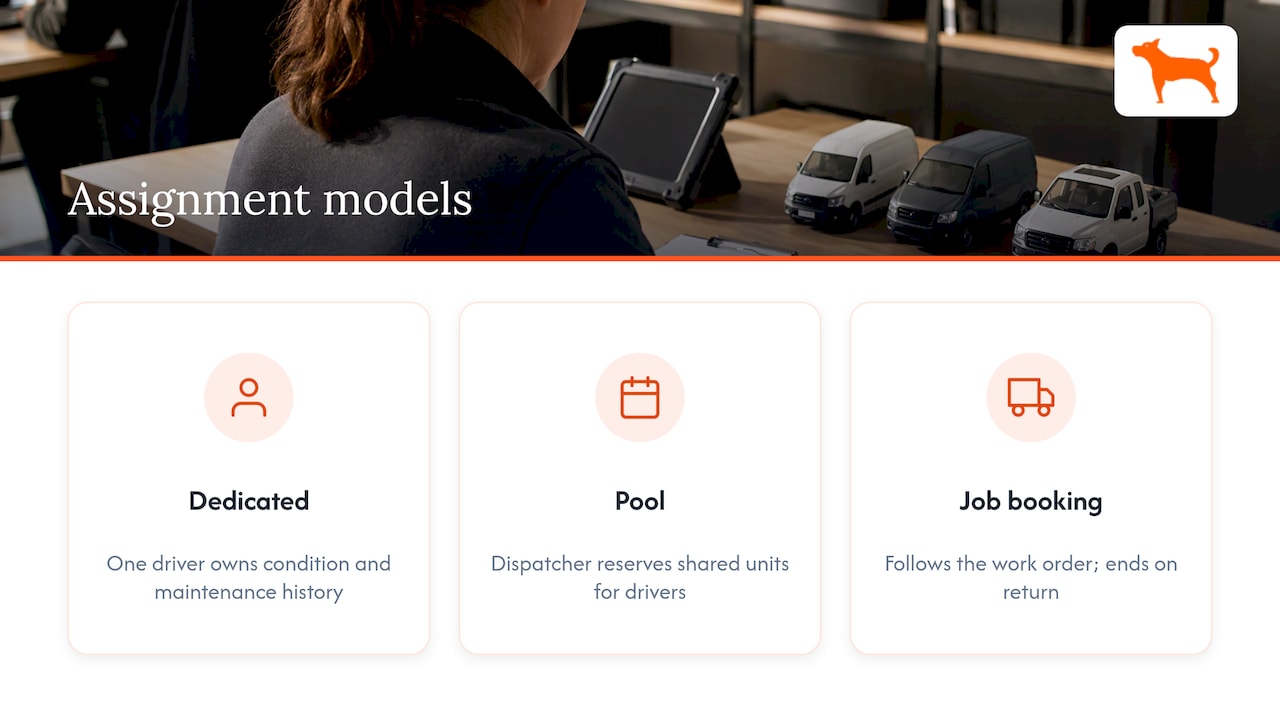
Assignment problems usually trace back to an unclear model, not to a careless driver. There are three that work in practice.
Dedicated assignment. One unit belongs to one driver or operator until the fleet changes it. This suits service trucks, a superintendent’s pickup, or a skid steer that always stays with one crew lead. The driver is accountable for the unit’s condition, and maintenance history stays tied to one person.
Pool assignment. A group of units is shared, and drivers draw from the pool through a reservation. Wisconsin’s Fleet Driver and Management manual defines a pool vehicle as a work-shared vehicle available for business use through reservation, with a dispatcher who reserves and issues it. That structure is useful well beyond state government: one person owns the issue decision, so two drivers cannot both walk away with the same truck.
Job or booking assignment. The unit follows the work order or the rental contract. An excavator goes to a jobsite for a week, a dump truck goes to a haul for a day. The assignment starts with the booking and ends with the return.
Decide which model each unit follows and write it down. A pool unit that quietly becomes someone’s daily driver is the most common way a fleet loses track of mileage and maintenance.
Use a utilization rule to keep dedicated units honest
Dedicated assignment is only worth it when the unit works. South Dakota’s Policy and Procedure Manual for Assigned Drivers and Pool Vehicles (April 19, 2024) sets a minimum of 500 miles per month on a rolling average for an agency-assigned vehicle, and a vehicle that falls below it may be required to return to the pool. You do not have to copy that number, but you should set your own threshold, measured in miles or engine hours depending on the asset, and review it on a schedule. That review needs reliable trip and mileage data, which is where tracking pays for itself.
Step 1: Verify the driver is qualified for that specific unit
A name on a schedule is not a qualification. Before assigning, confirm the driver can legally and competently run what you are handing over.
Commercial motor vehicles
For trucks that fall under the Federal Motor Carrier Safety Regulations, 49 CFR 391.51 requires a driver qualification file for each employed driver. The file includes:
- the employment application
- a motor vehicle record (MVR) from each licensing authority, which is the state’s report of a driver’s license status and violations
- a road-test certificate or its equivalent
- the annual MVR inquiry and the reviewer’s note
- the medical examiner’s certificate (or the CDLIS MVR medical status for CDL holders)
- any Skill Performance Evaluation Certificate or medical exemption
The file is kept for as long as the driver is employed and for three years afterward, with limited permitted earlier removal of specified records.
Timing matters too. Under 49 CFR 391.23, a motor carrier must obtain the driver’s three-year MVR within 30 days of the start of employment and investigate the driver’s safety performance with DOT-regulated employers over the preceding three years. Before the driver operates a commercial motor vehicle, the carrier must also have the medical examiner’s certificate and verify the examiner’s listing on the National Registry. In practice, put the file’s status on the same screen or sheet as the schedule, so a dispatcher sees an expired medical card before assigning the truck, not after.
Heavy equipment
OSHA does not issue operator licenses for most construction machinery. The employer decides who is qualified. For cranes and derricks, OSHA’s 2018 final rule requires employers to train operators, evaluate their competency and document the evaluations. The rule’s preamble also explains that certification alone does not ensure an operator can safely use every machine, so the employer must evaluate the operator’s experience and competency with the particular equipment assigned, and train when needed.
For an equipment rental company or a contractor, that means the qualification check is per machine type, not per person. A driver who is excellent on a loader is not automatically cleared for a telehandler. Keep a short matrix of operators against machine types, with the evaluation date, and consult it every time you assign.
Step 2: Reserve the unit so two people cannot hold it
Conflicting assignments come from a missing single source of truth: one person says yes by text, another says yes at the yard. Fix this with three rules.
- One issuer. Name a dispatcher or yard manager who is the only person who can release a pool or rental unit. Wisconsin’s manual uses exactly this control: the agency dispatcher reserves and issues pool vehicles.
- One record. Every reservation lives in one place, whether that is a shared calendar, a dispatch board or your management software. A unit is either reserved or free, and the record shows by whom and for which job.
- Supervisor approval. The same Wisconsin manual requires a supervisor to approve every pool use, and defaults to the smallest available vehicle based on the occupants and equipment. Defaulting to the smallest suitable unit keeps your larger, costlier assets free for the jobs that need them.
When a conflict does come up, such as an urgent job needing a truck already booked, handle it as a reassignment, not a silent swap. Change the record first, tell both drivers, then move the unit. If the record and the yard disagree, the yard wins in practice, and your data stops being trustworthy.
Step 3: Hand off with a recorded start
The handoff is where disputes about damage, fuel and mileage begin. Capture the same few items every time. The U.S. General Services Administration’s dispatcher guide (March 2023) is a good model for the return side: the user completes a reservation by entering the ending odometer, which cannot be lower than the beginning reading, plus the number of keys returned, the vehicle condition, comments and a contact number. The reservation is then listed as completed.
Adapt that to your operation with a handoff record that includes:
- driver name and the job or booking number
- start odometer or engine hours
- fuel level and visible damage, with photos if you can
- keys and attachments issued (buckets, forks, trailer hitches)
- expected return time and location
For trailers and non-powered equipment, there is no odometer, so location history and time on site stand in for mileage. Those units are the ones most likely to wander off a schedule, because nobody sits in them.
Step 4: Track what the unit actually does
A log tells you what people wrote down. A tracker tells you what the unit did. Compare the two and you catch the gaps: the truck that logged 40 miles but ran 90, the loader that idled for six hours, the trailer parked at a different site than the work order says.
Our trackers cover the data a dispatcher needs for this comparison:
- Real-time location for each unit, so you can answer “where is it?” without a phone call.
- Trip and mileage reports, which feed your start and end records and your utilization reviews.
- Idle time tracking, useful for spotting equipment that is assigned but not working.
- Customizable geofencing and push alerts, so you know when a unit leaves the yard or arrives at or exits a jobsite.
- Maintenance reminders, so service intervals follow the actual miles and not a guess.
South Dakota’s manual adds a procedural point worth copying: a Driver Change Form must be submitted within three working days of any driver change, so maintenance reminders stay current. When a unit changes hands, update who is responsible the same day, and the service schedule, mileage record and accountability all stay attached to the right person.
Put the assignment and the data side by side
| Assignment record says | Tracking data shows | What to do |
|---|---|---|
| Unit assigned to Driver A for Job 12 | Unit parked at yard all day | Check whether the job started; release the unit if not |
| Pool truck returned at 4:30 p.m. | Truck still moving at 6:00 p.m. | Confirm return time and handoff with the driver |
| Loader assigned, 8 hours | Heavy idle, little movement | Review whether the loader is the right unit or the job is delayed |
| Dedicated truck, monthly threshold set | Miles under threshold for several months | Move it to the pool or reassign |
Step 5: Reassign, return and close the loop
Reassignments will happen daily on active jobsites. The rule is the same as for a first assignment: update the record, re-check qualification for the new driver, and log a fresh start reading. Do not carry the previous driver’s start odometer forward.
On return, require the end reading, condition notes and keys before the reservation closes, as the GSA process does. Then review the trip data for that reservation. A two-minute comparison of logged miles against tracked miles on each return builds an accurate history without a separate audit project.
For rental units, closing the loop also protects billing. When the return time, location and usage are recorded and backed by location history, there is less to argue about with a customer and less to estimate when you invoice.
Common failures and how to prevent them
- Assigning from memory. If the dispatcher has to remember which operators are cleared for which machine, an assignment will eventually go to someone who is not. Use the qualification matrix.
- Letting expired paperwork ride. Medical certificates and annual MVR reviews have dates. Put those dates where the dispatcher can see them.
- No owner for returns. If nobody closes a reservation, the next booking starts on bad data. Make closing a task with a name on it.
- Treating all assets alike. A trailer needs location and geofence alerts. A truck needs miles and driver records. A loader needs hours and idle time. Set the record fields per asset type.
- Paying more to know less. A tracking program that adds a monthly fee per unit puts a cost on every new asset you add, which discourages tracking the small ones. Per-unit subscriptions are a reason fleets track only part of what they own.
Putting it together with Moto Watchdog
The routine above works with a clipboard. It works better when every unit reports its own location, miles and idle time. Moto Watchdog trackers start at $124.99 as a one-time purchase. Lifetime 4G data is included, there are no monthly or recurring fees, no activation fees and no add-ons, and one dashboard supports unlimited vehicles and users. That means a dispatcher, a yard manager and an owner can all see the same units, and adding a trailer or a skid steer later does not add a bill.
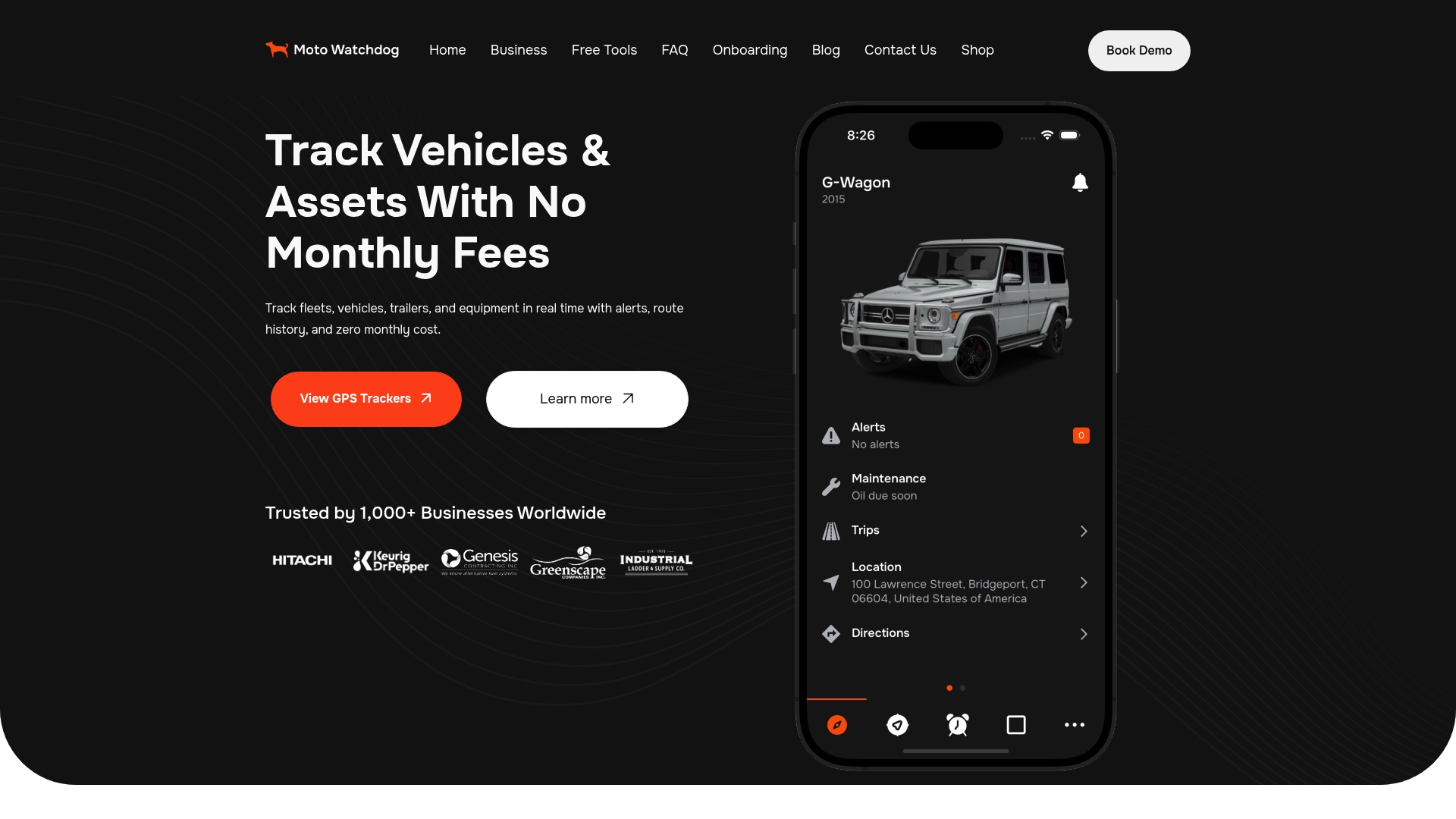
The app handles multi-device management, sharing and push notifications, and the business page offers API access for fleets that want tracking data to flow into their own systems. For a fleet or rental yard, the practical result is that each assignment you make can be checked against what the unit actually did.
Our perspective
Most assignment trouble we hear about is not a software problem. It is a record problem: the person who has the unit and the person on paper are not the same, and nobody finds out until something is damaged or a service interval is missed.
Our view is that every unit in a fleet should be able to speak for itself. When a truck, a trailer or a piece of equipment reports its own location, miles and idle time, the assignment record stops being a promise and becomes something you can confirm in seconds.
That is why we built our trackers without monthly fees. When tracking has no recurring cost, you do not have to choose which assets deserve it. You track the pickup, the trailer and the compact loader, and you see all of them on one dashboard with as many users as you need.
Start with an assignment model, a qualification check and a recorded handoff. Then let the data keep everyone honest.
Louis
FAQ
What is the difference between an assigned vehicle and a pool vehicle?
An assigned vehicle is dedicated to one driver, who is accountable for it day to day. A pool vehicle is shared and issued through a reservation, usually by a dispatcher, for a specific trip or job. Pool units need stricter check-out and return records because the user changes often.
How do I stop two drivers from being assigned the same vehicle?
Give one person authority to issue units and keep every reservation in a single record. Wisconsin’s fleet manual uses this model: a dispatcher reserves and issues pool vehicles, and a supervisor approves each use. When a conflict appears, change the record first, then move the unit.
What should I check before assigning a truck to a driver?
For commercial motor vehicles, confirm the driver qualification file is complete and current under 49 CFR 391.51, including the MVR and the medical examiner’s certificate. For heavy equipment, confirm the operator has been trained and evaluated on that machine type, since OSHA places that responsibility on the employer.
Do I need a tracker on every assigned vehicle?
Tracking every unit gives you one consistent record, including trailers and equipment that have no odometer. With Moto Watchdog, a tracker is a one-time purchase starting at $124.99, with no monthly fees, so adding more units does not add recurring cost.
Sources
- South Dakota Policy and Procedure Manual for Assigned Drivers and Pool Vehicles
- Wisconsin Fleet Driver and Management Policies and Procedures Manual
- GSA Fleet Dispatch and Reservation Dispatcher User Guide
- 49 CFR 391.51, driver qualification file
- 49 CFR 391.23, investigation and inquiries
- OSHA 2018 final rule on cranes and derricks, operator qualification

