How to start saving money
Lorem ipsum dolor sit amet, consectetur adipiscing elit lobortis arcu enim urna adipiscing praesent velit viverra sit semper lorem eu cursus vel hendrerit elementum morbi curabitur etiam nibh justo, lorem aliquet donec sed sit mi dignissim at ante massa mattis.
- Neque sodales ut etiam sit amet nisl purus non tellus orci ac auctor
- Adipiscing elit ut aliquam purus sit amet viverra suspendisse potent
- Mauris commodo quis imperdiet massa tincidunt nunc pulvinar
- Excepteur sint occaecat cupidatat non proident sunt in culpa qui officia
Why it is important to start saving
Vitae congue eu consequat ac felis placerat vestibulum lectus mauris ultrices cursus sit amet dictum sit amet justo donec enim diam porttitor lacus luctus accumsan tortor posuere praesent tristique magna sit amet purus gravida quis blandit turpis.

How much money should I save?
At risus viverra adipiscing at in tellus integer feugiat nisl pretium fusce id velit ut tortor sagittis orci a scelerisque purus semper eget at lectus urna duis convallis. porta nibh venenatis cras sed felis eget neque laoreet suspendisse interdum consectetur libero id faucibus nisl donec pretium vulputate sapien nec sagittis aliquam nunc lobortis mattis aliquam faucibus purus in.
- Neque sodales ut etiam sit amet nisl purus non tellus orci ac auctor
- Adipiscing elit ut aliquam purus sit amet viverra suspendisse potenti
- Mauris commodo quis imperdiet massa tincidunt nunc pulvinar
- Adipiscing elit ut aliquam purus sit amet viverra suspendisse potenti
What percentege of my income should go to savings?
Nisi quis eleifend quam adipiscing vitae aliquet bibendum enim facilisis gravida neque. Velit euismod in pellentesque massa placerat volutpat lacus laoreet non curabitur gravida odio aenean sed adipiscing diam donec adipiscing tristique risus. amet est placerat in egestas erat imperdiet sed euismod nisi.
“Nisi quis eleifend quam adipiscing vitae aliquet bibendum enim facilisis gravida neque velit euismod in pellentesque”
Do you have any comments? Share them with us on social media
Eget lorem dolor sed viverra ipsum nunc aliquet bibendum felis donec et odio pellentesque diam volutpat commodo sed egestas aliquam sem fringilla ut morbi tincidunt augue interdum velit euismod eu tincidunt tortor aliquam nulla facilisi aenean sed adipiscing diam donec adipiscing ut lectus arcu bibendum at varius vel pharetra nibh venenatis cras sed felis eget.
After hours vehicle alerts notify fleet managers when a vehicle moves, starts, or crosses a geofence outside scheduled business hours, combining location data with time-based rules to flag unauthorized use. We build these systems to catch unexpected activity fast, whether it’s a geofence breach caught through IPAWS style public warnings or a private fleet notification routed straight to a manager’s phone.
TL;DR:
- Prioritize geofence breaches and ignition starts outside scheduled hours; combine ignition status with location data to distinguish towing or GPS drift from unauthorized use.
- Send push alerts to the primary contact, then text a secondary contact if nobody acknowledges; call dispatch only after confirming unauthorized use or a safety risk.
- Tracking triggered by events can lag by a few minutes while conserving battery power; hardwired devices avoid that tradeoff.
- Run a pilot with a handful of vehicles, review alert logs weekly, and adjust geofence buffers and movement thresholds to reduce false alarms.
Table of Contents
- How after hours vehicle alerts work: geofence, ignition, and event based pings
- Common alert types and triggers fleet managers should enable
- How to configure effective after hours alerts: a practical checklist
- Notification channels and response workflows for after hours alerts
- Technical and operational limits: latency, battery, and false positives
- Why Moto Watchdog fits after hours alert monitoring
- What fleet managers get wrong about after hours alerts
- Getting started with after hours alerts on your fleet
- FAQ
- Sources
How after hours vehicle alerts work: geofence, ignition, and event based pings
After hours alerts rely on three technical layers working together. A geofence defines a boundary around a yard, job site, or delivery zone, and when that boundary is paired with a time window, the system knows to stay silent during business hours and alert the moment a vehicle crosses the line after close.
Ignition detection adds a second layer. A vehicle that starts its engine at 11 PM behaves differently than one that simply rolls a few feet from wind or towing, and separating ignition-on events from movement-only events cuts down on noise while catching the activity that actually matters.
Event-based pinging ties the two together. Rather than transmitting location constantly, a device sends a signal when a defined event occurs, which extends battery life and keeps message latency low for the alerts that count.
- Geofence plus schedule: flags entry or exit during restricted hours.
- Ignition-on detection: distinguishes engine starts from passive movement.
- Event-based pings: preserve battery while keeping alert latency short.
- Notification channels: push for speed, SMS for redundancy, email for records.
Common alert types and triggers fleet managers should enable
Not every trigger carries the same weight, and prioritizing the right ones keeps a notification system useful instead of overwhelming.
- Geofence violations during restricted hours reveal unauthorized yard departures or unexpected site visits, often the first sign of misuse.
- Ignition starts outside a scheduled shift point to possible unauthorized use, especially when paired with a driver ID mismatch.
- Extended idling or unexpected movement while a vehicle should be parked can indicate anything from a forgotten key to a deliberate attempt to use the vehicle off the books.
- Tamper and device-fault alerts suggest someone has attempted to disconnect or disable the tracking hardware, a signal worth immediate escalation.
- Speeding or harsh-driving events after hours matter less for routine compliance and more as corroborating evidence when a vehicle is already flagged for unauthorized use.
Municipal fleets illustrate how these categories work in practice. The Frisco GPS vehicle-tracking policy lists speed, idling, tampering, and unauthorized use as standard monitoring categories, with some systems updating location data every two minutes to keep pace with active fleet movement.
How to configure effective after hours alerts: a practical checklist
Setting up alerts that stay useful over time takes a bit of planning up front. We recommend working through these steps in order.
- Define business hours and any policy-aligned restricted windows directly in the system, including weekends and holidays.
- Build flexible geofences around yards, job sites, and delivery zones, with buffer radii wide enough to avoid flagging normal parking drift.
- Set ignition and movement thresholds, including minimum distance and speed, so a vehicle nudged a few feet doesn’t trigger a false alarm.
- Design an escalation path: a push notification to the primary contact, an SMS to a secondary contact if unacknowledged, then a phone call or dispatch request.
- Run a pilot with a handful of vehicles, review the alert logs weekly, and adjust sensitivity based on what shows up as noise versus what shows up as a real event.
Municipal telematics evaluations, including a Nashville telematics evaluation from 2026, point to customizable event-based tracking and unlimited geofences as features that separate a workable system from one that generates constant false alarms.
Pro Tip: Start with wide geofence buffers and tight ignition windows, then narrow the buffers gradually once you see how your vehicles actually behave after hours.
Notification channels and response workflows for after hours alerts
Choosing the right channel for each alert type shapes how quickly a manager can respond. Push notifications arrive fastest and work well for time-sensitive events like an ignition start at 2 AM. SMS adds redundancy for the moments a manager isn’t near the app, and email builds a running record that’s easier to search later during a compliance review.
A clear triage workflow turns a notification into an action instead of a distraction:
- Verify the vehicle’s location and recent activity in the app before reacting.
- Contact the assigned driver directly, by app message or phone call, to rule out a simple scheduling mix-up.
- Escalate to dispatch or law enforcement only once unauthorized use or a safety risk is confirmed.
For fleets running their own dispatch or reporting systems, API and webhook integrations can push these events directly into existing software, keeping the alert history in one place for insurance claims or internal audits.
Technical and operational limits: latency, battery, and false positives
Event-based tracking trades a bit of update frequency for battery life, so an alert might lag a few minutes behind a continuously polling system. Battery-powered devices need event-triggered pings for critical activity while routing routine telemetry through scheduled uploads; hardwired installations avoid that trade-off entirely by drawing power from the vehicle itself.
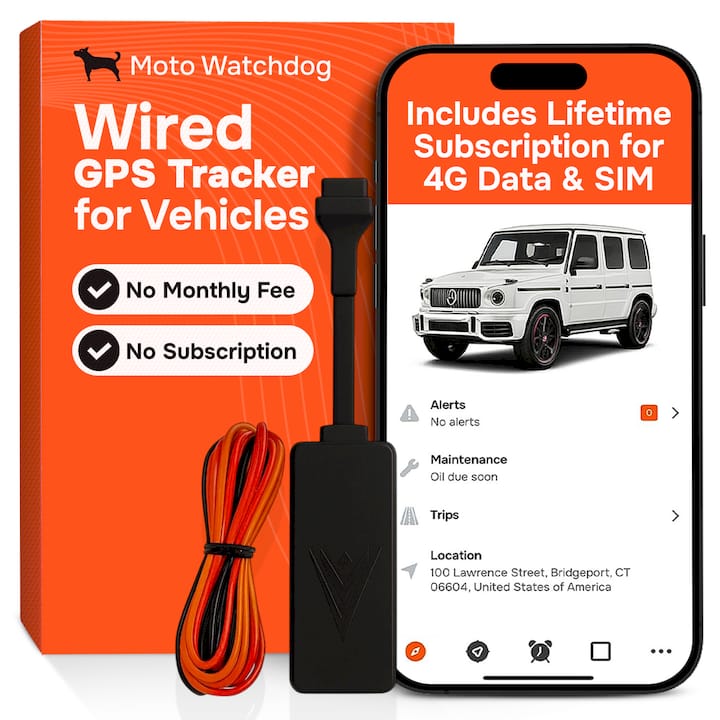
False positives usually trace back to GPS drift, brief stops mistaken for parking, or towing events that move a vehicle without an ignition trigger. Combining ignition status with geofence data, an approach demonstrated in geofence research from Argonne National Laboratory, catches stationary misuse and towing scenarios that a single trigger type would miss.
Why Moto Watchdog fits after hours alert monitoring
The system is built around subscription-free 4G tracking with event-based alerts, customizable geofencing, ignition detection, and API access for fleets that want automated workflows. Many businesses rely on this accuracy for daily monitoring, and there are blog resources that walk through setup details for teams getting started with after-hours rules.
What fleet managers get wrong about after hours alerts
The biggest mistake we see isn’t choosing the wrong trigger. It’s skipping the escalation plan entirely. Fleets spend weeks tuning geofence radii and ignition thresholds, then route every alert to a single overworked inbox nobody checks after 6 PM. A perfectly tuned system with no clear chain of response is just a louder version of the same blind spot.
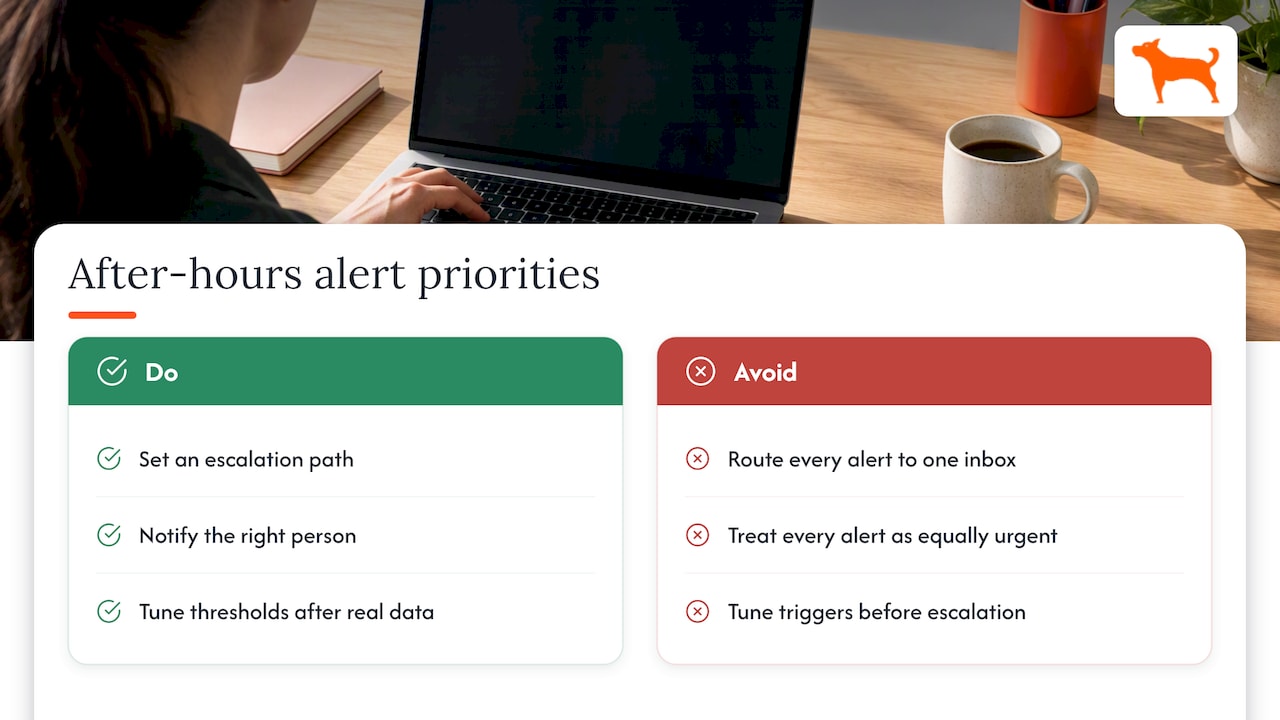
The second mistake is treating every alert as equally urgent. A geofence breach at 11 PM and a minor GPS drift reading during a storm don’t deserve the same phone call, and a system that can’t distinguish between the two trains managers to ignore notifications altogether, which defeats the purpose.
If we had to prioritize one thing for a fleet manager setting this up today, it’s the escalation path, not the trigger list. Get the right person notified through the right channel at the right moment, and even an imperfect set of thresholds will catch the activity that matters. Tune the thresholds after that, once real data shows what normal looks like for your fleet.
— Louis
Getting started with after hours alerts on your fleet
Setting up after-hours monitoring starts with choosing the right hardware for your vehicles. Our Trackers page covers device options for fleets of any size, each running on subscription-free 4G with no recurring fees to budget around.

From there, decide between hardwired and battery-powered installation based on vehicle use, set up your geofences and restricted-hour schedules, and run a short pilot before rolling out fleet-wide. Fleets that need automated data feeds into existing dispatch or reporting software can check our API access page for integration details, and our anti-tamper and jammer-detection features add another layer of protection for vehicles parked overnight. Support is available for setup questions through the contact options on the relevant pages.
FAQ
What is a vehicle alert?
A vehicle alert is a notification triggered when a tracked vehicle meets a defined condition, such as crossing a geofence, starting its engine, or losing connection to its tracking device. Fleet systems generate these alerts automatically and deliver them through push notifications, SMS, or email depending on how the system is configured.
What is an example of a vehicle service reminder message?
A typical service reminder message notifies a fleet manager that a vehicle has reached a mileage or time threshold for scheduled maintenance, such as an oil change or inspection. These reminders usually arrive through the same app or dashboard used for other vehicle alerts, keeping maintenance and security notifications in one place.
How do I see emergency alerts on my phone?
Emergency alerts reach mobile phones automatically through Wireless Emergency Alerts, a system broadcast by authorized government agencies through cell towers rather than an app or subscription. These public alerts are separate from fleet vehicle notifications, which come through a dedicated tracking app instead.
Are there current emergency alerts near Bend, Oregon?
Current public emergency alerts for any specific area, including Bend, Oregon, are issued through the Wireless Emergency Alerts system and show up automatically on enabled mobile devices in range. For the latest active alerts, check your phone’s emergency alert settings or your local emergency management agency’s page directly.
How do I reduce false positives in after hours alerts?
Reducing false alarms starts with widening geofence buffers slightly and combining ignition status with location data rather than relying on movement alone. Reviewing alert logs on a regular schedule and adjusting thresholds based on real activity patterns keeps the system accurate over time.
Sources
- Wireless Emergency Alerts (FEMA / IPAWS)
- Frisco GPS vehicle-tracking policy (City of Frisco)
- Nashville telematics evaluation (2026)
- ARG-US geofence program (PATRAM paper)